
Keyboard PCB म्हणजे काय हे कळलं नव्हतं — Keyboard उघडलं तेव्हा आत जे दिसलं ते Fascinating होतं
Hot-swap switch replace करताना पहिल्यांदा keyboard उघडला.
Keycaps काढले, screws काढले, case separate केला. आत एक green board दिसला — त्यावर copper traces, small components, आणि switch sockets.
“हे PCB आहे” — कुणीतरी Discord वर सांगितलं.
पण Soldered vs Hot-swap, 3-pin vs 5-pin, North vs South facing LEDs — हे terminology confused करत होतं. Research केलं. हळूहळू कळलं.
आज Mahayoddha.in वर keyboard PCB properly explain करतो — technical नाही, practical perspective मधून.
PCB म्हणजे काय — Simple Explanation
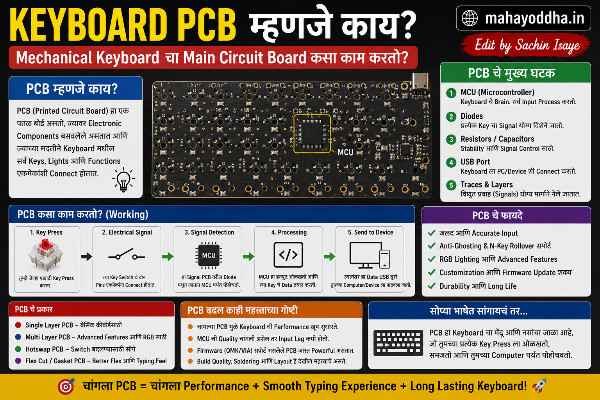
PCB — Printed Circuit Board. Keyboard चा brain आणि backbone एकत्र.
Green (किंवा black, red, blue) board वर copper pathways (traces) etched आहेत. Switches connect झाल्यावर electrical signal या traces मधून processor पर्यंत जातो. Processor key identify करतो, USB मधून computer ला सांगतो.
Keyboard PCB वर असतात — switch mounting holes/sockets, USB controller chip, RGB LED drivers (असल्यास), stabilizer mounting points.
PCB keyboard चा सगळ्यात important component आहे — switch feel, sound, software features — सगळं ultimately PCB वर depend करतो.
Soldered vs Hot-Swap — Fundamental Difference
Mahayoddha.in च्या Hot-Swap article मध्ये user perspective explain केलं. PCB perspective:
Soldered PCB:
Switch pins PCB च्या holes मधून जातात. खाली solder joints होतात — permanent electrical connection. Switch remove करायला desoldering लागतो.
Standard, widely available, cost effective. बहुतेक budget keyboards soldered आहेत.
Hot-Swap PCB:
PCB वर metal sockets soldered आहेत (factory ने). Switch pins या sockets मध्ये push होतात — friction fit connection. No solder required by user.
Cost slightly more — sockets manufacturing cost add होतो. User benefit significant — switch change easy आहे.
3-Pin vs 5-Pin — Switch आणि PCB Compatibility
Switch pins बद्दल confusion common आहे. हे practically important आहे — wrong combination होणार नाही.
3-Pin Switch:
दोन electrical pins (conducting) + एक plastic center pin (stabilizing).
5-Pin Switch:
दोन electrical pins + एक plastic center pin + दोन additional plastic side pins (extra stability on PCB).
PCB Side:
3-pin PCB — तीन holes/sockets. 5-pin switches fit नाही होत — extra two pins साठी holes नाहीत.
5-pin PCB — पाच holes/sockets. 3-pin switches fit होतात (two holes empty राहतात). 5-pin switches perfectly fit.
Solution for mismatch:
5-pin switch on 3-pin PCB — extra two plastic pins clip करा. Small diagonal cutters/scissors. Electrical function affect नाही होत — plastic pins only for PCB stabilization.
3-pin switch on 5-pin PCB — fine, works perfectly.
Check करा: Switch specifications मध्ये “PCB Mount (5-pin)” किंवा “Plate Mount (3-pin)” clearly mention असतं.
North vs South Facing LEDs — RGB साठी Important
PCB वर switch sockets च्या position relative to LEDs दोन orientations मध्ये येतात.
South Facing:
LED switch च्या खाली (user side) असतो. Keycap खाली LED clearly visible. Shine-through keycaps वर RGB vibrant दिसतो. Most budget keyboards south-facing.
North Facing:
LED switch च्या वर (away from user) असतो. Interference problem — Cherry profile keycaps interference होतो north-facing LEDs सोबत. Keycap bottom hits LED housing — switch रगडतो.
Practical Impact:
Cherry profile keycaps + north-facing PCB = bottom of keycap LED housing ला touch करतो = scratchy sound, potential damage.
Fix — “north-facing compatible” keycaps (specific tolerance) किंवा switch stems ज्यात LED channel आहे.
Budget PCBs check — south-facing safer. Premium boards — specifications clearly mention करतात.
Flex Cuts — Sound आणि Feel वर Impact
Custom keyboard PCBs मध्ये flex cuts असतात — PCB मधले rectangular cutouts.
PCB rigid material आहे normally. Flex cuts PCB ला slight flexibility देतात — typing करताना PCB थोडा flex होतो. Typing feel softer, more cushioned वाटतो. Harsh bottoming out कमी होतो.
Budget keyboards — flex cuts नाहीत. Rigid PCB.
Mid-range custom builds — partial flex cuts. Premium builds — extensive flex cuts.
Sound difference — flex PCB deeper, more cushioned sound. Rigid PCB — sharper, more pronounced.
Mahayoddha.in च्या upcoming Keyboard Build Guide article मध्ये flex cuts detail मध्ये येतील.
Hotswap Socket Brands — Quality Difference
Not all hot-swap sockets same आहेत.
Kailh Box Sockets:
Red colored, box design. Most common budget hot-swap keyboards मध्ये. Rated 5,000 swaps. Reliable for regular users.
Mill-Max 0305 / 7305:
Brass, premium quality. Soldered by custom builders onto PCBs. More durable than Kailh. Tighter tolerances — excellent contact. Expensive.
Gateron Sockets:
Gateron branded keyboards मध्ये. Similar to Kailh mechanism.
Budget keyboard घेताना — Kailh sockets standard आहेत, adequate आहेत. Custom build करत असाल — Mill-Max consider करा.
PCB Size आणि Keyboard Layout Connection
PCB size directly keyboard layout determine करतो.
Full size (104 key) PCB — numpad included.
TKL (87 key) PCB — numpad नाही.
75% PCB — TKL पेक्षा compact, function row आहे.
65% PCB — Arrow keys आहेत, function row नाही.
60% PCB — Most compact mainstream.
PCB आणि case — matched असणं आवश्यक आहे. 60% PCB 65% case मध्ये fit नाही होत. Custom builds मध्ये PCB-case compatibility critical consideration आहे.
Programmable PCB — QMK/VIA Support
काही PCBs programmable आहेत — QMK किंवा VIA firmware support.
QMK — open source keyboard firmware. प्रत्येक key साठी custom actions define करता येतात. Layers — Fn + key combinations — create करता येतात. Macros, media controls, custom shortcuts.
VIA — QMK वर based, GUI interface. No coding required. Real-time key remapping. Keyboard connected असताना changes apply होतात.
Mahayoddha.in च्या upcoming QMK/VIA article मध्ये detail येईल.
Budget keyboards — programmable firmware नाही किंवा limited. Mid-range onwards — VIA support common होत आहे.
ESD Protection — Practical Concern
Premium PCBs ESD (Electrostatic Discharge) protection components असतात — diodes, capacitors. Static electricity discharge — touching PCB without grounding — components damage करू शकतो.
Basic precaution — PCB handle करताना metal surface touch करा आधी (grounding). Anti-static wrist strap use करा custom building मध्ये. Budget keyboards — ESD protection minimal. Premium builds — better protection.
Budget vs Premium PCB — What Actually Differs
| Factor | Budget PCB | Premium PCB |
|---|---|---|
| Hot-Swap | Kailh sockets / Soldered | Mill-Max or quality Kailh |
| Flex | Rigid | Flex cuts possible |
| LED Orientation | South-facing (mostly) | Clearly specified |
| Firmware | Basic / No VIA | VIA/QMK programmable |
| 5-pin Support | Often 3-pin only | Usually 5-pin |
| ESD Protection | Minimal | Better |
| Build Quality | Adequate | Superior |
| Price | Included in keyboard | ₹२,५++ ते ₩१०,++ standalone |
FAQ
Q. PCB खराब झाला तर keyboard useless होतो का?
हो, PCB keyboard चा core component आहे. Damage झाला तर keyboard काम करत नाही. Budget keyboards — PCB replacement impractical (cost > new keyboard). Custom builds — PCB replacement possible, same form factor PCB order करा. म्हणूनच PCB careful handle करणं important आहे.
Q. PCB वरून keyboard quality judge करता येते का?
Partially. Flex cuts, 5-pin support, VIA compatibility, LED orientation — हे quality indicators आहेत. पण feel आणि sound case, mount style, switches, foam यांवर पण depend करतो. PCB alone complete picture नाही देत.
Q. सगळे MX compatible switches सगळ्या hot-swap PCBs मध्ये fit होतात का?
बहुतेक standard MX switches (3-pin plate mount) standard Kailh hot-swap boards मध्ये fit होतात. 5-pin switches — pin clipping लागू शकतो. Non-MX switches (Alps, Topre) — fit नाही होत MX sockets मध्ये. Purchase करण्याआधी compatibility confirm करा.
Q. PCB वर directly RGB लावता येते का?
Stock RGB LEDs already soldered असतात RGB keyboards मध्ये. DIY LED addition soldering skill लागते — advanced modification आहे. Standard keyboards साठी impractical. Custom builds मध्ये per-key RGB PCBs available आहेत ज्यात LEDs already included असतात.
Q. Wireless keyboard PCB different असतो का?
हो. Wireless PCB मध्ये Bluetooth/2.4GHz chip असतो, battery management circuit असतो, power optimization components असतात. More complex than wired PCB. Troubleshooting पण different आहे. Mahayoddha.in च्या wireless keyboard articles मध्ये connectivity side explain आहे.
Conclusion
Keyboard उघडल्यावर PCB बघितला — तेव्हा “हे काय आहे” होतं. आता clearly कळतं — हा keyboard चा foundation आहे.
Soldered vs hot-swap, 3-pin vs 5-pin, north vs south facing — हे practical decisions आहेत जे keyboard purchase किंवा custom build मध्ये matter करतात.
Mahayoddha.in च्या Mechanical Keyboard Guide series मध्ये हे important chapter आहे. Switches, keycaps, profiles — सगळे articles एकत्र वाचले तर complete picture येतो.
तुम्ही keyboard उघडला आहे का कधी? PCB बघितला का? Comment मध्ये सांगा.

Sachin Isaye
सचिन इसाये
नमस्कार! मी सचिन इसाये, Founder of Mahayoddha.in. २०१७ पासूनच्या माझ्या Blogging आणि Digital Content क्षेत्रातील अनुभवाचा वापर करून, मी Keyboard, Typing Speed, Windows Shortcuts आणि Digital Skills यांसारख्या विषयांवर सोप्या मराठीत practical माहिती देण्याचा प्रयत्न करतो.
Keyboard Buying Guide, Mechanical Keyboard, Wireless Keyboard, Keyboard Problems, Keyboard Typing Skills आणि Keyboard Ergonomics यांसारखे विषय सामान्य मराठी वाचकांना सहज समजावून सांगणे, हेच माझे काम आहे.
विद्यार्थी, Bloggers, Content Writers, Office Users, Work From Home करणारे आणि नवीन computer users यांना keyboard वापरून आपलं काम जलद, सोपं आणि smart करता यावं, हेच माझं ध्येय आहे. नवीन Keyboard Guides, Typing Tips आणि Windows Shortcuts साठी Mahayoddha.in ला नियमित भेट द्या.