
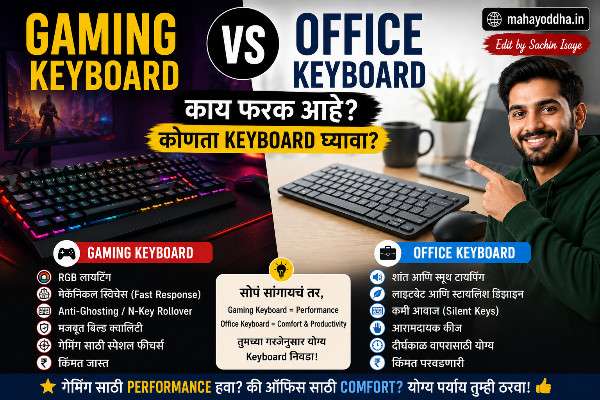
Gaming Keyboard घेतला, Office मध्ये वापरला — आणि जे झालं ते सांगतो
Mahayoddha.in च्या Office Keyboard article मध्ये हे mention केलं आहे — Blue switch gaming keyboard office मध्ये नेला, manager ने बोलावलं, keyboard बदला म्हणाले. Gaming Keyboard vs Office Keyboard.
पण त्या experience नंतर एक deeper question आला — Gaming keyboard आणि Office keyboard मध्ये technically काय फरक आहे? Marketing आहे की genuine difference आहे?
Research केलं. दोन्ही types seriously वापरले. काही गोष्टी genuine differences आहेत — काही फक्त marketing आहे.
आज Mahayoddha.in वर honest comparison करतो.
पहिली गोष्ट — “Gaming Keyboard” आणि “Office Keyboard” हे Official Categories नाहीत
Manufacturing मध्ये “gaming” आणि “office” असे separate production lines नाहीत.
Same factory, same switches, same PCB — different branding, different aesthetics, different price tags.
Corsair K70 — “gaming keyboard.” Keychron K2 — “office/typing keyboard.” दोन्हींमध्ये mechanical switches आहेत. दोन्ही USB connected आहेत. Technology fundamentally same आहे.
फरक आहे — features, aesthetics, marketing focus. Performance मध्ये dramatic difference नाही.
हे माहीत असलं की comparison honest perspective मधून करता येतो.
Genuine Differences — जे Actually Matter करतात
RGB Lighting
Gaming keyboards — RGB standard आहे. Per-key RGB, multiple effects, software customization. Aesthetics priority आहे gaming setup मध्ये.
Office keyboards — backlight minimal किंवा नाही. White backlight किंवा single color. Logitech MX Keys — backlit आहे पण subtle. Professional look maintain होतो.
Practical impact: RGB office productivity वर zero impact करतो. Gaming performance वर पण zero impact करतो honestly. Pure aesthetics आहे. Office मध्ये RGB बंद करता येतो — gaming keyboard office मध्ये वापरता येतो.
Switch Types Available
Gaming keyboards — primarily Linear switches (Red, Speed Silver) focus असतो. Rapid keystrokes साठी optimized. Clicky options (Blue) पण available.
Office keyboards — Tactile (Brown) आणि Silent switches जास्त available असतात. Long typing sessions, quiet environment consider केलेलं असतं.
Practical impact: Switch type genuinely matters. Gaming साठी Linear, Office typing साठी Tactile preferred. पण हे keyboard category नाही — switch choice आहे. Gaming keyboard Brown switch मध्ये येतो, office keyboard Red switch मध्ये येतो — दोन्ही available आहेत.
Polling Rate
Gaming keyboards — 1000Hz polling rate standard. म्हणजे keyboard प्रति second 1000 वेळा PC ला status report करतो. High-end gaming keyboards — 8000Hz पण आहेत.
Office keyboards — 125Hz ते 500Hz typically.
Practical impact: 1000Hz vs 125Hz — 1ms vs 8ms response difference. Typing साठी — zero noticeable difference. Competitive gaming साठी — theoretically advantage, practically human reaction time bottleneck आहे. Mahayoddha.in च्या Polling Rate article मध्ये detail आहे.
Anti-Ghosting आणि N-Key Rollover
Gaming keyboards — N-Key Rollover standard. म्हणजे simultaneously कितीही keys press केल्या तरी सगळ्या register होतात.
Office keyboards — 6-Key Rollover typically. सहा simultaneous keys.
Practical impact: Typing मध्ये maximum दोन ते तीन keys simultaneously — 6-Key Rollover more than sufficient. Gaming मध्ये — complex key combinations frequent असतात. N-Key genuinely matters gaming साठी. Office typing साठी — irrelevant.
Software आणि Macro Support
Gaming keyboards — dedicated software (iCUE, Synapse, G Hub). Per-key remapping, macro recording, profile switching.
Office keyboards — minimal software किंवा नाही. Plug and play.
Practical impact: Macros productivity साठी useful आहेत — gaming exclusive नाही. Complex repetitive tasks automate होतात. पण majority office users macros वापरत नाहीत. Nice to have, not essential.
Marketing Differences — जे Actually Matter करत नाहीत
“Gaming Grade” Claims
“Professional gaming switches,” “tournament grade performance,” “ultra-fast response” — marketing copy आहे.
Cherry MX Red switch gaming keyboard मध्ये आणि office keyboard मध्ये — same switch आहे. “Gaming grade” label price justify करण्यासाठी असतो.
Aggressive Design
Angular corners, sharp lines, tactical look — gaming keyboards मध्ये common आहे. Office keyboards — rounded, minimal design.
Performance वर zero impact. Pure aesthetics.
Price Premium
Gaming keyboard label — same specifications असताना जास्त price. “Gaming” branding premium add करतो.
Realistically — ₹२,०++ Redragon gaming keyboard आणि ₹२,०++ Keychron C series office keyboard — comparable build quality. Keychron better value in this case.
Actual Performance Comparison
Typing Speed आणि Accuracy
Switch type matter करतो, keyboard category नाही.
Brown switch gaming keyboard — Tactile feedback. Typing accuracy benefit.
Red switch office keyboard — Linear, no feedback. Potentially more errors.
Gaming keyboard Brown switch असेल तर typing performance office keyboard पेक्षा कमी नाही.
Mahayoddha.in च्या Accuracy article मध्ये explain आहे — switch feedback accuracy improvement करतो.
Gaming Performance
Office keyboard Red switch असेल — gaming साठी adequate आहे. Polling rate कमी असेल — casual gaming साठी irrelevant.
Competitive esports — dedicated gaming keyboard genuine advantage देतो. Casual gaming — office keyboard with linear switches works fine.
Price Comparison — Same Features, Different Labels
| Feature | Gaming Keyboard | Office Keyboard | Winner |
|---|---|---|---|
| RGB | ₹१,५++ मध्ये | ₹३,++ + required | Gaming |
| Silent options | Limited | More options | Office |
| Build quality (same price) | Variable | Generally consistent | Office |
| Software | Feature rich | Minimal | Gaming |
| Professional look | Poor | Excellent | Office |
| Multi-device | Rare | Common (Logitech) | Office |
| Value for money | Marketing premium | Generally better | Office |
कोणता घ्यायचा — Situation नुसार
Primarily Gaming, Gaming + Work Mixed
Gaming keyboard घ्या. RGB enjoy करा. Linear switches gaming साठी optimal. Software macros useful असतात. Redragon, Cosmic Byte — budget gaming. Keychron, Glorious — quality gaming keyboards.
RGB बंद करून office मध्ये वापरता येतो — flexibility आहे.
Primarily Office, Occasional Gaming
Office keyboard घ्या. Silent switches priority. Professional look. Multi-device option. Logitech, Keychron — reliable options. Casual gaming — office keyboard handles fine.
Work From Home, Both Equal
Keychron K2 किंवा Royal Kludge RK71 — हे genuinely dual-purpose keyboards आहेत. Mechanical, wireless, good build quality. Gaming adequate आहे, office excellent आहे. RGB minimal आहे — professional look maintain होतो.
Competitive Gaming Priority
Dedicated gaming keyboard — Razer, Corsair, SteelSeries premium range. Polling rate, N-Key Rollover, specific switches — competitive gaming साठी matters करतात. Office work secondary असेल.
Common Mistakes
Gaming Keyboard = Better Keyboard हे Assumption
चुकीचं आहे. Same price point मध्ये office keyboards generally better build quality देतात — Logitech, Keychron. Gaming label premium price justify करतो without corresponding quality.
Office Keyboard = Boring, Low Quality
पण नाही. Keychron, Logitech MX Keys — premium office keyboards excellent feel, excellent build. Gaming keyboards पेक्षा better typing experience देतात बऱ्याच cases मध्ये.
RGB = Gaming Only
RGB gaming keyboards मध्ये standard आहे — पण Logitech MX Keys backlit आहे. Subtle backlight office appropriate आहे. Heavy RGB gaming specific आहे.
Real World Test — दोन्ही वापरले, काय कळलं
Redragon K617 (gaming) — Red switch, 60% layout. Gaming session — smooth, fast.
Keychron K2 (office/typing) — Brown switch, 75% layout. Article writing — tactile feedback, accurate.
Gaming मध्ये Keychron पण works — casual gaming adequate. Writing मध्ये Redragon पण works — but Brown switch keyboard better accuracy देतो.
Conclusion — Switch type matters जास्त, keyboard category कमी.
FAQ
Q. Gaming keyboard office मध्ये वापरणं professionally inappropriate आहे का?
RGB बंद ठेवलं तर physically look acceptable आहे. Aggressive design कधी कधी out of place वाटतो. Sound concern जास्त important आहे — Blue switch gaming keyboard office मध्ये problem. Red किंवा Silent switch gaming keyboard + RGB off — office appropriate आहे practically. Corporate culture नुसार vary होतो.
Q. ₹३,०++ budget आहे — gaming की office keyboard घ्यायचा?
Dual purpose साठी — Royal Kludge RK71 किंवा Keychron C series. Gaming focused असाल — Redragon K617 hot-swap. Office focused असाल — Keychron C1. ₹३,०++ range मध्ये quality mechanical keyboards दोन्ही categories मध्ये available आहेत. Switch choice नुसार decide करा — Red/Linear gaming साठी, Brown/Tactile typing साठी.
Q. Corsair, Razer gaming keyboards quality justify करतात का price?
Premium gaming keyboards (₹८,++ ते ₩१५,++) — build quality excellent आहे. Software excellent आहे. Aesthetics premium आहे. पण same price मध्ये Keychron, GMMK Pro — typing experience better देतात. Gaming specific features (polling rate, N-Key) casual gaming साठी overkill आहेत. Competitive esports player असाल तर justify होतो. Casual gamer + typist — better alternatives आहेत.
Q. Office keyboard gaming साठी completely avoid करायला हवा का?
नाही. Logitech MX Keys — casual gaming fine. Keychron K2 Red switch — gaming adequate. Competitive FPS (Valorant, CS2) seriously खेळत असाल तर dedicated gaming keyboard advantage देतो. Casual gaming (strategy, RPG, single player) — office keyboard handles perfectly.
Q. Switch upgrade करता येतो gaming keyboard वर — office साठी better बनवता येतो का?
Hot-swap gaming keyboard असेल — हो. Red switch काढा, Brown किंवा Silent switch install करा. Gaming keyboard office appropriate होतो. Redragon K617 hot-swap आहे — switch upgrade possible. Mahayoddha.in च्या Hot-Swap article मध्ये detail आहे.
Conclusion
Gaming keyboard vs Office keyboard — ultimately marketing distinction आहे genuine technical distinction पेक्षा जास्त.
Real differences — RGB (aesthetics), polling rate (competitive gaming matters, office irrelevant), N-Key Rollover (gaming useful, office irrelevant), switch availability (similar options दोन्हींमध्ये).
Switch type genuinely matters — Linear gaming साठी, Tactile typing साठी. Keyboard label नाही.
Mahayoddha.in वर नेहमी practical advice देतो — label बघू नका, specifications बघा. Switch type, build quality, connectivity, budget — या factors वर decide करा.
तुम्ही primarily gaming करतात की office work? दोन्ही equally करतात? Budget किती आहे? Comment मध्ये सांगा — specific recommendation करता येईल.

Sachin Isaye
सचिन इसाये
नमस्कार! मी सचिन इसाये, Founder of Mahayoddha.in. २०१७ पासूनच्या माझ्या Blogging आणि Digital Content क्षेत्रातील अनुभवाचा वापर करून, मी Keyboard, Typing Speed, Windows Shortcuts आणि Digital Skills यांसारख्या विषयांवर सोप्या मराठीत practical माहिती देण्याचा प्रयत्न करतो.
Keyboard Buying Guide, Mechanical Keyboard, Wireless Keyboard, Keyboard Problems, Keyboard Typing Skills आणि Keyboard Ergonomics यांसारखे विषय सामान्य मराठी वाचकांना सहज समजावून सांगणे, हेच माझे काम आहे.
विद्यार्थी, Bloggers, Content Writers, Office Users, Work From Home करणारे आणि नवीन computer users यांना keyboard वापरून आपलं काम जलद, सोपं आणि smart करता यावं, हेच माझं ध्येय आहे. नवीन Keyboard Guides, Typing Tips आणि Windows Shortcuts साठी Mahayoddha.in ला नियमित भेट द्या.