
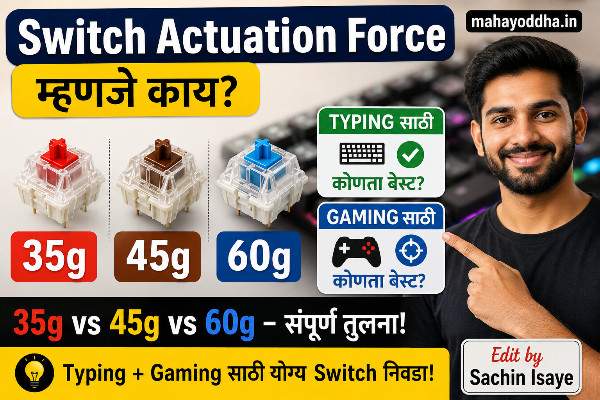
Actuation Force बद्दल माहीत नव्हतं — पण एकदा कळलं तेव्हा पहिला keyboard चुकीचा घेतला होता हे लक्षात आलं
Mechanical keyboard research करताना specs मध्ये “45g actuation force” दिसायचं ,Switch Actuation Force.
“Gram मध्ये force?” — ignore केलं. Color आणि RGB बघितलं, reviews बघितले, घेतला.
दोन आठवड्यांनंतर लक्षात आलं — keyboard थोडा heavy वाटतोय. दीड-दोन तास typing केली की fingers थकतात. तेव्हा actuation force seriously बघितला.
माझ्या keyboard मध्ये Blue switch होता — 60g. Daily long-form writing साठी heavy होता.
नंतर Brown switch keyboard घेतला — 45g. Difference immediately जाणवला.
आज Mahayoddha.in वर actuation force properly explain करतो — numbers म्हणजे काय, कसा फरक पडतो, आणि तुमच्यासाठी कोणता right आहे.
Actuation Force म्हणजे काय — Simple Physics
Key press करायला force लागतो. तो force gram मध्ये measure होतो — gram-force (gf).
45g म्हणजे — 45 gram weight एखाद्या key वर ठेवलं तर ती key activate होईल.
हे abstract वाटतं. Practical terms मध्ये — 45g म्हणजे fingertip ने comfortable light press. 35g म्हणजे barely touch. 60g म्हणजे deliberate push.
Force Curve — Switch दाबताना force uniform नसतो. Tactile आणि Clicky switches मध्ये specific point ला force peak होतो — bump — नंतर कमी होतो. Linear मध्ये gradual increase आहे.
Mahayoddha.in च्या Switches article मध्ये Linear, Tactile, Clicky explain केलं आहे. Actuation force हा त्याच्यावर layer आहे — same type चे switches different forces मध्ये येतात.
Actuation Point आणि Total Travel — हे दोन Different Things आहेत
Key press केली की पूर्ण खाली जाईपर्यंत total travel असतो. Standard mechanical switch — 4mm total travel.
Actuation point — key register होण्याचा specific depth. बहुतेक switches — 2mm वर actuation. म्हणजे key पूर्ण खाली जायची गरज नाही — अर्ध्यावरच register होतो.
हे membrane keyboard पेक्षा completely different आहे — membrane मध्ये key पूर्ण दाबल्यावरच register होतो.
Bottoming Out — Key पूर्ण खाली — base ला — जाणं. Membrane keyboard users ची automatic habit असते. Mechanical keyboard मध्ये bottoming out necessary नाही — actuation already झाली आहे.
Bottoming out केलं तर fingers hard surface ला hit करतात. Long sessions मध्ये finger joints strain. Mahayoddha.in च्या Trigger Finger article मध्ये हे explain आहे.
Touch typing शिकताना bottoming out avoid करणं important आहे — actuation point पर्यंत press, release.
35g Actuation Force — Ultra Light
35g म्हणजे feather touch. Fingers keys वर resting असताना accidentally press होऊ शकतो.
Gateron Yellow, Gateron Clear, Kailh Speed Silver — common 35g switches. Speed-oriented switches मध्ये येतात.
Actual Experience:
FPS games — Counter-Strike, Valorant — मध्ये milliseconds matter करतात. 35g switches rapid key registration enable करतो. Reaction time difference minimal असतो practically, पण psychologically confident वाटतं.
Typing साठी — accidental presses जास्त होतात. “I meant to press ‘k’ but ‘l’ accidentally pressed because finger slightly shifted.” Accuracy suffer करते initially.
35g switches सोबत floating fingers technique necessary — fingers keys touch करत नाहीत, hover करतात, deliberate press करतात. हे skill develop होतं पण time लागतो.
कोणासाठी:
Competitive FPS gaming. Lightning fast reflexes priority. Accuracy over speed नाही — speed over accuracy.
45-50g Actuation Force — Sweet Spot का म्हणतात
Most popular range. Cherry MX Red (45g), Gateron Red (45g), Brown switches (45g + tactile bump), Outemu Red (45g).
का Sweet Spot:
Accidental press होत नाही — deliberately press करावं लागतं. पण force इतका नाही की fingers थकतील. Long sessions comfortable राहतात.
Writing focus करताना — thoughts येतात, fingers automatically type करतात. Force “background” होतो — consciously think करायला नाही लागत. High force switches मध्ये force awareness येते — distraction.
माझा experience Brown switch (45g + bump) वर:
Mahayoddha.in साठी articles लिहिताना — तीन चार तास continuous typing comfortable आहे. Finger fatigue येत नाही. Bump confirmation देतो — accuracy maintain होते.
कोणासाठी:
Writers, bloggers, content creators. Coders. Students — long note taking sessions. Office workers. Casual gamers. General purpose users.
60g+ Actuation Force — Heavy Switches
Cherry MX Blue (50g + click), Cherry MX Green (80g), some tactile switches high force versions.
60g म्हणजे deliberate push required. Accidental presses near-zero.
Real World Difference:
Typing दरम्यान — “I know I pressed this key” certainty जास्त असते. Particularly fast typing मध्ये fingers एकावर settle होण्याआधी दुसरी press व्हायची chance कमी.
Data entry jobs — consistent deliberate keystrokes needed — heavy switches suit होतात.
Problem:
दोन घंटे typing नंतर fingers/forearm dull ache येतो. Repetitive heavy force — RSI risk वाढतो. Mahayoddha.in च्या RSI article मध्ये explain आहे.
Heavy switches वापरायचे असतील तर breaks mandatory — दर तासाला stretches.
कोणासाठी:
Occasional typists जे accidental presses frustrated करतात. Heavy finger typists जे naturally जोरात press करतात. Short typing sessions.
Gaming vs Typing — Force Requirements का Different आहेत
Gaming मध्ये key press pattern different आहे. WASD keys repeatedly press होतात — same keys continuous. Light switches rapid re-actuation enable करतात.
Typing मध्ये — different keys, varied rhythm. Brain decides which key, finger goes there, presses. Accidental press typing मध्ये जास्त costly आहे — word break होतो, correction लागतो.
Gaming साठी — 35-45g optimal.
Typing साठी — 45-55g optimal.
Mixed use साठी — 45-50g sweet spot.
Pre-Travel vs Actuation Force — Additional Technical Detail
Pre-travel — key दाबायला सुरुवात केली ते actuation point पर्यंत — keyboard नोंदवत नाही.
Short pre-travel — key जवळ register होतो. Faster gaming.
Long pre-travel — finger travel करतो before registration. Typing rhythm मध्ये fit होतो.
Speed-oriented switches — short pre-travel, low force. Typing-oriented — moderate pre-travel, moderate force.
Quick Reference
| Force | Feel | Best For | Avoid If |
|---|---|---|---|
| 35g | Feather light | FPS Gaming | Long typing sessions |
| 45g Linear | Light, smooth | Gaming + Typing balance | Prefer feedback |
| 45g Tactile | Light + bump | Writing, Coding | Quiet environment needed |
| 50g Clicky | Medium + click | Satisfying typing alone | Office, shared space |
| 60g+ | Heavy | Deliberate typing | Long sessions |
FAQ
Q. Switch force घरी try केल्याशिवाय online घेणं safe आहे का?
YouTube वर specific switch sound comparisons बघा. Force feel व्हिडिओवर fully convey नाही होत, पण sound helps. First time buyer साठी — 45g Brown recommend करतो. Most forgiving, middle ground. Wrong निघाला तर hot-swap keyboard असेल तर switch बदलता येतो.
Q. Same force, different brands — feel same असतो का?
नाही. Cherry MX Red 45g आणि Gateron Red 45g — Gateron smoother आहे generally. Factory lubed switches smoother असतात. Same specs, different feel. Gateron often preferred for value. Cherry MX premium durability reputation आहे.
Q. Heavy force वापरून fingers थकतात — solution काय?
Switch replace करा lighter force ने. Hot-swap keyboard असेल तर easy. नसेल तर — typing technique improve करा. Bottom out नाही करणं. Actuation point पर्यंतच press. Mahayoddha.in च्या wrist pain article मध्ये technique tips आहेत.
Q. Actuation force आणि typing speed directly related आहेत का?
Partially. Light force rapid presses enable करतो. पण accuracy drop केला तर net speed कमी होतो — corrections साठी वेळ जातो. Optimal force वापरला तर accuracy + speed balance होतो. Individual typing style important factor आहे.
Q. ४५g Red आणि ४५g Brown मध्ये काय फरक आहे — same force तर?
Actuation force same आहे — 45g. पण feel completely different. Red — smooth linear, कुठला bump नाही. Brown — 45g पर्यंत smooth, नंतर tactile bump येतो, registration होते, नंतर smooth. Sound different — Red quieter, Brown slightly more audible. Same force, completely different experience.
Conclusion
पहिला keyboard Blue switch — 60g — घेतला. Heavy होता long writing साठी. दुसरा Brown switch — 45g — घेतला. Immediately comfortable.
Force difference seemingly small वाटतो — 15 grams. पण हजारो keystrokes per day मध्ये accumulate होतो. Long term impact significant आहे.
Mahayoddha.in च्या Mechanical Keyboard Guide series मध्ये हे important chapter आहे. Switch type (Linear/Tactile/Clicky) आणि actuation force — दोन्ही एकत्र consider करायला हवे.
तुम्ही कोणता switch वापरतात आणि force किती comfortable वाटतो? Long sessions नंतर finger fatigue येतो का? Comment मध्ये सांगा.

Sachin Isaye
सचिन इसाये
नमस्कार! मी सचिन इसाये, Founder of Mahayoddha.in. २०१७ पासूनच्या माझ्या Blogging आणि Digital Content क्षेत्रातील अनुभवाचा वापर करून, मी Keyboard, Typing Speed, Windows Shortcuts आणि Digital Skills यांसारख्या विषयांवर सोप्या मराठीत practical माहिती देण्याचा प्रयत्न करतो.
Keyboard Buying Guide, Mechanical Keyboard, Wireless Keyboard, Keyboard Problems, Keyboard Typing Skills आणि Keyboard Ergonomics यांसारखे विषय सामान्य मराठी वाचकांना सहज समजावून सांगणे, हेच माझे काम आहे.
विद्यार्थी, Bloggers, Content Writers, Office Users, Work From Home करणारे आणि नवीन computer users यांना keyboard वापरून आपलं काम जलद, सोपं आणि smart करता यावं, हेच माझं ध्येय आहे. नवीन Keyboard Guides, Typing Tips आणि Windows Shortcuts साठी Mahayoddha.in ला नियमित भेट द्या.