
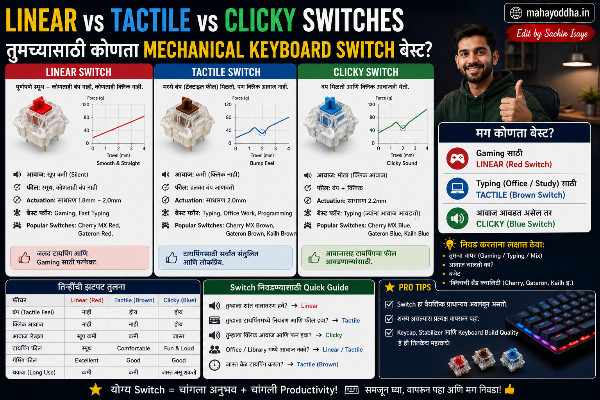
तीन Switches Try केले — कोणता ठेवला आणि कोणता परत केला
Mechanical keyboard घेण्याआधी एक problem होतं — कोणता switch घ्यायचा? Linear vs Tactile vs Clicky Switches.
Online सगळे सांगतात “Blue switch best आहे typing साठी,” “Red switch gaming साठी,” “Brown switch balanced आहे.” पण हे वाचून नक्की कळत नाही — actual feel कसा असतो.
मग एक smart गोष्ट केली. एक local PC accessories shop आहे जिथे display keyboards वापरून बघता येतात. तिन्ही types try केले — प्रत्येकावर पाच मिनिटे typing.
तो अनुभव सांगतो — त्यावरून तुम्हाला actual decision घेणं सोपं जाईल.
Switch म्हणजे नक्की काय — एकदा Mechanism समजलं तर सगळं Clear होतं
Keyboard मध्ये प्रत्येक key खाली एक independent switch असतो. Switch तीन parts मध्ये काम करतो — stem, spring, आणि housing.
Key दाबली की stem खाली जातो. Spring compress होतो. Specific point ला electrical contact होतो — key register होतो. Spring परत push करतो — key वर येते.
यात तीन design variations आहेत — हेच Linear, Tactile, आणि Clicky switches बनवतात.
Linear — Stem straight खाली जातो, कुठला bump नाही, contact होतो.
Tactile — Stem खाली जाताना एक physical bump येतो — त्या point ला contact होतो. Bump feel म्हणजे “key registered” signal.
Clicky — Tactile सारखाच bump, पण त्यात एक additional click mechanism आहे — plastic piece जो snap होतो आणि audible click sound येतो.
Linear Switches — Try केल्यावर काय जाणवलं
Shop मध्ये Red switch keyboard वर बसलो. “The quick brown fox jumps over the lazy dog” type केलं.
पहिली गोष्ट — smooth. खूपच smooth. Key दाबली की resistance नाही, bump नाही, simply खाली जाते. Piano key सारखं feel.
दुसरी गोष्ट — silent. आवाज जवळजवळ नाही. Keycap plastic sound येतो, पण switch चा sound नाही.
तिसरी गोष्ट — accidentally keys जास्त press होतात. Touch करायला गेलो आणि accidentally character आला. Resting fingers ला adjustment लागतं.
Linear switches कोणासाठी:
Gaming — BGMI, Valorant, rapid keystrokes. Light actuation force rapid input साठी. Office environment — neighbors आहेत. रात्री typing — sound concern. Wrist/finger fatigue concern — light switches कमी force लागतो.
Linear switches कोणासाठी नाही:
Heavy accuracy-focused typing — feedback नसल्याने errors जास्त होतात initially. Beginners — accidental presses होतात.
Tactile Switches — हे Try केल्यावर “Ah, this makes sense” moment आलं
Brown switch keyboard वर try केलं.
Bump clearly जाणवला — key half way वर एक slight resistance येतो, नंतर smooth. ते bump म्हणजे registration confirmation. “Key register झाली” हे feel होतं.
Sound — Linear पेक्षा जास्त, Clicky पेक्षा खूप कमी. “Thock” सारखा subtle sound. Office मध्ये uncomfortable नाही.
Accuracy — Bump मुळे consciously push करावं लागतं. Accidental presses कमी. Initially slow वाटलं, पण accuracy better होती.
Tactile switches कोणासाठी:
Writers, bloggers, content creators — long typing sessions, accuracy important. Coders — deliberate keystrokes, error costly. Office users — sound moderate, acceptable. Touch typing शिकत असाल — feedback muscle memory build करायला help करतो.
Mahayoddha.in साठी articles लिहिताना हाच switch वापरतो — Brown switch mechanical keyboard. Accuracy benefit clearly जाणवतो.
Tactile switches कोणासाठी नाही:
Silent environment mandatory असेल — bump sound येतो. Pure gaming — rapid presses साठी bump slightly hindrance.
Clicky Switches — Experience Unique होता
Blue switch keyboard touch केला आणि लगेच जाणवलं — हे different आहे.
“Click-clack” — प्रत्येक key press ला distinct sound. Satisfying आहे. Genuinely satisfying. Mahayoddha.in च्या पहिल्या mechanical keyboard article मध्ये लिहिलं होतं — पहिल्यांदा live “click-clack” ऐकला तेव्हा हसू आलं.
Bump + click एकत्र. Physical feedback आणि audio feedback दोन्ही. Accuracy maximum — दोन confirms मिळतात प्रत्येक key साठी.
पण shop मध्ये दोन minutes नंतर:
Shopkeeper आणि आजूबाजूचे लोक माझ्याकडे बघायला लागले. इतका आवाज येत होता.
Clicky switches कोणासाठी:
घरी एकट्याने काम करतात. Sound isolation असलेल्या office मध्ये. Writers जे tactile satisfaction पेक्षा audio satisfaction prefer करतात. Nostalgic typewriter experience हवं असेल.
Clicky switches कोणासाठी नाही:
Open office — colleagues disturb होतात. Shared living space — family members, roommates. Rात्री typing. Video calls दरम्यान — मायक्रोफोन pick up करतो. Online classes attend करताना.
Same Switch, Different Brands — हे Important आहे
“Red Switch” म्हटलं की Cherry MX Red, Gateron Red, Kailh Red, Akko Linear — सगळे Red switches आहेत पण feel slightly different आहे.
Cherry MX — Original. Premium feel. Slightly heavier. ₹प्रती switch जास्त.
Gateron — Budget friendly. Smoother than Cherry MX actually. Popular choice.
Kailh — Good quality, slightly different characteristics.
Outemu — Budget keyboards मध्ये common. Decent quality entry level.
Indian market मध्ये Cosmic Byte, Redragon, Ant Esports यांच्या budget keyboards मध्ये Outemu switches येतात. Quality acceptable आहे starting साठी.
Mahayoddha.in च्या budget mechanical keyboard article मध्ये specific models cover आहेत.
Switch Comparison — एका नजरेत
| Feature | Linear (Red) | Tactile (Brown) | Clicky (Blue) |
|---|---|---|---|
| Sound | Silent | Medium | Loud |
| Feedback | None | Bump | Bump + Click |
| Actuation Force | Light (45g) | Medium (45g+bump) | Heavy (50g+bump) |
| Gaming | Best | Good | Not ideal |
| Typing Accuracy | Lower initially | High | Highest |
| Office Use | Excellent | Good | Poor |
| Beginner Friendly | Less | Most | Less |
| Fatigue | Lowest | Low | Moderate |
Switch Selection Guide — तुमची Situation कोणती
“रात्री घरी काम करतो, family झोपलेली असते” → Linear (Red). Sound zero.
“Long articles, blog posts लिहितो, accuracy important” → Tactile (Brown). Feedback helps.
“Gaming primarily, typing secondary” → Linear (Red). Speed priority.
“Coding करतो, deliberate keystrokes” → Tactile (Brown) किंवा Linear. Personal preference.
“घरी एकट्याने आहे, satisfying experience हवं” → Clicky (Blue). Enjoy करा.
“First time mechanical keyboard, confused” → Tactile (Brown). Middle ground, most forgiving.
“Office मध्ये वापरतो” → Linear (Red) किंवा Silent Tactile. Silent options available आहेत.
FAQ
Q. Switch physically try केल्याशिवाय online घेणं safe आहे का?
YouTube switch comparison videos बघा — sound clearly ऐकू येतो. Tactile feel व्हिडिओवर convey होत नाही, पण sound comparison helpful आहे. Gateron Red vs Brown vs Blue comparison videos specifically बघा. First keyboard असेल तर Brown recommend करतो — middle ground आहे, regret होण्याची शक्यता कमी.
Q. Switch बदलता येतो का keyboard वर?
Hot-swap keyboard असेल तर — हो, easily. Soldered keyboard असेल तर — soldering skill लागतो. Mahayoddha.in च्या Mechanical Keyboard category मध्ये hot-swap बद्दल article येईल. First keyboard घेताना hot-swap consider करा — future flexibility राहते.
Q. Blue switch gaming साठी का नाही?
Gaming मध्ये rapid key presses होतात. Clicky switch मध्ये reset point actuation point च्या वर आहे — rapid double presses साठी finger up जास्त travel करावं लागतं. Linear मध्ये reset faster होतो. Competition gaming मध्ये हा difference matters. Casual gaming मध्ये difference negligible आहे.
Q. Brown switch Blue पेक्षा silent आहे का?
हो. Blue switch मध्ये click mechanism आहे — dedicated loud sound. Brown मध्ही bump आहे पण click नाही. Brown significantly quieter आहे Blue पेक्षा. Red सगळ्यात quiet. Sound priority असेल तर Red > Brown > Blue.
Q. Laptop keyboard वरून mechanical वर switch करताना adjustment किती लागतो?
Key travel जास्त आहे mechanical मध्ये — initially finger depth different वाटतं. एक ते दोन दिवस adjustment. Sound नवीन वाटतो — एका आठवड्यात normal होतं. Overall transition easy आहे — most users within a week comfortable असतात.
Conclusion
तिन्ही switches try केल्यावर Brown switch घेतला. Mahayoddha.in साठी long-form articles लिहितो — accuracy important आहे, sound concern आहे (shared space). Brown switch दोन्हींसाठी suitable आहे.
Switch selection personal आहे — use case, environment, preference यावर depend करतो. “Best switch” असं काही नाही — “best switch for you” असतं.
तुमची situation काय आहे? Gaming, writing, coding, office — आणि sound concern आहे का? Comment मध्ये सांगा — specific recommendation करता येईल.

Sachin Isaye
सचिन इसाये
नमस्कार! मी सचिन इसाये, Founder of Mahayoddha.in. २०१७ पासूनच्या माझ्या Blogging आणि Digital Content क्षेत्रातील अनुभवाचा वापर करून, मी Keyboard, Typing Speed, Windows Shortcuts आणि Digital Skills यांसारख्या विषयांवर सोप्या मराठीत practical माहिती देण्याचा प्रयत्न करतो.
Keyboard Buying Guide, Mechanical Keyboard, Wireless Keyboard, Keyboard Problems, Keyboard Typing Skills आणि Keyboard Ergonomics यांसारखे विषय सामान्य मराठी वाचकांना सहज समजावून सांगणे, हेच माझे काम आहे.
विद्यार्थी, Bloggers, Content Writers, Office Users, Work From Home करणारे आणि नवीन computer users यांना keyboard वापरून आपलं काम जलद, सोपं आणि smart करता यावं, हेच माझं ध्येय आहे. नवीन Keyboard Guides, Typing Tips आणि Windows Shortcuts साठी Mahayoddha.in ला नियमित भेट द्या.