
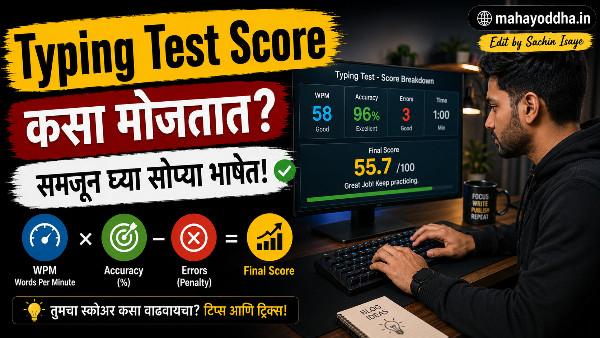
Typing Test Score मध्ये ५० WPM आला — पण नंतर कळलं खरा Score वेगळाच होता
तीन महिन्यांपूर्वी typing test दिला — 10FastFingers वर. Score आला ५२ WPM. Excited झालो.
मग Monkeytype वर test दिला — same session मध्ये. Score आला ४७ WPM. का?
मग TypeRacer वर — ४३ WPM. आणखी कमी.
तीन वेगळ्या tools वर तीन वेगळे scores. Confusing होतं.
Research केलं. समजलं — WPM calculation पेक्षा simple वाटतं पण आत complexity आहे. Gross WPM, Net WPM, Accuracy penalty, CPM — हे सगळं एकत्र काम करतं. आणि different tools different methods वापरतात.
आज Mahayoddha.in वर हे clearly explain करतो — WPM म्हणजे नक्की काय, कसं calculate होतं, आणि तुमचा “खरा” score कुठला.
“Word” म्हणजे Typing मध्ये काय असतो — हे माहीत नसलेली सगळ्यात Surprising गोष्ट
Typing speed मोजताना “words” count करतात. पण “word” म्हणजे English dictionary मधला word नाही.
Typing मध्ये standard definition आहे — ५ keystrokes = १ word.
हे का? कारण English words वेगवेगळ्या lengths च्या आहेत. “I” एक letter, “Congratulations” चौदा letters. दोन्हींना एक word म्हटलं तर comparison unfair होतो.
Five keystroke standard सगळ्या words ला equalize करतो.
Keystrokes मध्ये काय count होतं:
Letters, numbers, punctuation — सगळं count होतं. Spacebar press पण count होतो. Backspace count होत नाही — tools different ways handle करतात हे.
उदाहरणे:
“Apple” — 5 keystrokes (A,p,p,l,e) + space = 6 keystrokes = 1.2 words.
“I am” — I(1) + space(1) + a(1) + m(1) = 4 keystrokes = 0.8 words.
“Hello, World!” — H,e,l,l,o,comma,space,W,o,r,l,d,exclamation = 13 keystrokes = 2.6 words.
म्हणजे actual word count नाही — keystroke count ÷ 5 = WPM words.
Gross WPM — Raw Speed
Gross WPM म्हणजे errors ignore करून calculate केलेला speed.
Formula:
Gross WPM = (Total Keystrokes ÷ 5) ÷ Minutes
Example:
एक minute test. ३०० keystrokes type केले.
Gross WPM = (300 ÷ 5) ÷ 1 = 60 WPM.
हा number impressive दिसतो. पण errors किती झाल्या ते यात नाही.
Gross WPM — raw typing speed. Accuracy information नाही. Practice motive साठी useful — “मी किती fast type करू शकतो potential मध्ये.”
Net WPM — खरा Score
Net WPM errors penalty include करतो.
Standard Formula:
Net WPM = Gross WPM − (Errors Per Minute × Penalty)
Different tools different penalties वापरतात. Most common — प्रत्येक error साठी एक WPM penalty.
Example:
Gross WPM = 60. Errors = 8.
Net WPM = 60 − 8 = 52 WPM.
Why Net WPM matters:
Real-world typing मध्ये — article लिहिताना, email करताना — errors correct करावे लागतात. Error correction time consume करतो. High error rate असेल तर effective output कमी होतो.
Government typing exams, data entry jobs — Net WPM use करतात. Speed test certificates — Net WPM.
माझा score different tools वर different का येत होता? कारण different error penalty structures. Monkeytype aggressive penalty, 10FastFingers standard, TypeRacer content-based difference.
CPM — Characters Per Minute
CPM = Characters Per Minute. Simple conversion.
Relationship:
CPM = WPM × 5
किंवा: WPM = CPM ÷ 5
का CPM वापरतात:
काही tools आणि jobs CPM prefer करतात — particularly non-English languages जिथे word boundaries different आहेत. Hindi, Marathi typing साठी CPM more fair measurement आहे.
Data entry jobs — characters count करतात, words नाही. एक digit entry पण “word” नाही — character आहे.
Example:
५० WPM = २५० CPM.
Accuracy Percentage — हे सगळ्यात Important Number आहे
Formula:
Accuracy % = (Correct Keystrokes ÷ Total Keystrokes) × 100
Example:
३०० keystrokes type केले. २८५ correct, १५ errors.
Accuracy = (285 ÷ 300) × 100 = 95%.
Accuracy आणि Effective Speed:
९५% accuracy म्हणजे दर वीस keystrokes ला एक error. Sounds reasonable?
पण calculate करा — ५० WPM (२५० keystrokes per minute) × ५% error rate = १२-१३ errors per minute. म्हणजे रोज एक हजार word article लिहिताना — roughly ६० ते ७० corrections. हे significant time आहे.
Mahayoddha.in च्या Accuracy article मध्ये explain केलं आहे — ९७%+ accuracy goal असावी.
Different Tools Different Scores का देतात
हे confusion common आहे. Reasons:
Word Lists:
10FastFingers — top two hundred most common English words. Simple, familiar words. Score जास्त येतो.
Monkeytype — configurable. Top words mode, random words mode, quotes mode. Random words mode harder.
TypeRacer — quotes आणि passages. Uncommon words, proper nouns, punctuation heavy. Score कमी येतो.
Error Penalty:
काही tools — error झाला, fix नाही केला तर penalty. काही tools — error fix करता येतो, penalty नाही. Net calculation different.
Content Difficulty:
“the and is” — easy, fast type. “pneumonoultramicroscopicsilicovolcanoconiosis” — slow, errors likely.
माझ्या Three Scores Explanation:
10FastFingers — ५२ WPM. Common words, moderate penalty.
Monkeytype — ४७ WPM. Different mode, stricter calculation.
TypeRacer — ४३ WPM. Quote content, punctuation, pressure.
सगळे valid आहेत — different contexts मोजतात.
Typing Speed Standards — तुमचा Score कुठे आहे
| WPM Range | Level | Context |
|---|---|---|
| 0-25 WPM | Beginner | Two-finger typing, learning stage |
| 26-40 WPM | Basic | Average casual user |
| 41-60 WPM | Intermediate | Comfortable daily use |
| 61-80 WPM | Proficient | Content writers, students |
| 81-100 WPM | Advanced | Professional typists |
| 100+ WPM | Expert | Speed typists, stenographers |
| 150+ WPM | Elite | Competition typists |
World record — Barbara Blackburn, २१२ WPM.
Average person — ४०-४५ WPM. Average office worker — ५०-६० WPM. Recommended for content writers — ७०+ WPM.
Typing Test देताना काय बघायचं
Primary metrics:
Net WPM — effective speed. Accuracy % — consistency quality.
Secondary metrics:
Consistency % (Monkeytype) — rhythm stable आहे का. Raw WPM — potential ceiling. Time-based breakdown — कुठे slow झालो.
Comparison करताना:
Same tool, same mode, same test length — compare करा. Different tools compare करणं meaningful नाही — different standards आहेत.
Progress tracking:
Monthly same test. Screenshot घ्या. Numbers note करा. Trend बघा.
FAQ
Q. Typing test मध्ये Backspace count होतो का WPM मध्ये?
Tool dependent आहे. काही tools — Backspace keystrokes count नाही करत. काही tools — Backspace दाबला की error mark होतो. Monkeytype — error as-is count करतो, correction allowed नाही in strict mode. 10FastFingers — correction allowed, but error marked. Test देण्याआधी tool चे rules बघा.
Q. Exam साठी typing test देतो — Gross WPM की Net WPM मोजतात?
बहुतेक government exams आणि professional certifications Net WPM वापरतात. Specific exam requirement check करा — IBPS, SSC, state government exams — सगळ्यांचे different standards असतात. Error penalty किती आहे ते specifically बघा.
Q. Marathi typing साठी WPM standard आहे का?
Marathi typing साठी standard WPM नाही — CPM use होतं जास्त. Government Marathi typing tests — specific CPM requirement असतो. Marathi words English पेक्षा generally longer असतात — WPM comparison direct नाही होत. CPM fairer metric आहे Marathi साठी.
Q. ६ महिन्यांत ७० WPM achieve करता येतो का?
Starting point वर depend आहे. ३०-३५ WPM वरून सुरुवात करत असाल — ६ महिन्यांत ७० WPM achievable आहे consistent daily practice ने. Mahayoddha.in च्या Touch Typing article मध्ये माझा journey share केला आहे — ३४ WPM वरून ७०+ WPM पर्यंत. दोन ते तीन महिने लागले.
Q. Typing speed plateau झाली — ५५ WPM वर अडकलो — काय करावे?
Plateau common आहे. Causes — wrong technique, inconsistent practice, comfort zone typing. Solutions — deliberately uncomfortable practice (unfamiliar word sets, shorter test times), technique audit (finger assignment check), Keybr वर weak keys, accuracy focus (speed नाही). Mahayoddha.in च्या upcoming Plateau article मध्ये हे detail मध्ये येईल.
Conclusion
त्या दिवशी तीन different scores बघून confusion झाला होता. आता clearly समजतं — different tools, different calculations, different contexts.
Important takeaway — Net WPM + Accuracy हे दोन numbers सगळ्यात meaningful आहेत. Gross WPM impressive दिसतो पण reality नाही दाखवत.
Mahayoddha.in वर Typing Skills series मध्ये हे foundational knowledge आहे. Test tools, accuracy improvement, touch typing — सगळ्या articles एकत्र वाचले तर complete picture मिळतो.
आजच Monkeytype वर test द्या — Gross WPM, Net WPM, आणि Accuracy तिन्ही note करा. त्या तिन्ही numbers एकत्र तुमची actual typing situation सांगतात.
तुमचा Gross आणि Net WPM मधला gap किती आहे? Comment मध्ये सांगा — gap जास्त असेल तर accuracy work करणं priority आहे.

Sachin Isaye
सचिन इसाये
नमस्कार! मी सचिन इसाये, Founder of Mahayoddha.in. २०१७ पासूनच्या माझ्या Blogging आणि Digital Content क्षेत्रातील अनुभवाचा वापर करून, मी Keyboard, Typing Speed, Windows Shortcuts आणि Digital Skills यांसारख्या विषयांवर सोप्या मराठीत practical माहिती देण्याचा प्रयत्न करतो.
Keyboard Buying Guide, Mechanical Keyboard, Wireless Keyboard, Keyboard Problems, Keyboard Typing Skills आणि Keyboard Ergonomics यांसारखे विषय सामान्य मराठी वाचकांना सहज समजावून सांगणे, हेच माझे काम आहे.
विद्यार्थी, Bloggers, Content Writers, Office Users, Work From Home करणारे आणि नवीन computer users यांना keyboard वापरून आपलं काम जलद, सोपं आणि smart करता यावं, हेच माझं ध्येय आहे. नवीन Keyboard Guides, Typing Tips आणि Windows Shortcuts साठी Mahayoddha.in ला नियमित भेट द्या.