
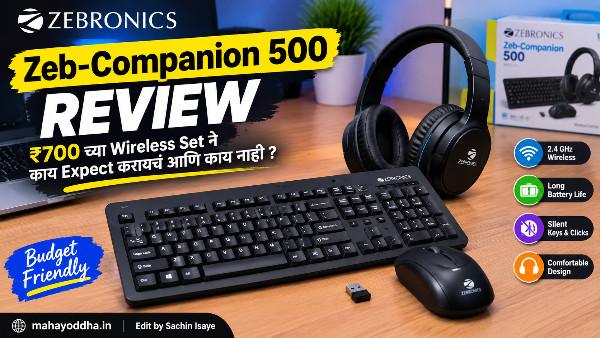
Zebronics Zeb-Companion 500 Review — ₹७०० च्या Wireless Set ने काय Expect करायचं आणि काय नाही
Office मध्ये एक colleague होता — नवीन laptop घेतला, keyboard-mouse combo हवं होतं. Budget ₹७०० ते ₩८५०.
“Wireless हवं, silent हवं, budget कमी आहे” — हे तीन requirements होत्या.
Zebronics Zeb-Companion 500 suggest केला. घेतला. तीन महिने वापरला. मग review विचारलं.
“Basic काम होतं. जास्त expect केलं नव्हतं, जास्त मिळालं नाही. पण value for money आहे.”
हा honest verdict आहे. आज Mahayoddha.in वर हे properly review करतो — specifications, actual experience, कोणासाठी suitable आहे, कोणासाठी नाही.
Zebronics Zeb-Companion 500 — Specifications
Keyboard:
Connectivity — 2.4GHz Wireless, USB Nano Receiver. Key Type — Chiclet (Scissor Switch). Layout — Full Size with Rupee Key (₹). Power — AA Battery. Switch — Power On/Off. Sound — Ultra Silent claim.
Mouse:
Connectivity — Same USB Nano Receiver (single dongle for both). DPI — 1000 DPI standard. Buttons — Three (Left, Right, Scroll). Power — AA Battery.
Common:
Receiver — Single USB Nano Receiver for both keyboard and mouse. Range — 10 meters claimed. OS Compatibility — Windows, Linux, Mac.
Unboxing आणि First Impression
Box मध्ये येतं — keyboard, mouse, USB nano receiver, batteries (काही versions मध्ये included, काही मध्ये नाही — check करा), warranty card.
First Look:
Keyboard slim आहे. Chiclet design — laptop keyboard सारखं look. Black color — professional vाटतो. Rupee key (₹) dedicated आहे — Indian users साठी useful.
Mouse compact आहे. Hand size medium असेल तर comfortable. Large hands साठी slightly small वाटेल.
Build quality — plastic आहे obviously. ₹७०० च्या range मध्ये premium plastic expect करणं unrealistic. पण feel cheap नाही — adequate आहे.
Keyboard Experience — Honest Assessment
Chiclet Keys — काय आहे हे
Chiclet keys म्हणजे laptop-style flat keys. Individual keys square/rectangular shape, slightly raised, gaps मध्ये. Scissor switch mechanism आत — rubber dome वर scissor mechanism असतो जो key stability देतो.
Regular membrane keyboard पेक्षा better feel आणि stability. Mechanical keyboard पेक्षा significantly different — tactile feedback नाही, click नाही. Laptop keyboard सारखं feel.
Typing experience — smooth, consistent. Keys wobble नाही होत — scissor mechanism stability देतो. Key travel short आहे — laptop keyboard accustomed असाल तर familiar feel येतो.
Ultra Silent — Claim सत्य आहे का
Partially. Standard membrane keyboard पेक्षा quieter आहे. “Ultra silent” थोडं exaggerated claim आहे.
Keyboard completely silent नाही — typing करताना soft sound येतो. Library मध्ये bothered होईल असा नाही. Office colleague जवळ बसलेले असतील — annoying नाही.
Blue switch mechanical keyboard च्या comparison मध्ये — dramatically quieter. Silent mechanical switches (Cherry MX Silent) comparison मध्ये — similar sound level.
Work from home video calls साठी — adequate. Mic pickup होत नाही significantly.
Key Layout आणि Rupee Key
Full size layout — numpad included. Data entry, spreadsheet heavy users साठी useful.
Rupee key (₹) — dedicated key आहे. Indian users साठी genuinely convenient. Previously Alt codes किंवा copy-paste लागायचं — direct key convenient आहे.
Key spacing — standard. Accidental press होत नाही.
Function keys — F1 ते F12 standard. Media keys Fn combination मध्ये आहेत.
Wireless Performance — 2.4GHz Reality
Range
10 meters claimed. Practical reality — eight ते नऊ meters without obstacles. Wall मधून — पाच ते सहा meters. Home/office use मध्ये adequate आहे.
Latency
2.4GHz RF connection — latency near-zero. Bluetooth पेक्षा जास्त reliable. Typing दरम्यान कुठलाही noticeable delay नाही.
Gaming साठी — casual gaming adequate आहे. Competitive FPS नाही. Mahayoddha.in वर gaming keyboard articles मध्ये explain केलं आहे — competitive gaming साठी dedicated gaming keyboard better आहे.
Single Dongle — Biggest Convenience
एकाच USB nano receiver ने keyboard आणि mouse दोन्ही connect होतात. एकच USB port use होतो — laptop साठी significant advantage. Ports कमी असतात laptop मध्ये.
Dongle खूप छोटा आहे — barely visible when plugged in. Travel मध्ये keyboard use करायला dongle laptop मध्येच ठेवता येतो.
Mouse Experience
Feel आणि Comfort
Compact mouse. Medium hands साठी comfortable palm grip. Claw grip पण possible. Large hands — slightly cramped feel येऊ शकतो.
Buttons — click sound soft आहे. “Ultra silent” claim mouse buttons साठी पण applicable आहे — quieter than standard.
Scroll wheel — smooth. Horizontal scroll नाही — standard vertical only.
1000 DPI — Adequate का नाही
1000 DPI — standard office use साठी adequate. Documents, spreadsheets, web browsing — fine.
Photo editing, graphic design — adjustable DPI नसल्याने limitation येतो. Precision work साठी dedicated mouse better आहे.
Gaming — 1000 DPI fixed, no adjustability — casual gaming okay, serious gaming नाही.

Power Management — Practical Details
Keyboard Power Switch
Dedicated power on/off switch आहे — keyboard च्या बाजूला. रात्री झोपताना off करा — battery life significantly वाढते. सकाळी on करा — instantly connect होतो.
Auto sleep feature पण आहे — काही मिनिटे use नाही केलं तर sleep mode. Key press केली की wake होतो.
Battery Life
Manufacturer claim — keyboard एक ते दोन वर्षे. Mouse सहा ते बारा महिने.
Real world — power switch regularly off केलं तर keyboard eight ते बारा months. Mouse सहा ते आठ months.
AA batteries — easily available, inexpensive. Rechargeable AA batteries वापरता येतात — long term economical.
Build Quality — Budget Reality
₹७०० combo set मध्ये premium build expect करू नका — honest आहे हे.
Keyboard body — ABS plastic. Light weight. Flex होतो slightly जोरात press केल्यावर — premium keyboards मध्ये नाही होत. Daily use मध्ये issue नाही.
Mouse body — similar. Scroll wheel plastic. Buttons consistent click देतात.
Durability expectation — दोन ते तीन वर्षे regular office use. Heavy gaming, rough handling — कमी टिकेल. Gentle office use — adequate lifespan.
Compatibility
Windows — Plug and play. Driver नाही लागत.
Mac — Basic functions work करतात. Mac specific keys (Command, Option) Windows equivalent ने map होतात. Full Mac functionality नाही.
Linux — Generally works. Basic input without special features.
Android phone/tablet — OTG adapter ने keyboard connect होतो. Mouse Android ला OTG ने connect होतो. Mahayoddha.in वर OTG Guide आहे.
Comparison — Same Range मध्ये Alternatives
| Product | Price | Type | Key Advantage |
|---|---|---|---|
| Zebronics Zeb-Companion 500 | ₹७०० ते ₹८५० | Wireless Chiclet Combo | Silent, single dongle, Rupee key |
| Logitech MK235 | ₹१,२++ ते ₹१,4++ | Wireless Membrane Combo | Logitech reliability, better build |
| Logitech MK120 | ₹९५० | Wired Membrane Combo | Logitech quality, wired |
| Portronics Chicklet Plus | ₹१,5++ | Bluetooth Slim | Multi-device, Bluetooth |
| HP CS10 Combo | ₹६५० ते ₹७५० | Wireless Membrane Combo | HP brand, budget |
Honest assessment:
Logitech MK235 ₹५०० ते ₩६०० जास्त आहे — significantly better build quality, better reliability, better long term value.
Budget absolutely ₹८०० पेक्षा कमी असेल तर Zebronics Zeb-Companion 500 reasonable choice आहे. Budget थोडा stretch करता येत असेल — Logitech consider करा.
कोणासाठी Suitable आहे
Perfect for:
Budget conscious users — ₹७०० ते ₩८५० range. Office basic typing — documents, emails, spreadsheets. Home desktop/laptop — casual daily use. Single USB port occupy करायचं नाही — single dongle advantage. Silent typing preference आहे.
Avoid if:
Gaming — particularly competitive gaming. Heavy graphic design, precision work. Mac primary user. Long term durability priority — invest in Logitech. Mechanical keyboard feel हवं आहे.
Actual User Scenarios
Scenario एक — Office Data Entry
Full size keyboard, numpad included. Silent keys — colleagues disturb होत नाहीत. Wireless — desk clean राहतो. Rupee key — accounts work साठी convenient. Rating: Excellent
Scenario दोन — Work From Home
Silent keys — video calls mic pickup कमी. Wireless — clean desk setup. Single dongle — laptop USB port वाचतो. Rating: Good
Scenario तीन — Student Home Use
Budget friendly. Wireless convenience. Basic typing, notes, assignments. Rating: Good
Scenario चार — Gaming
1000 DPI fixed mouse — adjustability नाही. Keyboard gaming features नाहीत. Casual gaming — okay. Competitive — avoid. Rating: Average
FAQ
Q. Zebronics Zeb-Companion 500 Logitech K120 पेक्षा better आहे का?
Different categories आहेत. Logitech K120 wired, Zebronics wireless. Wireless convenience साठी Zebronics better — single price मध्ये keyboard + mouse + wireless मिळतो. Build quality आणि longevity — Logitech slightly better. Budget मध्ये wireless combo हवं असेल — Zebronics reasonable choice. Build quality priority असेल — Logitech K120 + basic wireless mouse combination better.
Q. Dongle हरवला तर keyboard वापरता येतो का?
नाही. 2.4GHz keyboard specific dongle ला paired असतो. Dongle हरवला तर keyboard useless. Dongle safe place ठेवा — laptop port मध्ये permanently लावून ठेवा travel मध्ये. Mahayoddha.in वर Dongle हरवल्यावर काय करायचं article आहे — detail मध्ये.
Q. Battery कधी change करायची हे कसं कळेल?
Keyboard slow respond करायला लागेल — key press delay येईल. Mouse erratic movement करेल. Wireless range कमी होईल — जवळ आणूनही काम करेल. हे signs दिसले की battery change करा. Proactive approach — six months ला keyboard battery, तीन months ला mouse battery change करा.
Q. दुसऱ्या Zebronics keyboard सोबत हा mouse वापरता येतो का?
नाही. Dongle specific keyboard-mouse pair साठी आहे. Different Zebronics products different dongles वापरतात — cross-compatible नाहीत.
Q. Rupee key (₹) Word आणि Excel मध्ये properly काम करतो का?
हो. Rupee key (₹) standard Unicode character आहे — U+20B9. सगळ्या modern applications मध्ये properly display होतो. Word, Excel, Google Docs, browser — सगळ्यात works. Legacy software मध्ये font support नसेल तर display issue येऊ शकतो.
Conclusion
त्या colleague ने तीन महिने वापरला, “value for money आहे” म्हणाला. हा fair verdict आहे.
Zebronics Zeb-Companion 500 — budget wireless keyboard-mouse combo म्हणून adequate आहे. Silent keys office साठी good आहे. Single dongle convenience आहे. Rupee key Indian users साठी useful आहे.
Premium build quality नाही, mechanical feel नाही, gaming features नाहीत. हे expect करणं budget मध्ये unrealistic आहे.
Mahayoddha.in वर नेहमी honest review देतो — product च्या limitations clearly सांगणं important आहे. ₹७०० मध्ये जे मिळतं ते reasonable आहे — जास्त expect करू नका.
Budget ₹१,२++ ते ₹१,५++ stretch करता येत असेल — Logitech MK235 significantly better long term investment आहे.
तुम्ही Zebronics Zeb-Companion 500 वापरत आहात का? Experience कसा आहे? Comment मध्ये सांगा.

Sachin Isaye
सचिन इसाये
नमस्कार! मी सचिन इसाये, Founder of Mahayoddha.in. २०१७ पासूनच्या माझ्या Blogging आणि Digital Content क्षेत्रातील अनुभवाचा वापर करून, मी Keyboard, Typing Speed, Windows Shortcuts आणि Digital Skills यांसारख्या विषयांवर सोप्या मराठीत practical माहिती देण्याचा प्रयत्न करतो.
Keyboard Buying Guide, Mechanical Keyboard, Wireless Keyboard, Keyboard Problems, Keyboard Typing Skills आणि Keyboard Ergonomics यांसारखे विषय सामान्य मराठी वाचकांना सहज समजावून सांगणे, हेच माझे काम आहे.
विद्यार्थी, Bloggers, Content Writers, Office Users, Work From Home करणारे आणि नवीन computer users यांना keyboard वापरून आपलं काम जलद, सोपं आणि smart करता यावं, हेच माझं ध्येय आहे. नवीन Keyboard Guides, Typing Tips आणि Windows Shortcuts साठी Mahayoddha.in ला नियमित भेट द्या.