
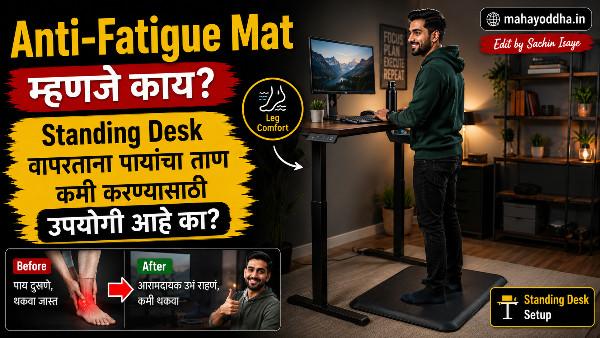
Standing Desk घेतला, पण दोन तासांनंतर पाय दुखायचे — Anti-Fatigue Mat ने काय फरक झाला
चार महिन्यांपूर्वी standing desk experiment सुरू केलं.
Mahayoddha.in च्या WFH Setup article मध्ये sitting-standing alternating बद्दल लिहिलं होतं. Practice करायचं ठरवलं. Adjustable desk stand घेतला — electric नाही, manual crank type — ₹८,०००. Setup केला.
पहिला दिवस — exciting होतं. Standing करत typing करणं. दोन तासांनंतर — टाचा uncomfortable, पाय थकलेले. Heel थोडी dull ache.
“Concrete floor वर उभं राहणं obviously tiring आहे” — पण solutions शोधले. Anti-fatigue mat बद्दल वाचलं. घेतला.
फरक dramatic होता. Standing sessions comfortable झाले. आज हे explain करतो.
Prolonged Standing चा Problem — Sitting पेक्षा Different आहे
Sitting health problems बद्दल बरंच बोललं जातं — sedentary lifestyle, back pain. Standing desk solution म्हणून popular झाला.
पण prolonged standing independently harmful आहे — lower back pain, varicose veins, joint stress, heel pain. Standing desk चा benefit तेव्हा मिळतो जेव्हा sitting आणि standing alternating होतं — continuous standing नाही.
Concrete किंवा wood floor वर उभं राहिलं की — shock absorption नाही. Body weight directly joints वर. Heel, ankle, knee, lower back — सगळ्यावर.
Anti-fatigue mat हे address करतो — cushioning देतो, micro-movements encourage करतो, circulation improve करतो.

Anti-Fatigue Mat कसे काम करतो — Mechanism
Mat soft surface असतो — foam, gel, किंवा combination. पायाखाली soft surface असल्याने:
Micro-movements — Hard floor वर perfectly still उभं राहतो — muscles static होतात, circulation कमी होतो. Soft surface वर body automatically micro-adjustments करतो — small shifts, weight transfer. हे micro-movements muscles actively engage करतात, blood flow maintain होतो.
Shock absorption — Weight impact absorb होतो — joints वर direct load कमी होतो.
Pressure distribution — Foot का pressure evenly distribute होतो — heel points वर concentrate होत नाही.
Types — कोणता कधी
Flat Foam Mat — Basic
Simple flat surface. Zero point seventy five ते एक inch thickness. PU foam किंवा EVA foam.
₹५०० ते ₹१,५०० मध्ये मिळतो. Beginner साठी adequate आहे. One ते two hours standing साठी sufficient.
काय बघायचं — anti-slip base mandatory. Beveled edges — flat edges वर trip होण्याचा risk. Minimum ¾ inch thickness — कमी असेल तर benefit कमी.
3D Ergonomic Mat — Advanced
Uneven surface — bumps, ridges, raised portions. Barefoot वापरल्यावर reflexology effect — foot pressure points stimulate होतात. Ankle आणि foot muscles actively engage होतात.
₹१,५०० ते ₩३,५०० range. Three plus hours standing साठी better option. Active standing encourage करतो — passive standing नाही.
माझ्याकडे हाच आहे — barefoot वापरतो. रोजच्या standing sessions मध्ये पाय less tired. Heel pain completely गेला.
Gel Mat
Top layer soft gel, bottom firm support. Comfortable feel. Expensive — ₹२,५०० ते ₩५,०००. Restaurants, retail workers साठी designed originally. Home office साठी foam mat sufficient असतो.
Anti-Fatigue Mats with Balance Board
Balance board integrate केलेला — standing करताना balance training. Active standing maximum. Expensive आणि learning curve आहे. Serious health-focused users साठी.
Standing Desk Setup — Complete Picture
Anti-fatigue mat एकट्याने काम करत नाही — complete setup लागतो.
Monitor Height
Standing करताना monitor eye level ला असावं. Mahayoddha.in च्या Monitor Stand article मध्ये हे explain आहे. Adjustable monitor arm standing-sitting दोन्हींसाठी height change करतो — gas spring arm एका बोटाने move होतो.
Keyboard Position
Standing position मध्ये keyboard elbow height ला — roughly ninety degrees. Wrist neutral. Same principles apply होतात — Mahayoddha.in च्या wrist pain articles मध्ये detail आहे.
Footwear
Barefoot anti-fatigue mat वर — maximum benefit. Arch support असलेले shoes दुसरा option. Flat chappals avoid करा — heel unsupported.
Standing Duration
Standing सुरू केलं असेल तर — पहिल्या आठवड्यात thirty minutes per session. Gradually वाढवा. आदर्श ratio — एक तास sitting, तीस मिनिटे standing. Continuous standing avoid करा.
Standing vs Sitting vs Alternating — काय Research सांगतं
Prolonged sitting — cardiovascular risks, back pain, metabolic issues.
Prolonged standing — varicose veins, lower back pain, joint stress, fatigue.
Alternating — best. Thirty minute intervals. Movement breaks.
Standing desk benefit मिळवायला — mat, proper height setup, alternating strategy. Mat शिवाय standing desk — benefits partially cancel होतात.

Exercises Standing करताना — Optional पण Useful
Anti-fatigue mat आहे तर काही micro-exercises possible आहेत typing करताना:
Calf raises — standing करताना periodically heels raise करा. Calf muscles, circulation.
Weight shifting — एका पायावरून दुसऱ्यावर gentle shift. Passive standing avoid.
Toe spreads — barefoot असाल तर toes spread करा, release करा.
हे exercises distraction नाहीत — subconscious होतात with practice.
Buying Guide — काय Check करायचं
| Feature | Minimum | Better | Best |
|---|---|---|---|
| Thickness | ¾ inch | 1 inch | 1.5 inch+ |
| Material | EVA Foam | PU Foam | PU + Gel |
| Surface | Flat | Textured | 3D Ergonomic |
| Base | Anti-slip | Anti-slip + grip | Full anti-slip |
| Edges | Straight | Beveled | Smooth beveled |
| Size | 50×75 cm | 60×90 cm | Custom |
| Warranty | None | 1 year | 2+ years |
Budget recommendation — ₹८०० ते ₹१,५०० range मध्ये decent PU foam mat मिळतो. Amazon, Flipkart — “anti-fatigue mat” किंवा “ergonomic standing mat” search करा. Reviews मध्ये specifically flat edge complaints, durability, anti-slip performance बघा.
FAQ
Q. Regular yoga mat anti-fatigue mat म्हणून वापरता येतो का?
Partially. Yoga mat cushioning देतो — better than hard floor. पण anti-fatigue mat specifically designed आहे — compression properties, edge design, anti-slip base. Yoga mat compress होतो time नंतर, edges flat असतात — trip risk. Short term substitute म्हणून चालेल, long term साठी dedicated mat better आहे.
Q. Anti-fatigue mat dining room किंवा kitchen साठी पण useful आहे का?
Absolutely. Kitchen standing — cooking, washing — जास्त tiring असतं. Kitchen anti-fatigue mats specific आहेत — water resistant, easy to clean, grease resistant. Home office mat आणि kitchen mat different products आहेत — appropriate one घ्या.
Q. Standing desk नाही, पण occasionally उभं राहतो — mat useful आहे का?
हो. Counter height work, ironing board, आर्ट/craft work — occasional standing साठी mat beneficial आहे. Dedicated standing desk mandatory नाही — mat independently useful आहे.
Q. Anti-fatigue mat किती दिवस टिकतो?
Quality mat दोन ते पाच वर्षे टिकतो regular use मध्ये. Low quality foam compress होतो — सहा ते बारा महिन्यांत effectiveness कमी होते. Compression test — mat वर hand press करा, quickly release करा — original shape quickly येतो तर quality चांगली आहे.
Q. Varicose veins आहेत — standing desk आणि anti-fatigue mat safe आहे का?
Varicose veins असतील तर doctor ला विचारा. Generally — prolonged static standing varicose veins worse करतो. Anti-fatigue mat micro-movements encourage करतो — blood circulation improve होतो — potentially beneficial. Compression stockings wearing during standing recommended असतात varicose veins असतील तर. Specific medical advice doctor ने द्यावी.
Conclusion
Standing desk घेतल्यावर anti-fatigue mat without — टाचा दुखणं, पाय थकणं. Mat घेतल्यावर — standing sessions comfortable, longer duration possible, heel pain गेला.
₹१,२०० मध्ये 3D ergonomic mat घेतला. Genuinely useful investment आहे.
Mahayoddha.in च्या ergonomics series मध्ये — eye strain, neck pain, wrist pain, RSI, CTS, trigger finger, monitor stand, anti-fatigue mat — हे सगळे interconnected आहेत. Holistic ergonomic setup बनवणं हे goal आहे.
Standing desk वापरतात का? Heel pain experience केलं का? Comment मध्ये सांगा — experience useful होईल इतरांना.

Sachin Isaye
सचिन इसाये
नमस्कार! मी सचिन इसाये, Founder of Mahayoddha.in. २०१७ पासूनच्या माझ्या Blogging आणि Digital Content क्षेत्रातील अनुभवाचा वापर करून, मी Keyboard, Typing Speed, Windows Shortcuts आणि Digital Skills यांसारख्या विषयांवर सोप्या मराठीत practical माहिती देण्याचा प्रयत्न करतो.
Keyboard Buying Guide, Mechanical Keyboard, Wireless Keyboard, Keyboard Problems, Keyboard Typing Skills आणि Keyboard Ergonomics यांसारखे विषय सामान्य मराठी वाचकांना सहज समजावून सांगणे, हेच माझे काम आहे.
विद्यार्थी, Bloggers, Content Writers, Office Users, Work From Home करणारे आणि नवीन computer users यांना keyboard वापरून आपलं काम जलद, सोपं आणि smart करता यावं, हेच माझं ध्येय आहे. नवीन Keyboard Guides, Typing Tips आणि Windows Shortcuts साठी Mahayoddha.in ला नियमित भेट द्या.