
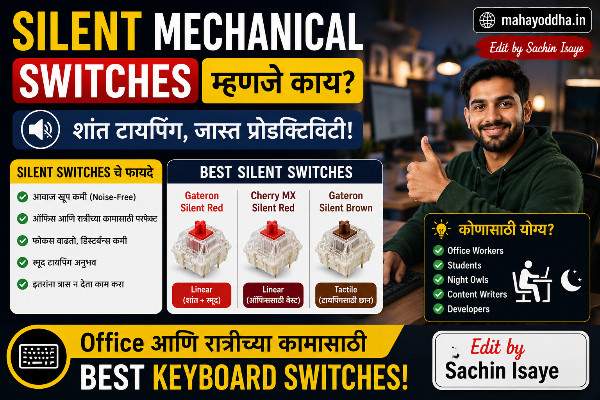
Silent Mechanical Keyboard घेतला — Video Call मध्ये पहिल्यांदा कुणी “keyboard आवाज येतोय” म्हणालं नाही
Brown switch mechanical keyboard घेतल्यावर एक problem आला.Silent Mechanical Switches.
Mahayoddha.in साठी काम करताना zoom calls होतात. एका call मध्ये “background मध्ये keyboard चा आवाज येतोय, मute करा” असं सांगितलं. Embarrassing होतं.
रात्री उशिरा articles लिहितो — wife झोपलेली असते. Brown switch quiet आहे Blue पेक्षा, पण तरी thock आवाज येतोच.
Silent switches बद्दल research केलं. Cherry MX Silent Red try करायला मिळालं एका मित्राच्या keyboard वर. Immediately difference जाणवला.
आज Mahayoddha.in वर silent switches properly explain करतो — काय आहेत, कसे work करतात, आणि regular switches पेक्षा काय different आहे.
Regular Mechanical Switch मध्ये आवाज कुठून येतो
हे माहीत असलं तर silent switch चं mechanism clear होतं.
Regular switch मध्ये आवाज दोन stages ला येतो.
Downstroke — Key press केली. Stem खाली जातो. Bottom out झाल्यावर stem switch housing च्या bottom ला hit करतो. “Clack” आवाज.
Upstroke — Finger release केली. Spring stem वर push करतो. Stem switch housing च्या top ला hit करतो. “Click” आवाज.
दोन्ही impacts — plastic on plastic — आवाज produce करतात.
Clicky switches मध्ये additional click bar असतो — तो extra loud click add करतो. Mahayoddha.in च्या Switch Types article मध्ये हे explain आहे.
Silent Switch मध्ये नक्की काय Different आहे
Silent switch मध्ये stem वर छोटे silicone किंवा rubber dampeners असतात.
Downstroke मध्ये — stem bottom ला जाण्याआधी rubber pad bottom ला touch करतो. Impact absorbed होतो. Plastic on plastic नाही — rubber on plastic. Sound dramatically कमी होतो.
Upstroke मध्ये — stem वर येताना पण rubber pad impact absorb करतो.
दोन्ही impacts dampened — sound reduction ७०-८०% पर्यंत होतो.
Feel मध्ये काय फरक:
Dampeners मुळे key slightly different feel येतो. “Mushy” किंवा “muted” वाटतो काही लोकांना. Travel थोडा shorter वाटतो. पण basic mechanical switch advantages — tactile feedback (silent brown मध्ये), actuation point, durability — सगळं same राहतं.
Silent Red vs Silent Brown — Which One
Silent Red — Linear + Silent
Regular Red switch चा silent version. Smooth linear feel, no bump, significantly quieter.
Feel:
Downstroke smooth. No resistance. Bottom out feel absorb होतो. Upstroke quiet.
Overall — buttery smooth, very quiet.
Actuation — 45g approximately. Same as regular Red.
Gaming साठी:
Silent Red competitive gaming साठी excellent आहे. Light, fast, quiet. FPS games मध्ये teammates ला keyboard आवाज ऐकू येणार नाही.
Typing साठी:
Feedback नसल्याने accuracy benefit नाही मिळत. पण quietness साठी sacrifice acceptable आहे बऱ्याच users साठी.
कोणासाठी:
Gaming primary, quiet environment needed. Office — neighbors आहेत. Shared workspace. Video calls frequent आहेत.
Silent Brown — Tactile + Silent
Regular Brown switch चा silent version. Tactile bump आहे, पण sound dramatically कमी.
Feel:
Downstroke smooth. 45g पर्यंत. Bump येतो — registration signal. नंतर smooth. Upstroke quiet.
Feedback आहे, loud sound नाही — best of both worlds असं म्हणता येतो.
Typing साठी:
Bump accuracy benefit देतो — Mahayoddha.in च्या Accuracy article मध्ये explain आहे. Long typing sessions comfortable. Video calls मध्ये keyboard pickup near-zero.
रात्री typing साठी:
Wife/family झोपलेले असताना — Silent Brown ideal आहे. Thock sound नाही. Bump feel येतो, sound येत नाही.
कोणासाठी:
Writers, bloggers, content creators — sound sensitivity आहे. Office environment. Students — रात्री study. Work from home — video calls frequent आहेत.
माझ्यासाठी हाच option आहे — Silent Brown. Mahayoddha.in साठी articles लिहितो, रात्री mostly, video calls होतात. All three concerns address होतात.
Silent Switch vs O-Rings — काय Difference आहे
O-rings हे aftermarket dampening solution आहे — regular switches वर existing keyboards वर लावतात.
Regular keyboard वर O-rings लावले की — keycap stem वर rubber ring असतो. Bottom out झाल्यावर rubber impact absorb करतो.
Silent Switch vs O-Rings:
O-rings फक्त downstroke दamp करतात. Upstroke दamp नाही होत. Partial sound reduction.
Silent switches दोन्ही — downstroke आणि upstroke — damp करतात. More thorough reduction.
O-rings feel more mushy करतात. Silent switches better engineered dampening आहे.
O-rings use case: Existing keyboard आहे, switch change करायचे नाही, थोडा sound reduction हवा — O-rings ₹१५०-₩३०० मध्ये मिळतात. Quick cheap solution.
Silent switches — proper solution. More effective. New keyboard घेताना किंवा hot-swap keyboard असेल तर switch replacement.
Popular Silent Switch Options — Indian Market मध्ये
Cherry MX Silent Red — Premium brand. Trusted quality. ₹१,५०० per 10 switches approximately. Cherry MX keyboards — Corsair, some imports — मध्ये येतात.
Cherry MX Silent Black — Heavier linear, 60g. Silent version. Heavy typists साठी.
Gateron Silent Red/Brown — Budget friendly. Cherry MX पेक्षा slightly smoother feel actually. Popular recommendation.
TTC Silent Bluish White — Tactile silent. Unique feel. Budget imports.
Kailh Silent Box Pink/Brown — Box design — dust resistant. Silent. Good budget option.
Outemu Silent variants — Budget Indian market keyboards मध्ये येतात. Decent quality for price.
Indian market मध्ये specific silent switches standalone order करणं complex आहे. Pre-built keyboards silent switches सोबत घेणं practical आहे. Budget options — Redragon, Cosmic Byte — काही models मध्ये silent switches offer करतात.
Sound Comparison — Real World Numbers
ही approximate values आहेत — exact dB room acoustics वर depend करतो.
| Switch Type | Approximate Sound Level |
|---|---|
| Blue Clicky | ५५-६५ dB |
| Brown Tactile | ४५-५५ dB |
| Red Linear | ४०-५० dB |
| Silent Brown | ३०-४० dB |
| Silent Red | २५-३५ dB |
| Membrane Keyboard | ३०-४५ dB |
Silent switches membrane keyboard च्या level ला किंवा below येतात — हे significant आहे.
Video Calls आणि Recording — Silent Switches का Necessary आहेत
Microphone keyboard sound pick up करतो — particularly Blue switches. Brown पण moderately.
Online meetings मध्ये — fast typing करत असाल तर mic pick up होतो. Colleagues disturbed होतात.
YouTube recording, podcast, streaming — keyboard clicks background noise add करतात. Post-production मध्ये noise reduction available आहे, पण better source recording prefer होतो.
Silent switches + good mic placement = professional audio quality.
FAQ
Q. Silent switches feel change करतात का — mushy वाटतात का?
Slightly different feel आहे. Dampeners travel थोडा shorter करतात. काही users “mushy” म्हणतात, काही prefer करतात — softer landing comfortable आहे long sessions मध्ये. Try केल्याशिवाय preference कळत नाही. Generally — finger fatigue कमी होतो silent switches वर.
Q. Silent switch लुब केला तर आणखी quiet होतो का?
हो. Switch lubrication sound further reduce करतो. Mahayoddha.in च्या upcoming Switch Lubrication article मध्ये हे cover होईल. Lubed silent switch — exceptionally quiet. Factory lubed silent switches available आहेत काही brands मध्ये.
Q. Keyboard case आणि desk mat sound वर impact करतात का?
Significantly. Aluminum case — bright, clicky sound. Polycarbonate case — deeper sound. Foam filled case — quieter. Desk mat (soft) — keyboard bottom vibration absorb करतो, typing quieter होतो. Silent switches + foam case + desk mat = library-level quiet.
Q. Silent Brown tactile bump feel होतो regular Brown सारखाच का?
Slightly less pronounced. Dampeners bump feel थोडा softer करतात. Cherry MX Silent Brown — regular Brown पेक्षा subtler bump. Gateron Silent Brown — regular Brown च्या जवळ bump feel. Brand nुसार vary होतो. Generally — feedback less than regular tactile, more than linear.
Q. Office मध्ये सहकारी शेजारी आहेत — कोणता switch recommend करतो?
Silent Red किंवा Silent Brown दोन्ही office appropriate आहेत. Silent Red — quietest. Silent Brown — slight feedback + quiet. Personal preference — feedback नको असेल तर Silent Red, typing accuracy important असेल तर Silent Brown.
Conclusion
त्या zoom call नंतर seriously switch बदलण्याचा विचार केला. Silent Brown switch keyboard घेतला.
पुढच्या video call मध्ये — keyboard sound issue नाही आला. रात्री typing — family disturb नाही. Mahayoddha.in साठी articles लिहिताना — focus better आहे, background sound नाही.
Silent switches expensive वाटतात initially — regular switches पेक्षा जास्त किंमत. पण use case match होत असेल तर worth आहे.
Video calls frequent आहेत, shared space आहे, रात्री काम करतो — या तिन्ही conditions असतील तर silent switch seriously consider करा.
तुम्हाला keyboard sound कधी problem झाला आहे का — video call मध्ये किंवा घरात? Comment मध्ये सांगा.

Sachin Isaye
सचिन इसाये
नमस्कार! मी सचिन इसाये, Founder of Mahayoddha.in. २०१७ पासूनच्या माझ्या Blogging आणि Digital Content क्षेत्रातील अनुभवाचा वापर करून, मी Keyboard, Typing Speed, Windows Shortcuts आणि Digital Skills यांसारख्या विषयांवर सोप्या मराठीत practical माहिती देण्याचा प्रयत्न करतो.
Keyboard Buying Guide, Mechanical Keyboard, Wireless Keyboard, Keyboard Problems, Keyboard Typing Skills आणि Keyboard Ergonomics यांसारखे विषय सामान्य मराठी वाचकांना सहज समजावून सांगणे, हेच माझे काम आहे.
विद्यार्थी, Bloggers, Content Writers, Office Users, Work From Home करणारे आणि नवीन computer users यांना keyboard वापरून आपलं काम जलद, सोपं आणि smart करता यावं, हेच माझं ध्येय आहे. नवीन Keyboard Guides, Typing Tips आणि Windows Shortcuts साठी Mahayoddha.in ला नियमित भेट द्या.