
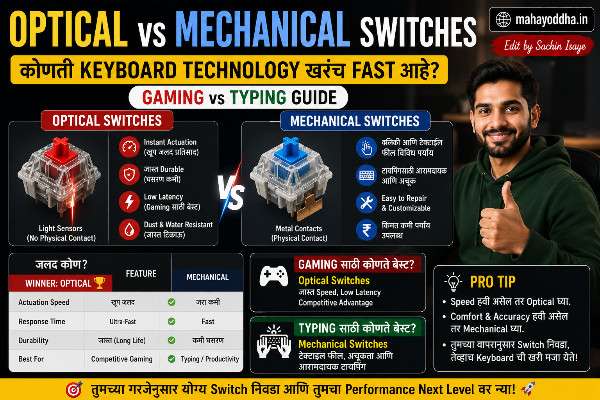
Optical Switch “World’s Fastest” म्हणतात — पण Gaming मध्ये खरंच फरक जाणवला का? Honest सांगतो
एक मित्र आहे जो seriously BGMI खेळतो. त्याने Razer Optical keyboard घेतला — “0.2ms response time, world’s fastest” असं marketing बघून.
दोन महिन्यांनंतर विचारलं — “फरक जाणवला का gaming मध्ये?”Optical vs Mechanical Switches.
तो म्हणाला — “खरं सांगायचं तर gameplay improvement होतं की keyboard मुळे की practice मुळे ते distinguish करता आलं नाही.”
Honest answer आहे हा.
Optical switch technology genuinely different आहे mechanical पेक्षा. Speed technically faster आहे. पण “World’s Fastest” marketing आणि actual gaming improvement — दोन वेगळ्या गोष्टी आहेत.
आज Mahayoddha.in वर हे properly explain करतो.
Mechanical Switch कसे काम करते — Quick Recap
Mahayoddha.in च्या Switch Types article मध्ये detail आहे. Short version:
Key दाबली → stem खाली → metal contacts touch → circuit complete → letter register.
Metal contacts physical touch आहे. Contact होण्यासाठी milliseconds लागतात. Debounce time add होतो — keyboard software same key rapid re-trigger filter करतो.
Total latency — hardware contact + debounce + polling = roughly 5-15ms.
Optical Switch — Technology वेगळी आहे
Optical switch मध्ये metal contacts नाहीत.
Switch च्या आत infrared light beam असतो — horizontal, housing च्या एका side पासून दुसऱ्या side पर्यंत.
Key normal position मध्ये — light beam unobstructed.
Key press केली — stem खाली येतो. Stem मध्ये एक small slot आहे. Stem specific depth ला आली की slot light beam align होतो — light passes through. Sensor detect करतो — key register होतो.
Metal contact नाही — light signal आहे.
Light speed वर detection होतो — literally. No physical contact needed.
Debounce advantage:
Mechanical switches मध्ये contact bounce होतो — contact touch झाली, slightly separate झाली, पुन्हा touch झाली — microseconds मध्ये. Software debounce filter करतो — false triggers eliminate करतो. पण debounce delay add होतो.
Optical switches मध่ contact bounce नाही — light either passes through किंवा नाही. Debounce time कमी असतो किंवा near-zero.
Speed Comparison — Numbers काय सांगतात
Optical keyboard manufacturers claim करतात — 0.2ms response time.
High-end mechanical keyboards — 1-5ms.
Average mechanical — 5-15ms.
Real world context:
Human reaction time — 150-250ms.
Professional gamer reaction time — 100-150ms.
0.2ms vs 5ms difference — 4.8ms. हे human reaction time च्या 3-5% आहे.
म्हणजे — theoretically optical faster आहे. Practically — human reaction time ही bottleneck आहे, keyboard response time नाही.
Gaming मध्ये खरंच फरक पडतो का
हे honest answer आहे — depends on game type.
FPS Games — CS2, Valorant, BGMI:
These games milliseconds matter करतात. Click registration speed character survival ला impact करू शकतो. Professional esports players — very high level — येथे optical advantage असू शकतो.
पण — professional level मध्ये सगळे factors optimized असतात. Monitor refresh rate, network ping, system latency, mouse polling rate — सगळं. यात keyboard latency एक small piece आहे.
Casual गेमर साठी — 4.8ms difference gameplay visible improvement देणार नाही. Skill, strategy, game sense — यांचा impact keyboard latency पेक्षा thousand times जास्त आहे.
Typing, Blogging, Coding:
येथे optical speed advantage literally irrelevant आहे. 0.2ms vs 5ms — दोन्ही human typing speed पेक्षा dramatically faster आहेत. Optical switch typing faster करणार नाही.
Tactile Feedback — Important Difference
Optical switches primarily linear feel मध्ये येतात. Optical tactile options exist करतात — Razer Optical Yellow (linear), काही brands tactile optical बनवतात — पण variety mechanical पेक्षा खूप कमी आहे.
Mechanical switch ecosystem — Red, Brown, Blue, Silent Red, Silent Brown, speed switches, heavy switches, light switches — vast variety.
Writer साठी Brown switch tactile feedback accuracy help करतो. Optical equivalent — limited options.
Hot-Swap Compatibility
Mechanical hot-swap keyboards मध्ये switch replace करणं easy. Amazon, AliExpress वर switches मिळतात. Red घेतला, नंतर Brown try करायचा — swap करा.
Optical hot-swap — proprietary problem. Razer optical switches Razer keyboards मध्येच fit होतात. SteelSeries optical switches त्यांच्या keyboards साठी. Cross-compatibility कमी.
Mechanical ecosystem — Cherry MX compatible switches जगभर मिळतात. Customization options vast आहेत.
Durability — Optical चा Genuine Advantage
Metal contacts wear होतात. Over millions of presses — contact slightly degrade होतो, feel change होतो.
Optical मध्ये wear होणारे metal contacts नाहीत. Theoretically longer lifespan.
Manufacturer claims:
Mechanical switches — 50-100 million keystrokes rated.
Optical switches — 80-100 million keystrokes, some 150 million+.
Practical reality:
Both types — average user कदाचित 20-30 million keystrokes per year. 50 million rated mechanical switch — दोन वर्षांपेक्षा जास्त heavy use मध्ये. Casual user — 5-10 years.
Durability advantage exists पण average user साठी both are practically same lifespan.
Price Comparison
पूर्वी optical keyboards significantly expensive होते. आता gap कमी झाला आहे.
Budget optical keyboards — Cosmic Byte, Redragon optical — ₹२,०००-₩४,००० range मध्ये available आहेत.
Same range मध्ये mechanical keyboards पण available आहेत — आणि switch variety जास्त आहे.
Premium optical — Razer, SteelSeries — ₹६,०००-₩१५,०० range. Premium mechanical पण same range मध्ये available आहे.
Optical vs Mechanical — Honest Comparison
| Factor | Optical | Mechanical |
|---|---|---|
| Response Time | 0.2-1ms | 1-15ms |
| Practical Speed Difference | Negligible for humans | Same for typing |
| Gaming Advantage | Competitive FPS — slight | Casual gaming — same |
| Typing Feel | Model dependent, less variety | Rich variety, better options |
| Tactile Options | Limited | Extensive |
| Hot-Swap Compatibility | Proprietary, limited | Universal, vast |
| Durability | Slightly better | Excellent |
| Price | Similar range now | Similar range |
| Customization | Limited | Extensive |
| Community/Support | Growing | Established, large |
FAQ
Q. Optical keyboard घेतला तर WPM वाढेल का?
नाही. WPM typing technique, touch typing, accuracy वर depend करतो — switch technology वर नाही. Mahayoddha.in च्या Typing Skills series मध्ये हे explain आहे. Best switch निवडला तरी practice शिवाय speed येत नाही.
Q. BGMI साठी optical worth आहे का?
BGMI mobile game आहे — touchscreen. Optical keyboard mobile gaming साठी irrelevant आहे. PC gaming साठी — casual BGMI playing, regular mechanical keyboard sufficient आहे. Competitive PC esports — optical consideration करा.
Q. Razer optical keyboard reliable आहे का?
Razer premium brand आहे — quality good आहे. पण Razer optical switches Razer ecosystems साठी proprietary आहेत. Future switch replacement किंवा customization limited राहील. Typing focused user साठी mechanical better value आहे.
Q. Hall Effect switches बद्दल ऐकलं — optical पेक्षा better आहे का?
Hall Effect switches नवीन technology आहे — magnetic sensors वापरतात. Analog input possible आहे — gamepad analog stick सारखं keyboard keys वापरता येतात. Wooting keyboards hall effect वापरतात. Niche market साठी आहे — competitive gaming, specific use cases. Mainstream typing साठी mechanical practical choice आहे.
Q. Optical switch misfires होतात का — accidentally trigger होतो का?
Debounce कमी असल्याने — theoretically possible. Modern optical keyboards proper filtering implement करतात. Practical मध्ये misfire reports rare आहेत quality brands मध्ये. Budget optical keyboards — occasional issues reported.
Conclusion
त्या मित्राचा Razer Optical keyboard — good keyboard आहे. Quality excellent आहे. पण BGMI improvement — practice से हुआ, keyboard से नहीं.
Optical switch technology genuinely impressive आहे. Speed technically faster आहे. Durability advantage आहे. Competitive esports मध्ये edge असू शकतो.
पण Mahayoddha.in वर जे articles, blogging, typing करतात त्यांच्यासाठी — optical switch advantage near-zero आहे. Mechanical switches — Brown किंवा Red — better typing experience, better customization, better value देतात.
Technology impressive असणं आणि आपल्यासाठी necessary असणं — वेगळ्या गोष्टी आहेत.
तुम्ही primarily gaming करतात की typing? Gaming असेल तर casual की competitive? Comment मध्ये सांगा — specific recommendation करता येईल.

Sachin Isaye
सचिन इसाये
नमस्कार! मी सचिन इसाये, Founder of Mahayoddha.in. २०१७ पासूनच्या माझ्या Blogging आणि Digital Content क्षेत्रातील अनुभवाचा वापर करून, मी Keyboard, Typing Speed, Windows Shortcuts आणि Digital Skills यांसारख्या विषयांवर सोप्या मराठीत practical माहिती देण्याचा प्रयत्न करतो.
Keyboard Buying Guide, Mechanical Keyboard, Wireless Keyboard, Keyboard Problems, Keyboard Typing Skills आणि Keyboard Ergonomics यांसारखे विषय सामान्य मराठी वाचकांना सहज समजावून सांगणे, हेच माझे काम आहे.
विद्यार्थी, Bloggers, Content Writers, Office Users, Work From Home करणारे आणि नवीन computer users यांना keyboard वापरून आपलं काम जलद, सोपं आणि smart करता यावं, हेच माझं ध्येय आहे. नवीन Keyboard Guides, Typing Tips आणि Windows Shortcuts साठी Mahayoddha.in ला नियमित भेट द्या.