
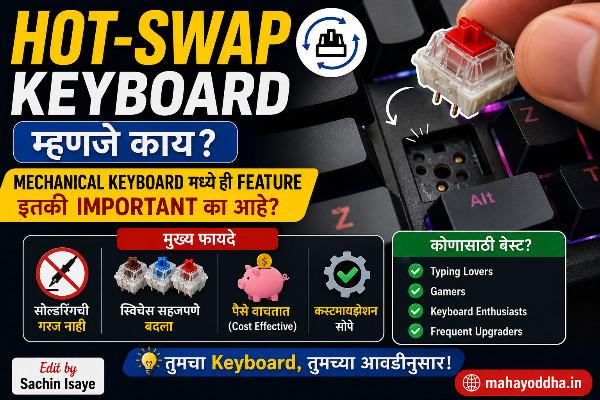
Hot-Swap Keyboard बद्दल पहिल्यांदा ऐकलं तेव्हा वाटलं Gimmick आहे — नंतर कळलं ही Feature का Important आहे
Redragon K617 Fizz वर एक YouTube review होता. Comment मध्ये कुणीतरी लिहिलं होतं — “Hot-swap आहे हे सगळ्यात important feature आहे या price ला.”
Hot-swap म्हणजे काय हे माहीत नव्हतं. “Keyboard गरम होतो का?” असा seriously विचार केला.
Research केलं. Kळलं — hot-swappable म्हणजे switches बदलता येतात — soldering शिवाय. Pull करा, push करा. Done.
“Okay, useful असेल.” — इतकंच वाटलं तेव्हा.
नंतर switch preference बदलली. Red switch घेतला होता, Brown try करायचा होता. Hot-swap असल्याने replacement set ordered, five minutes later switch done. Soldering skills लागल्या नाहीत.
तेव्हा truly कळलं — हे feature beginner साठी especially important का आहे.
Soldering म्हणजे काय — आणि Normal Keyboards मध्ये Problem काय आहे
Standard mechanical keyboard मध्ये switches PCB (Printed Circuit Board) ला soldered असतात. Solder म्हणजे metal alloy — high temperature ला melt होतो, switch pins आणि PCB pads bond करतो. Cooling नंतर permanent connection.
Switch खराब झाला, preferences changed, different feel try करायचा — तर:
Soldering iron लागतो. Desoldering pump किंवा wick लागतो. Skill लागते. PCB damage होण्याचा risk असतो. प्रत्येक switch साठी दोन ते तीन minutes. ८७ key TKL keyboard — roughly तीन ते चार तास.
Beginner साठी practically impossible without practice. Service center ला जायचं तर cost आहे.
Hot-Swap म्हणजे नक्की काय — Mechanism
Hot-swappable keyboard मध्ये PCB वर special sockets असतात — metal pin receptacles. Switch pins या sockets मध्ये push करायचे — friction fit. Electrical connection होतो.
Switch काढायचं असेल — switch puller tool (₹१०० ते ₩२०० मध्ये) किंवा paper clip ने — pull करा. Socket मधून switch निघतो.
नवीन switch लावायचं — pins align करा, gently push करा. Done.
Keyboard वर किंवा बाहेर काम करताना असताना switch change करता येतो — computer connected असताना — म्हणून “hot” swap. (Practically recommended to unplug during swap though.)
Time per switch: पंधरा ते तीस seconds. Experience नंतर दहा seconds.
Hot-Swap Types — सगळे Sockets Same नाहीत
Kailh Box Sockets
सगळ्यात common. Red box shaped socket. Switch pins दोन — round आणि square (box design). Standard two-pin MX switches compatible आहेत. Redragon, Royal Kludge, बऱ्याच budget keyboards मध्ये.
Durability: Manufacturer claim — five thousand swaps. Practical reality — hundreds of swaps easily without issue.
Mill-Max Sockets
Premium brass sockets. More durable than Kailh. Used in custom keyboard builds. Soldered onto PCB by builder. Very tight tolerances — excellent contact.
Budget keyboards मध्ये नाहीत — enthusiast builds मध्ये येतात.
Gateron North/South Facing
Gateron keyboards Gateron hot-swap sockets. Similar to Kailh mechanism.
Proprietary Sockets
काही keyboards proprietary sockets — फक्त specific brand switches compatible. Lock-in आहे. Avoid करणं better.
Switch Puller — लागतो का
Switch puller wire tool — two hooks, switch housing ला grip करतात. Pull करतात.
Hot-swap switch without puller — fingers ने pull करणं possible आहे पण awkward. Keycap काढलेलं असावं. Risk — switch housing crack होऊ शकतो जास्त force ने.
Switch puller — ₹१०० ते ₩२०० मध्ये Amazon वर. Keyboard accessories section मध्ये मिळतो. Invest करा — worth आहे.
Many keyboards include switch puller in box — check करा.
Practical Benefits — Real World
Switch Preference Change
Beginner म्हणून Red घेतला. Three months later — Brown try करायचा आहे. Hot-swap keyboard — switch set order करा, replace करा. Cost — replacement switches only. Same keyboard.
Without hot-swap — नवीन keyboard किंवा soldering. Both expensive/complex.
Individual Switch Replacement
Specific key problem आली — “A” key switch feel different. Single switch replace करा — पूर्ण keyboard disturb नाही. ₹१५ ते ₩५० per switch.
Mahayoddha.in च्या keyboard troubleshooting articles मध्ये individual key issues cover आहेत — hot-swap असेल तर hardware fix significantly easier आहे.
Switch Experimentation
Different switches feel try करता येतात. Tester किट घेण्याऐवजी — one type buy करा, try करा, like नाही झाला तर replace करा.
Linear gaming sessions साठी, tactile writing sessions साठी — दोन sets ठेवा, swap करा situation नुसार. Extreme case आहे हा, पण possible आहे.
Future Proofing
Switch technology evolve होत राहतो. नवीन switches येतात. Hot-swap keyboard — नवीन switches येतील तेव्हा upgrade possible without new keyboard purchase.
Who Should Prioritize Hot-Swap
Absolute must for:
Beginners — switch preferences माहीत नाहीत. Trial important आहे.
Anyone without soldering skills — hardware modification otherwise impossible.
People who might change preferences — gaming आज, writing tomorrow.
Budget conscious — keyboard protect करणं important आहे long term investment म्हणून.
Can skip if:
Soldering skills आहेत, DIY comfortable आहे. Switch preference completely settled आहे — premium specific switch keyboard available आहे without hot-swap. Very specific use case — like a typing purist who knows exactly they want lubed Boba U4s forever.
Budget Indian Market मध्ये Hot-Swap Options
Redragon K617 Fizz — ₹२,३०० ते ₩२,७++
Mahayoddha.in च्या budget mechanical keyboard article मध्ये mention आहे. 60% layout. Kailh hot-swap. Red switches stock. Popular first hot-swap keyboard.
Royal Kludge RK71 — ₹४,५++ ते ₩५,++
75% layout — dedicated arrow keys. Hot-swap, wireless, decent build. Good all-rounder.
Akko keyboards — ₹३,++ ते ₩७,++
GenesisPC वर available. Multiple layouts, hot-swap variants. Good PBT keycaps included.
Keychron C series — ₹३,५++ ते ₩४,++
Non hot-swap but affordable. V series — hot-swap variants available. Better build quality.
Keychron V series — ₹५,++ ते ₩८,++
Gasket mount, hot-swap, excellent build quality. Premium end of accessible market.
Compatibility Check — Important
Not all MX switches are equal in hot-swap compatibility.
Standard MX two-pin switches — work in all standard hot-swap sockets.
Five-pin switches (PCB mount) — some boards have 5-pin sockets (compatible), some boards have 3-pin sockets (5-pin switch needs bottom two pins clipped).
Before ordering replacement switches — check if your hot-swap board is 3-pin or 5-pin compatible.
Check करायला — manufacturer page किंवा board Reddit community.
Comparison
| Factor | Soldered Keyboard | Hot-Swap Keyboard |
|---|---|---|
| Switch Change | Soldering required | Pull and push |
| Skill Required | Intermediate-Advanced | Zero |
| Time per Switch | 3-5 minutes | 15-30 seconds |
| Risk of PCB Damage | Present | Near zero |
| Switch Experimentation | Impractical | Easy |
| Single Switch Replacement | Complex | Simple |
| Price Premium | None | Slight |
| Build Quality | Can be excellent | Can be excellent |
FAQ
Q. Hot-swap keyboards cheaper build quality असतात का?
नाही necessarily. Keychron V series hot-swap आहे आणि excellent build quality आहे. Redragon budget hot-swap आहे — budget build. Build quality brand आणि price tier वर depend करतो — hot-swap feature independently quality determine नाही करत.
Q. Switch push करताना pins bend होतात का?
Bend होऊ शकतात — improper insertion ने. Prevention — switch carefully align करा before pushing. Straight down, no angle. Slowly push करा — resistance clearly feel होतो when misaligned. Lights on करा, pins clearly bघा before inserting. Bent pin — carefully straighten करण्याचा प्रयत्न करा — thin tool ने gently.
Q. Hot-swap socket worn होतो का repetitive swapping ने?
Kailh sockets five thousand swaps rated आहेत. Most users — hundreds of swaps total — socket lifespan exceed नाही होत practical use मध्ये. Enthusiasts जे frequently experiment करतात — Mill-Max sockets more durable आहेत, custom boards मध्ये available.
Q. Soldered keyboard hot-swap मध्ये convert करता येतो का?
Technically possible — desoldering existing switches, Mill-Max sockets soldering. Requires skill, time, risk. Practical recommendation — नवीन hot-swap keyboard घेणं easier आणि cheaper for most people.
Q. 5-pin switches 3-pin hot-swap board मध्ये लावता येतात का?
Extra two pins (plastic stabilizer pins) clip करता येतात — flush with switch body. Diagonal cutters किंवा sharp scissors. Once clipped — 3-pin socket मध्ही fit होतो. Clipped pins affect switch function करत नाहीत — only for stabilization purpose होते.
Conclusion
Red switch से सुरुवात केली. Hot-swap असल्याने तीन months later Brown try केला — same keyboard. Fifteen minutes, new experience.
Mahayoddha.in साठी articles लिहिताना switch preferences settled आहेत आता — Brown switch comfortable आहे long sessions साठी. पण ते settle होण्यासाठी experimentation लागला — hot-swap ने ते possible केलं.
First mechanical keyboard घेत असाल तर — hot-swap prioritize करा. Preference माहीत नसताना locked-in होणं avoid होतो. Budget segment मध्ही hot-swap options available आहेत — ₹२,५++ पासून.
तुमच्या keyboard वर hot-swap आहे का? Switch change केला आहे का कधी? Comment मध्ये सांगा.

Sachin Isaye
सचिन इसाये
नमस्कार! मी सचिन इसाये, Founder of Mahayoddha.in. २०१७ पासूनच्या माझ्या Blogging आणि Digital Content क्षेत्रातील अनुभवाचा वापर करून, मी Keyboard, Typing Speed, Windows Shortcuts आणि Digital Skills यांसारख्या विषयांवर सोप्या मराठीत practical माहिती देण्याचा प्रयत्न करतो.
Keyboard Buying Guide, Mechanical Keyboard, Wireless Keyboard, Keyboard Problems, Keyboard Typing Skills आणि Keyboard Ergonomics यांसारखे विषय सामान्य मराठी वाचकांना सहज समजावून सांगणे, हेच माझे काम आहे.
विद्यार्थी, Bloggers, Content Writers, Office Users, Work From Home करणारे आणि नवीन computer users यांना keyboard वापरून आपलं काम जलद, सोपं आणि smart करता यावं, हेच माझं ध्येय आहे. नवीन Keyboard Guides, Typing Tips आणि Windows Shortcuts साठी Mahayoddha.in ला नियमित भेट द्या.