
Keycap Profile बदलला — आणि Same Keyboard वर Typing Experience completely different झाला
Mechanical keyboard घेतल्यावर सहा महिने perfectly happy होतो.
मग एका मित्राच्या keyboard वर try केलं — same switches, same brand, पण keys वर बोटे ठेवल्यावर immediately different feel आला. Shorter, flatter, fingers कमी travel करत होत्या.
“तुझा keyboard कोणता?” — “Keychron K2 with Cherry profile keycaps.”
माझ्याकडे OEM profile होतं. त्याच्याकडे Cherry profile. दोन्ही mechanical keyboards, दोन्ही Brown switches — पण feel noticeably different होता.
तेव्हा कळलं — keycap profile typing experience वर इतका impact करतो.
आज Mahayoddha.in वर हे explain करतो — profile म्हणजे काय, options कोणते, आणि practically काय difference पडतो.
Keycap Profile म्हणजे काय — एकदा समजलं की Choice Easy होतो
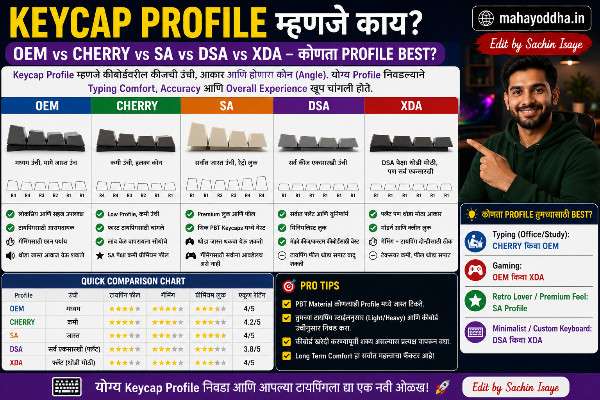
Profile म्हणजे keycap ची shape — height, angle, top surface curvature.
Keyboard च्या rows (number row, top row, home row, bottom row) वर बोटे different angles ने येतात — fingers naturally slight arc मध्ये move करतात. Sculpted profiles हे consider करतात — प्रत्येक row ला slightly different angle आणि height देतात. Natural finger motion सोबत align होतं.
Uniform profiles — सगळ्या rows same height आणि angle. Simpler design, different use case.
OEM Profile — सर्वात Common, पण का
Budget ते mid-range keyboards वर OEM profile standard आहे. Redragon, Cosmic Byte, Logitech budget, Corsair entry-level — बहुतेक OEM.
Physical dimensions:
Moderately tall — Cherry पेक्षा जास्त. Sculpted — rows different angles. Top surface slightly curved.
Why so common:
Manufacture करायला cost effective. All-rounder feel — gaming आणि typing दोन्हीसाठी adequate. Most people used to it — laptop keyboards similar height.
Actual experience:
Height moderate असल्याने finger travel medium आहे. Long sessions मध्ये slightly more effort than Cherry. पण familiar feel असल्याने adjustment period नाही.
Beginner साठी OEM safe choice आहे — overthink करायची गरज नाही.
Cherry Profile — Typing Enthusiasts का Prefer करतात
Cherry MX ने develop केला. Lower, slightly more angular than OEM.
Physical dimensions:
Shorter than OEM — roughly same total height but top surface angle different. Row sculpting more pronounced than OEM.
Why preferred for typing:
Lower height means fingers travel less distance per keystroke. Less finger effort per key. Long sessions — fatigue differential noticeable. Hours of typing — Cherry profile hands less tired.
My experience after switching:
त्या मित्राच्या keyboard वर cherry profile try केल्यावर — initially “feels different.” एक-दोन दिवस adjustment. नंतर OEM वर परत गेलो — suddenly OEM tall वाटला.
Mahayoddha.in साठी long articles लिहितो — Cherry profile genuinely more comfortable for multi-hour sessions.
कोणासाठी:
Writers, bloggers, coders — anyone typing for hours daily. Touch typists especially benefit — consistent lower profile reduces effort.
SA Profile — Vintage Look, Unique Sound, Different Purpose
SA — Signature Plastics profile. Tall, spherical top, vintage typewriter aesthetic.
Physical dimensions:
Significantly taller than OEM or Cherry. Spherical top surface — bowl shaped center.
Sound:
Tall keycaps — more resonant chamber between keycap and switch. Sound distinctly different — deeper, fuller “thock.” SA profile keyboards are often prized for sound alone.
Typing experience:
Very different. Finger travel much more. Initial adjustment significant. Not recommended for speed typing.
Wrist rest becomes important with SA — height requires different hand positioning.
Actual concern for daily use:
Gaming — not practical. Fast typing — slower. Long sessions — more fatigue.
SA is a collector’s profile, aesthetic profile. People buy SA keycaps for the look and sound — not productivity.
कोणासाठी:
Collectors, enthusiasts, people who use keyboard occasionally and love aesthetics. Not for daily heavy typing.
DSA Profile — Custom Layouts साठी
DSA — Signature Plastics, different series. Uniform profile, all rows same height, spherical top.
Physical dimensions:
Low profile, similar to Cherry height. All rows identical.
Why uniform:
Keyboard layout switching — Colemak, Dvorak, QWERTY — keycap positions change. Sculpted profiles have row-specific angles — keycap from Row 1 placed in Row 3 feels wrong. Uniform profiles — any keycap works anywhere. Easier layout customization.
Typing experience:
Without row differentiation, some users find position reference harder initially. No built-in ergonomic angle variation. Flat but low — reasonable for typing.
Mahayoddha.in च्या Dvorak article मध्ये layout experimentation cover केलं आहे — DSA suits those experiments.
कोणासाठी:
Layout experimenters, Colemak/Dvorak users, people who frequently rearrange keys.
XDA Profile — Modern Uniform
XDA newer uniform profile. Wider top surface than DSA, flat (not spherical).
Physical dimensions:
Slightly taller than DSA. Wider top — more surface area for finger contact. All rows same height.
Feel:
Larger contact surface — some prefer this. Flat top feels different from sculpted. Modern minimal aesthetic.
Compared to DSA:
More surface area. Slightly different feel. Sound slightly different — larger surface area changes resonance.
कोणासाठी:
Minimal aesthetic lovers, layout customizers, people who prefer flat top surface feel.
Height आणि Feel Comparison
| Profile | Height | Top Surface | Rows | Best For |
|---|---|---|---|---|
| Cherry | Lowest | Curved | Sculpted | Heavy typing, coding |
| DSA | Low | Spherical | Uniform | Custom layouts |
| XDA | Low-Medium | Flat | Uniform | Minimal aesthetic |
| OEM | Medium | Curved | Sculpted | General use, beginners |
| SA | Tallest | Spherical | Sculpted | Aesthetics, collection |
Practical Decision Guide
First keyboard — no prior experience:
OEM. Familiar feel, widely available, adequate for all uses. No adjustment needed.
Heavy typing — articles, code, notes:
Cherry. Lower height, less fatigue. Worth the brief adjustment period.
Aesthetics priority — sound, look:
SA. Accept the typing tradeoffs.
Layout experimentation — Colemak, Dvorak:
DSA or XDA. Uniform profiles enable easy key swapping.
RGB showcase — visible lighting:
Profile independent. Doubleshot shine-through keycaps matter more than profile for RGB. Mahayoddha.in च्या Doubleshot article मध्ये हे explain आहे.
FAQ
Q. Profile change केल्यावर keyboards compatibility issue येतो का?
Compatibility switch stem type वर depend करतो — MX compatible keycaps MX compatible keyboard वर fit होतात. Profile change compatibility affect नाही करत — physical fitting same. Layout compatibility matter करतो — TKL keyboard साठी TKL keycap set.
Q. Cherry profile keycap sets Indian market मध्ये मिळतात का?
Keychron keyboards Cherry profile keycaps include करतात — most available option. Separate keycap sets — AliExpress, budget options. Mid-range sets — slightly expensive import. Limited compared to OEM availability.
Q. OEM वरून Cherry वर shift केल्यावर typing speed drop होतो का?
Briefly — एक ते दोन दिवस adjustment. Height different असल्याने muscle memory slightly recalibrates. Speed recovery fast असते. Long term — Cherry profile typing faster आणि more comfortable.
Q. Laptop keyboard profile कोणता असतो?
Laptop keyboards ultra-low profile — proprietary. Standard keycap profiles laptop वर fit नाही होत. External Cherry किंवा OEM profile — obviously separate keyboard लागतो.
Q. Gaming साठी कोणता profile better — OEM की Cherry?
Gaming साठी Cherry slight edge — lower profile, less travel, marginally faster. OEM perfectly adequate for gaming. Real differentiator switches आणि polling rate आहे — profile minor factor in gaming.
Conclusion
त्या मित्राच्या keyboard वर Cherry profile try केल्यावर seriously consider केलं upgrade. Same keyboard, different keycap set — Cherry profile replacement set लावला.
Difference noticeable आहे — particularly three-four hour article writing sessions मध्ये. Fingers less tired.
Mahayoddha.in साठी articles लिहिताना cumulative typing hours जास्त आहेत. Small comfort improvement multiply होतो hours मध्ये.
Keyboard घेताना switches आणि keycap material बरोबर profile consider करा. Beginner — OEM safe. Heavy typer — Cherry worth trying.
तुमचा current keyboard कोणता profile आहे? OEM आहे का? Long sessions मध्ये fatigue जाणवतो का? Comment मध्ये सांगा.

Sachin Isaye
सचिन इसाये
नमस्कार! मी सचिन इसाये, Founder of Mahayoddha.in. २०१७ पासूनच्या माझ्या Blogging आणि Digital Content क्षेत्रातील अनुभवाचा वापर करून, मी Keyboard, Typing Speed, Windows Shortcuts आणि Digital Skills यांसारख्या विषयांवर सोप्या मराठीत practical माहिती देण्याचा प्रयत्न करतो.
Keyboard Buying Guide, Mechanical Keyboard, Wireless Keyboard, Keyboard Problems, Keyboard Typing Skills आणि Keyboard Ergonomics यांसारखे विषय सामान्य मराठी वाचकांना सहज समजावून सांगणे, हेच माझे काम आहे.
विद्यार्थी, Bloggers, Content Writers, Office Users, Work From Home करणारे आणि नवीन computer users यांना keyboard वापरून आपलं काम जलद, सोपं आणि smart करता यावं, हेच माझं ध्येय आहे. नवीन Keyboard Guides, Typing Tips आणि Windows Shortcuts साठी Mahayoddha.in ला नियमित भेट द्या.