
Keyboard वर Shine आला — तेव्हा पहिल्यांदा Keycap Material बद्दल seriously विचार केला
दीड वर्षांपूर्वी budget mechanical keyboard घेतला होता. Cosmic Byte, ABS keycaps.
सहा महिन्यांनंतर WASD keys वर glossy shine दिसायला लागला. एक वर्षानंतर Spacebar आणि Enter पण shiny झाले. बाकी keys matte, हे keys glossy — visually inconsistent दिसत होतं. PBT vs ABS Keycaps.
तेव्हा search केलं — “keyboard keys shiny why.” Answer — ABS plastic, body oils, friction over time.
Solution — PBT keycaps. Replace केले. फरक immediately जाणवला — texture different, sound different, look different.
आज Mahayoddha.in वर हे explain करतो — PBT आणि ABS नक्की काय आहेत, फरक काय आहे, आणि तुमच्यासाठी काय relevant आहे.
Plastic बद्दल थोडं — का Material Important आहे
Keycaps plastic चे आहेत. पण सगळे plastics same नाहीत — different chemical compositions, different properties.
ABS — Acrylonitrile Butadiene Styrene:
रोजच्या products मध्ये common आहे — LEGO blocks, car dashboards, pipe fittings. Light, easily moldable, smooth surface. Budget keyboards मध्ये standard.
PBT — Polybutylene Terephthalate:
Engineering plastic. Higher heat resistance, harder surface, chemical resistance. Electronics components मध्ये use होतो. Keycaps साठी premium choice.
दोन्ही functional आहेत. पण keyboard use case मध्ये — daily friction, finger oils, heat — properties वेगळ्या दिसतात.
Shine — ABS चा Biggest Problem
ABS soft plastic आहे relatively. Finger oils + daily friction + time = keycap surface alter होते. Rough texture smooth होते. Light reflect करायला लागतो — “shine” येतो.
हे WASD, Spacebar, Enter, Backspace — most used keys वर आधी दिसतं. Less used keys matte राहतात — inconsistent look.
Shine timeline:
Budget ABS keyboards — तीन ते सहा महिन्यांत shine दिसतो. Mid-range ABS — एक वर्षापर्यंत. Premium thick ABS (GMK) — दोन ते तीन वर्षे.
PBT — harder surface. Friction same process होतो, पण PBT दूर slow करतो significantly. Good PBT keyboards — तीन ते पाच वर्षांनंतर subtle shine, पहिल्यासारखं dramatic नाही.
Texture आणि Feel — Hands-On Difference
ABS Feel:
New ABS — smooth, slightly slippery. Satisfying feel for some. Over time — shine आल्यावर more slippery, fingers slide. Humid weather मध्ये — fingers sweat, slippery problem worse.
PBT Feel:
Slight texture — almost like fine sandpaper, but subtle. Grip better. Humid weather मध्ये pण texture maintains. Over time — texture stays, not slippery.
Writing, blogging साठी:
Long typing sessions मध्ये — finger grip important आहे. PBT texture consistent grip देतो. ABS शीne आल्यावर finger placement slightly off feel येतो — minor, but noticeable after hours.
My experience:
PBT keycaps replace केल्यावर पहिली गोष्ट — “keys feel different.” Texture initially unfamiliar. एका-दोन दिवसात familiar. Long article typing sessions मध्ये fingers less fatigued — correlation असू शकतो texture grip मुळे.
Sound Difference — Thock vs Clack
Keycap material sound affect करतो.
ABS:
Thinner walls generally. Higher pitched sound. “Clack” — bright, sharp. RGB heavy budget keyboards मध्ये हा sound common आहे.
PBT:
Thicker walls generally (not always). Lower pitched sound. “Thock” — deeper, more muted. Mechanical keyboard enthusiast community मध्ये “thocky” sound premium मानतात.
Important caveat:
Sound primarily switch type, case material, foam mods, desk mat वर depend करतो. Keycap material one factor आहे — sole determining factor नाही. Mahayoddha.in च्या upcoming Keyboard Sound Modding article मध्ये हे cover होईल.
Legend Printing — अक्षरे कधी पुसतात
Shine येणं वेगळं, legend fade होणं वेगळं.
Laser Etched / Pad Printed — Cheap method:
Letters surface वर printed आहेत. Over time — friction ने fade होतात. Budget keyboards मध्ये common. Time नुसार letters barely visible होतात.
Doubleshot — Premium method:
Two plastic pieces molded together. Inner piece letter shape, outer piece keycap body. Letter plastic different color embedded आहे surface मध्ये — fade होणं impossible. Can be ABS doubleshot or PBT doubleshot.
Dye-sublimated — PBT specific:
Dye heat transfer ने PBT मध्ये infuse होतो. Deep penetration — abrasion ने नाही जात. PBT साठी excellent method.
Recommendation:
Doubleshot PBT — best combination. Legend never fades, material durable, shine resistant.
RGB आणि Keycap Material — एक Consideration
RGB keyboard असेल तो rgb shine through केल्यावर different look येतो.
ABS — light passes through better. Thinner walls, more translucent. RGB vibrant दिसतो.
PBT — thicker, more opaque. RGB slightly muted दिसतो. PBT shine-through variants आहेत — specially made thin PBT — पण standard PBT RGB less bright.
RGB priority असेल तर ABS advantage आहे या specific aspect मध्ये.
Price Reality — Indian Market मध्ये
Budget keyboards (₹१,५०० ते ₩२,५++) — ABS keycaps standard.
Mid-range keyboards (₹२,५++ ते ₩५,++) — काही PBT include करतात, काही ABS.
Premium keyboards (₹५,++ +) — PBT standard होत आहे.
Aftermarket keycap sets:
Budget PBT sets — ₹५०० ते ₩१,५++. AliExpress options. Basic colors, limited layouts.
Mid-range PBT — ₹१,५++ ते ₩३,++. Better quality, more colors.
Premium PBT sets — ₹३,++ ते ₩१०,++. International group buys, premium brands.
Indian market specific:
Keychron keyboards — generally PBT keycaps include करतात. Good starting point. Locally available.
ABS Doubleshot vs PBT — Interesting Exception
GMK, Rama Works, JTK — premium ABS doubleshot keycaps बनवतात. High quality, thick ABS. Shine येतो पण much slower than cheap ABS. Sound — ABS characteristic bright sound. Feel — smooth.
Keyboard enthusiast community मध्ये GMK sets highly sought आहेत. Expensive, group buy only mostly.
हे prove करतं — material alone नाही, quality of material आणि manufacturing method matter करतात.
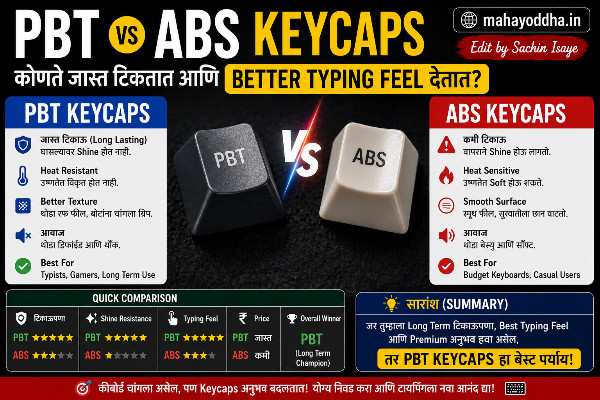
Comparison — एका नजरेत
| Factor | Budget ABS | Premium ABS (GMK) | PBT |
|---|---|---|---|
| Shine Timeline | ३-६ months | २-३ years | ३-५+ years |
| Texture | Smooth | Smooth | Slight texture |
| Sound | Bright clack | Bright clack | Deeper thock |
| RGB | Excellent | Excellent | Good to muted |
| Durability | Good | Excellent | Excellent |
| Legend Fade | Depends on printing | Doubleshot = never | Dye-sub/DS = never |
| Price | ₹ included in keyboard | ₹₹₹ | ₹₹ replacement sets |
FAQ
Q. Budget keyboard आहे ABS keycaps — replace करायला हवे का?
Necessary नाही immediately. Shine problem झाली तर consider करा. PBT replacement sets ₹५०० ते ₩१,५++ मध्ये येतात. Compatibility check करा — keyboard layout आणि keycap set layout match असणं important.
Q. Shine remove करता येतो ABS keycaps वर?
Partially. Toothpaste gentle scrub — temporary improvement. Ultimately texture permanently altered आहे. Best solution — replacement PBT keycaps. Mahayoddha.in च्या keyboard cleaning articles मध्ही cleaning methods आहेत.
Q. PBT keycaps ABS keyboard वर fit होतात का?
Generally हो — standard MX stem compatible आहेत. Layout compatibility important आहे — TKL keyboard साठी TKL compatible set. Non-standard layouts (bottom row) challenge आहे. Purchase करण्याआधी compatibility check करा.
Q. Typing sound improve करायला keycap material पुरेसा आहे का?
Partial factor आहे. Complete sound transformation साठी — desk mat, case foam, switch lube, keyboard case material — सगळं contribute करतं. Keycap change alone noticeable difference देतो, पण complete “thock” sound साठी multiple factors.
Q. Gaming keyboard ला PBT keycaps लावणं worthwhile आहे का?
Worthwhile आहे long term साठी. Gaming keyboards मध्ये WASD shine लवकर येतो — most used keys. PBT replacement reduces shine significantly. Texture gaming performance affect करत नाही. Straightforward upgrade.
Conclusion
ABS keyboard वर shine आला — problem कळली तेव्हा solution पण कळलं.
PBT replacement set ₹८०० मध्ये घेतला — same keyboard, different keycaps. Shine problem solved. Texture better. Sound slightly different — deeper.
Mahayoddha.in वर articles लिहिताना keycap texture unconsciously matter करतो — consistent grip, long sessions comfortable.
Keyboard घेताना keycaps बघा — switch type इतकाच important आहे. New keyboard घेत असाल तर PBT include करणारे models shortlist मध्ये ठेवा.
तुमच्या keyboard वर shine आला आहे का? कोणता keyboard आहे — ABS की PBT? Comment मध्ये सांगा.

Sachin Isaye
सचिन इसाये
नमस्कार! मी सचिन इसाये, Founder of Mahayoddha.in. २०१७ पासूनच्या माझ्या Blogging आणि Digital Content क्षेत्रातील अनुभवाचा वापर करून, मी Keyboard, Typing Speed, Windows Shortcuts आणि Digital Skills यांसारख्या विषयांवर सोप्या मराठीत practical माहिती देण्याचा प्रयत्न करतो.
Keyboard Buying Guide, Mechanical Keyboard, Wireless Keyboard, Keyboard Problems, Keyboard Typing Skills आणि Keyboard Ergonomics यांसारखे विषय सामान्य मराठी वाचकांना सहज समजावून सांगणे, हेच माझे काम आहे.
विद्यार्थी, Bloggers, Content Writers, Office Users, Work From Home करणारे आणि नवीन computer users यांना keyboard वापरून आपलं काम जलद, सोपं आणि smart करता यावं, हेच माझं ध्येय आहे. नवीन Keyboard Guides, Typing Tips आणि Windows Shortcuts साठी Mahayoddha.in ला नियमित भेट द्या.