
Typing नंतर बोटे आखडायची — Trigger Finger बद्दल Doctor ने जे सांगितलं ते Mahayoddha.in वर Share करतो
तीन महिन्यांपूर्वी एक uncomfortable experience झाला.
सकाळी उठलो, उजव्या हाताचं ring finger वाकवायला गेलो — “टक” असा आवाज आला आणि थोडी जड वाटली. दिवसभर typing केल्यावर संध्याकाळी तीच बोट straight करताना एक moment अडकायची.
Google केलं — Trigger Finger. Orthopedic ला भेटलो. Trigger Finger म्हणजे काय?
Doctor म्हणाले — “Early stage आहे. Habits बदला, surgery नाही लागणार.” त्यांनी specifically काय सांगितलं ते आज Mahayoddha.in वर share करतो — कारण हा problem bloggers, coders, writers मध्ये बऱ्यापैकी common आहे पण seriously घेतला जात नाही.
बोटे कसे काम करतात — हे माहीत नसेल तर Problem का होतो ते कळत नाही
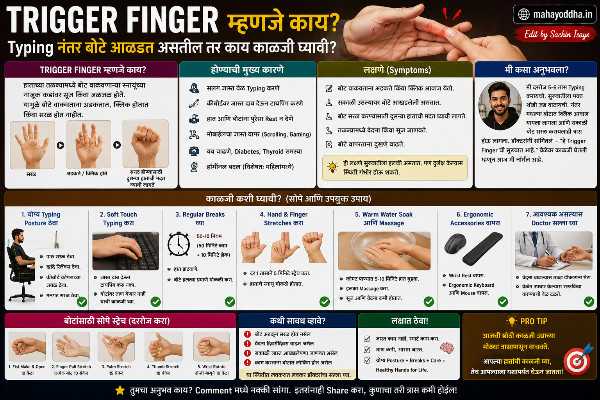
एक fact जो मला माहीत नव्हता — बोटांमध्ये muscles नाहीत. Forearm मध्ये muscles आहेत, त्यातून tendons निघतात, बोटांपर्यंत जातात. Tendons pull केले की बोटे वाकतात.
Tendons एका sheath मध्ये असतात — lubricated tube सारखी. Smooth movement होतो.
Repetitive typing मध्ये same tendons repeatedly move होतात. Sheath irritate होते, सूज येते. Swell झालेली sheath tendon ला smooth slide करू देत नाही — tendon अडकतो, “snap” होतो. हेच Trigger Finger आहे.
Early stage — occasional clicking, mild stiffness, सकाळी जड वाटणं. Advanced stage — बोट locked position मध्ये राहतं, manually straight करावं लागतं, pain येतो.
Early stage मध्ये lifestyle changes पुरतात. Advanced stage मध्ये injection किंवा surgery लागू शकते.
Trigger Finger vs Normal Finger Fatigue — फरक कसा ओळखायचा
Normal fatigue — typing session नंतर हात थकतात, rest नंतर completely recover होतात.
Trigger Finger signs — सकाळी उठल्यावर stiffness जी थोडा वेळ राहते. Bending करताना clicking किंवा snapping sound. बोट straight करताना momentary catching sensation. Finger base ला tender spot — बोटाच्या खालच्या palmar crease जवळ.
हे signs असतील तर doctor ला भेटा — self-diagnosis आणि self-treatment serious conditions मध्ये delay करतात.
Doctor ने सांगितलेले Changes — हे Seriously Follow केले
Typing Force कमी करा
हे सांगण्याआधी Doctor ने विचारलं — “तुम्ही keyboard कसा वापरतात, जोरात press करतात का?”
होय. सवय होती जोरात press करण्याची — जणू जास्त जोर दिला तर letter faster येईल.
Keys actuate होण्यासाठी जेवढं force लागतं तेवढंच द्यायचं — जास्त नाही. Mechanical keyboards मध्ये Red switches सगळ्यात कमी force लागतात — ३५-४५ gram actuation force. Blue switches जास्त — ५०-६० gram. Heavy typing करणाऱ्यांसाठी light switches physically better आहेत. Mahayoddha.in च्या mechanical keyboard articles मध्ये switch comparison detail मध्ये आहे.
Membrane keyboards मध्ये पण — bottom out करण्याची गरज नाही. Half press केलं तरी register होतं.
Warm Up — Typing सुरू करण्यापूर्वी
Cold muscles आणि tendons stiff असतात — injury prone. Doctor ने specifically हे सांगितलं.
Typing सुरू करण्यापूर्वी पाच मिनिटे warm up करा.
Wrist rotations — दोन्ही directions, दहा वेळा.
Finger taps — सगळ्या fingers thumb ला sequentially tap करा — index, middle, ring, pinky. दोन्ही hands, दहा rounds.
Hand shakes — हात loosely shake करा — wrist loose. Blood circulation improve होतो.
Gentle fist — हळूच fist बनवा, release करा. दहा वेळा.
हे routine घड्याळाचे alarm सारखं set केलं — typing सुरू करण्याआधी mandatory.
Exercises — Daily Practice
Tendon Gliding Exercises
हे Doctor ने specifically Trigger Finger साठी दिले. Tendons smooth glide करायला शिकवतात.
Position sequence:
Straight fingers → Hooked position (fingers curl at first joint) → Fist → Tabletop position (fingers straight, bent at knuckles) → परत straight.
हा sequence slowly करा. प्रत्येक position तीन seconds hold करा. दहा repetitions. दिवसातून तीन ते चार वेळा.
O Shape Exercise
Thumb आणि index finger O बनवा. Hold. Release. मग thumb आणि middle. मग ring. मग pinky. Complete both hands.
यात precision लागते — proper O form करा. Tendon flexibility maintain होते.
Flat Stretch
Table वर hand flat ठेवा. Fingers straight करा — stretch feel व्हायला हवं. पाच seconds hold. Release. दहा वेळा.
रात्री झोपण्याआधी हे करणं particularly beneficial आहे — रात्री tendons heal होतात, proper position मध्ये stretch केलेले असतील तर better.
Towel Squeeze
Rolled towel किंवा stress ball हळूच squeeze करा. Hard squeeze नाही — tendon rehab मध्ये resistance over-use avoid करतात early stages मध्ये. Doctor च्या guidance नुसार.
Break Schedule — Mahayoddha.in Series मधून
Wrist pain article, neck pain article, eye strain article — तिन्हींमध्ये breaks बद्दल सांगितलं आहे. Trigger Finger साठी पण same applies.
प्रत्येक तासाला दोन मिनिटांचा break — hands rest, stretch. Continuous typing sessions avoid करा.
Phone किंवा computer timer set करा. Mahayoddha.in च्या multitasking article मध्ये Windows Focus Sessions बद्दल आहे — break reminders साठी.
Heat Therapy
Typing session नंतर warm water मध्ये hands भिजवा — पाच ते दहा मिनिटे. ४०-४५ degrees comfortable warm — hot नाही.
Tendon inflammation असेल तर — acute flare up — ice pack. Chronic stiffness साठी heat. Doubt असेल तर doctor ला विचारा.
Ergonomic Considerations
Keyboard position — flat, neutral. Keyboard raise केलेलं असेल तर wrist extension होतो — tendons angle मध्ये work करतात. Negative tilt prefer करा.
Key repeat force — mechanical keyboards मध्ये factory lubed switches smoother असतात. Over time dry होतात. Lube करणं smooth feel improve करतो — Mahayoddha.in च्या keyboard cleaning/maintenance articles मध्ये हे briefly आहे.
Red Flags — हे झालं तर Immediately Doctor ला जा
बोट locked position मध्ये राहतं — straight होत नाही manually केल्याशिवाय. Severe pain finger base ला. Swelling visible आहे. Night pain — झोपताना दुखतं. Numbness किंवा tingling associated आहे.
Trigger Finger गोंधळवला जातो Carpal Tunnel Syndrome सोबत. दोन्ही separate conditions आहेत. Accurate diagnosis important आहे — treatment different आहे.
Trigger Finger Treatment Options — Doctor कडून
Early stage — RICE (Rest, Ice, Compression, Elevation), splinting रात्री, exercises.
Moderate stage — Corticosteroid injection — sheath मध्ये. Inflammation कमी करतो. ८०-९०% success rate आहे early-moderate cases मध्ये.
Severe stage — Surgery — tendon sheath release. Out-patient procedure. Recovery काही आठवडे.
हे सांगायचं कारण — early stage मध्ये घेतलेला action expensive आणि invasive treatment avoid करतो.
Quick Reference
| Stage | Symptoms | Action |
|---|---|---|
| Early | Occasional clicking, morning stiffness | Habits + exercises |
| Moderate | Regular clicking, catching sensation | Doctor + exercises |
| Advanced | Locked finger, severe pain | Doctor immediately |
| Normal fatigue | Rest नंतर complete recovery | Breaks + warm up |
FAQ
Q. Trigger Finger फक्त typing मुळे होतो का?
नाही. Repetitive gripping — tools, gym, स्वयंपाक — कुठलीही repetitive hand activity cause करू शकते. Diabetes, rheumatoid arthritis असणाऱ्यांना higher risk आहे. Typing common cause आहे desk workers मध्ये पण एकमेव नाही.
Q. Splint रात्री घालायचं का — doctor च्या advice शिवाय?
Doctor recommend केल्याशिवाय नाही. Incorrect splinting — wrong angle, wrong tightness — condition worse करू शकतो. Doctor prescribed splint आणि proper fitting important आहे.
Q. Gaming controller खूप वापरतो — Trigger Finger risk आहे का?
हो. Controller grip आणि repeated button presses tendons वर strain करतात. Gaming sessions दरम्यान breaks, post-gaming stretches — same principles apply. Pro gamers specifically hand care routines follow करतात.
Q. Exercise करताना pain येतो — continue करायचं का?
Mild discomfort — stretch feel — normal आहे. Pain — sharp, increasing — stop करा. Doctor ला सांगा. Pain through exercise करणं condition aggravate करू शकतो.
Q. एका हाताला Trigger Finger झाला, दुसऱ्या हालाला prevention साठी काय?
Same exercises दोन्ही hands ला करा — preventive म्हणून. Typing force aware रहा. Breaks दोन्हींसाठी. Risk factors — diabetes, RA — असतील तर doctor ला दोन्ही hands दाखवा.
Conclusion
Doctor ने early stage मध्ये diagnosis केला — surgery नाही लागली, injection नाही लागला. Habits बदलले, exercises केले, light switch mechanical keyboard वापरायला सुरू केलं.
तीन महिन्यांत clicking बंद झाली, stiffness गेली.
Mahayoddha.in वर keyboard ergonomics series मध्ये हे important chapter आहे. Eye strain, neck pain, wrist pain, trigger finger — सगळ्या conditions एकमेकांशी connected आहेत — wrong setup आणि wrong habits मुळे होतात.
Setup right करा, habits बदला, breaks घ्या. आणि early signs दिसले तर doctor ला भेटा — wait करू नका.
तुम्हाला typing नंतर बोटे आखडतात का? Morning stiffness येते का? Comment मध्ये सांगा — personal experience share केल्यावर इतरांना उपयोगी होतं.

Sachin Isaye
सचिन इसाये
नमस्कार! मी सचिन इसाये, Founder of Mahayoddha.in. २०१७ पासूनच्या माझ्या Blogging आणि Digital Content क्षेत्रातील अनुभवाचा वापर करून, मी Keyboard, Typing Speed, Windows Shortcuts आणि Digital Skills यांसारख्या विषयांवर सोप्या मराठीत practical माहिती देण्याचा प्रयत्न करतो.
Keyboard Buying Guide, Mechanical Keyboard, Wireless Keyboard, Keyboard Problems, Keyboard Typing Skills आणि Keyboard Ergonomics यांसारखे विषय सामान्य मराठी वाचकांना सहज समजावून सांगणे, हेच माझे काम आहे.
विद्यार्थी, Bloggers, Content Writers, Office Users, Work From Home करणारे आणि नवीन computer users यांना keyboard वापरून आपलं काम जलद, सोपं आणि smart करता यावं, हेच माझं ध्येय आहे. नवीन Keyboard Guides, Typing Tips आणि Windows Shortcuts साठी Mahayoddha.in ला नियमित भेट द्या.