
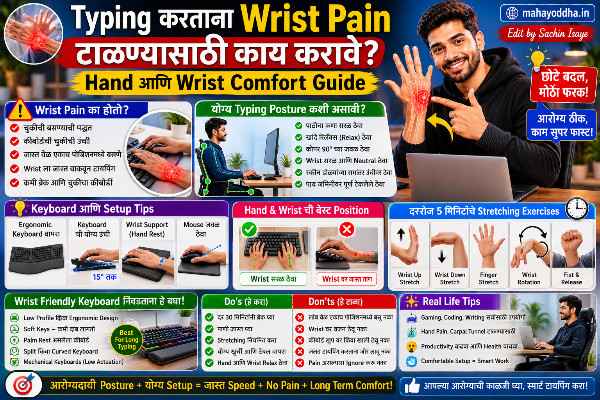
Typing करताना Wrist आणि Hand दुखू नये म्हणून — हे माहीत असतं तर आधीच केलं असतं
आठ महिन्यांपूर्वी Mahayoddha.in वर Ergonomic Keyboard article लिहिला. त्यात सांगितलं होतं — wrist pain असेल तर ergonomic keyboard घ्या.
पण एक महत्त्वाची गोष्ट राहिली होती — keyboard बदलण्यापेक्षा आधी habits बदला. बऱ्याच वेळा ₹८,००० चा ergonomic keyboard घेण्यापेक्षा काही simple changes करणं जास्त effective आहे.Typing करताना Wrist Pain.
आज Mahayoddha.in वर हे practically explain करतो — कारण, prevention, stretches, आणि जेव्हा seriously घ्यायला हवं तेव्हा.
नक्की काय होतं — Science थोडक्यात
Carpal Tunnel हा wrist मधला एक narrow passage आहे. यातून median nerve जातो — thumb, index, middle, आणि ring finger च्या half ला sensation देतो.
Prolonged typing मध्ये wrist bent position मध्ये असतो — हे carpal tunnel narrow करतो. Median nerve compress होतो. सुरुवातीला tingling आणि numbness. नंतर weakness आणि pain.
RSI — Repetitive Strain Injury — broader category आहे. Tendons, muscles, nerves — सगळ्यांना affect करू शकतो. Typing, mouse, gaming — repetitive hand movements मुळे होतो.
Warning signs जे ignore करू नयेत:
रात्री हात दुखणं किंवा numbness. थंब side ला weakness. Jar किंवा bottle उघडायला त्रास. सकाळी उठल्यावर stiff fingers. हे symptoms असतील तर doctor ला भेटा — self-treatment नाही.
Posture — इथेच सगळ्यात जास्त चुका होतात
Chair आणि Desk Height
Chair height असावी की arms roughly ninety degree angle मध्ये असाव्यात — elbow desk level ला. जास्त उंच chair — shoulders raise होतात. खूप खाली — arms awkward angle मध्ये.
Feet flat floor वर असाव्यात. Height कमी पडत असेल तर footrest वापरा.
Keyboard Position
Keyboard slightly negative tilt असावा — म्हणजे keyboard पुढून थोडा उंच, मागून flat. Wrist extension — m्हणजे wrist वर bend — avoid होतो.
बहुतेक keyboards च्या मागे fold-out legs असतात जे keyboard raise करतात — हे positive tilt आहे, wrist extension वाढवतो. हे legs fold in ठेवा.
Keyboard desk edge जवळ असावा — forearms desk वर rest करतात.
Wrist Position
Wrist “floating” असाव्यात — neutral position मध्ये. Not resting on desk while typing. Wrist rest typing दरम्यान वापरायचं नाही — breaks दरम्यान.
Common misconception — wrist rest typing करताना वापरायचं. Actually wrist rest pause दरम्यान support देतो — typing दरम्यान wrists floating असाव्यात.
Mouse Position
Mouse keyboard च्या level ला असावा. Shoulder raise होणार नाही असं. Vertical mouse seriously consider करा wrist pain असेल तर — natural handshake position मध्ये असतो.
Stretches — रोज करायचे
Prayer Stretch
Hands prayer position मध्ये — palms together chest समोर. हळूहळू hands खाली lower करा waist level पर्यंत — wrist stretch feel होईल. तीस seconds hold करा. दिवसातून तीन-चार वेळा.
Reverse Prayer
Backs of hands together, fingers down. हळूहळू raise करा. तीस seconds.
Wrist Extension Stretch
उजवा हात समोर करा, palm up. डाव्या हाताने fingers खाली bend करा — wrist extension stretch. तीस seconds. दोन्ही hands साठी.
Wrist Flexion Stretch
उजवा हात समोर, palm down. डाव्या हाताने fingers खाली pull करा — wrist flexion. तीस seconds. दोन्ही.
Finger Spread
Hands समोर करा, fingers tightly together. Full spread — fingers maximal apart. Repeat दहा वेळा.
Fist to Open
Tight fist बनवा. Full open. Repeat दहा वेळा. Circulation improve होतो.
Wrist Circles
Fists बनवा, wrist circles करा — clockwise दहा वेळा, counterclockwise दहा वेळा. Both hands.
Break Schedule — 45-5 Rule
मायक्रो ब्रेक्स
दर तीस ते पंचेचाळीस मिनिटांनी पाच मिनिटांचा break. या break मध्ये:
हात keyboard/mouse पासून दूर करा. Stretches करा — वर सांगितलेल्यापैकी दोन-तीन. उठा, थोडं चाला. पाणी पिण्याची संधी.
Long Breaks
दर दोन तासांनी पंधरा मिनिटांचा break. हात warm करा. Forearm massage.
Reminders
Phone मध्ये timer set करा. Windows Clock app — Focus Sessions feature वापरा. Mahayoddha.in च्या multitasking article मध्ये Focus Sessions बद्दल आहे. Stretchly किंवा WorkRave — free apps जे break reminders देतात.
Keyboard आणि Mouse Habits
Light Touch
Keys press करायला कमी force लागतो — बहुतेक लोक जास्त force वापरतात. Light touch type करायचा conscious effort करा. Mechanical keyboards मध्ये light switches — Red switches — कमी force लागतो, fatigue कमी होतो. Mahayoddha.in च्या mechanical keyboard articles मध्ये switch types detail मध्ये आहेत.
Mouse Usage कमी करणे
Keyboard shortcuts वापरणं mouse usage कमी करतो — wrist stress reduce होतो. Mahayoddha.in वर ५० Windows shortcuts, Chrome shortcuts, File Management shortcuts — सगळे articles आहेत. एक-एक shortcut शिकत जा, mouse dependency कमी होत जाते.
Typing Position
Home row — F आणि J — वर fingers rest करा. Touch typing wrist health साठी better आहे — keyboard बघत type करताना neck खाली झुकतो, posture खराब होतो. Mahayoddha.in च्या F आणि J bumps article मध्ये touch typing बद्दल detail आहे.
Heat आणि Cold Therapy
Heat — Typing नंतर warm water मध्ये hands भिजवा — पाच मिनिटे. Heating pad — forearms वर ठेवा. Muscle tension release होतो.
Cold — Swelling किंवा acute pain असेल तर ice pack — cloth मध्ये wrap करा, थेट skin वर नाही. पंधरा-वीस minutes.
Contrast therapy — Cold thirty seconds, warm thirty seconds, repeat — circulation improve होतो.
Ergonomic Products — Cost नुसार
| Product | Benefit | Approximate Cost |
|---|---|---|
| Wrist rest (foam) | Wrist support during breaks | ₹२००-₩५०० |
| Laptop stand | Screen eye level, neck straight | ₹५०० – ₹२,००० |
| External keyboard | Better angle than laptop keyboard | ₹१,५०० onwards |
| Vertical mouse | Natural wrist position | ₹८०० – ₹२,५०० |
| Ergonomic chair | Proper seating posture | ₹५,००० onwards |
| Split keyboard | Shoulder width typing | ₹८,००० onwards |
Budget priority — Laptop stand सगळ्यात cost-effective upgrade आहे. Screen eye level ला आल्याने neck posture improve होतो. External keyboard त्यानंतर.
FAQ
Q. Wrist pain सुरू झालाय — doctor ला जायला हवं का?
Tingling, numbness रात्री असेल, thumb weakness असेल, pain दोन आठवड्यांपेक्षा जास्त असेल — तर हो, doctor ला जा. हे Carpal Tunnel किंवा other nerve issue असू शकतो. Home remedies serious conditions delay करतात. Early treatment outcomes जास्त चांगले असतात.
Q. Anti-fatigue mat keyboard खाली ठेवणं useful आहे का?
Limited benefit आहे. Anti-fatigue mats standing desk साठी design केलेले आहेत — feet साठी. Keyboard खाली ठेवणं typing posture significantly improve करत नाही. Foam wrist rest जास्त targeted आणि useful आहे.
Q. Gaming मध्ये wrist दुखतो — typing सारखंच care घ्यायचं का?
Same principles apply होतात. Gaming मध्ये mouse grip आणि rapid movements जास्त intense असतात. Gaming mouse grip style बघा — palm grip wrist strain कमी करतो claw grip पेक्षा. Gaming sessions दरम्यान stretch breaks घ्या. Pro gamers daily stretching करतात.
Q. Laptop trackpad वापरतो, mouse नाही — wrist problem होतो का?
Trackpad laptop वर built-in असल्याने position fixed असतो — कधी कधी awkward angle. External mouse position adjust करता येतो — shoulder comfortable position मध्ये. Trackpad heavy use असेल तर external mouse consider करा, किंवा keyboard shortcuts वाढवा.
Q. Children ला early age मध्ये हे problem होतात का?
होऊ शकतात — online classes, gaming. Young people ला faster recovery होते पण habits early fix करणं important आहे. School bag weight, posture, screen time — सगळं consider करा. Children साठी frequent breaks mandatory आहेत.
Conclusion
Ergonomic keyboard article मध्ये hardware solution सांगितलं होतं. पण habits बदलणं, stretches करणं, posture fix करणं — हे free आहे आणि equally effective आहे.
Daily पाच मिनिटे stretches — prayer stretch, wrist circles, finger spreads — आणि दर तासाला थोडा break — हे consistent केलं तर wrist pain येण्याची शक्यता significantly कमी होते.
Mahayoddha.in वर tech आणि health दोन्ही important आहेत — gadget चांगला ठेवण्याइतकंच हात चांगले ठेवणं important आहे.
तुम्हाला typing नंतर wrist uncomfortable वाटतं का? Stretches try केल्या आहेत का? Comment मध्ये सांगा.

Sachin Isaye
सचिन इसाये
नमस्कार! मी सचिन इसाये, Founder of Mahayoddha.in. २०१७ पासूनच्या माझ्या Blogging आणि Digital Content क्षेत्रातील अनुभवाचा वापर करून, मी Keyboard, Typing Speed, Windows Shortcuts आणि Digital Skills यांसारख्या विषयांवर सोप्या मराठीत practical माहिती देण्याचा प्रयत्न करतो.
Keyboard Buying Guide, Mechanical Keyboard, Wireless Keyboard, Keyboard Problems, Keyboard Typing Skills आणि Keyboard Ergonomics यांसारखे विषय सामान्य मराठी वाचकांना सहज समजावून सांगणे, हेच माझे काम आहे.
विद्यार्थी, Bloggers, Content Writers, Office Users, Work From Home करणारे आणि नवीन computer users यांना keyboard वापरून आपलं काम जलद, सोपं आणि smart करता यावं, हेच माझं ध्येय आहे. नवीन Keyboard Guides, Typing Tips आणि Windows Shortcuts साठी Mahayoddha.in ला नियमित भेट द्या.