
Wrist दुखायला लागलं होतं — Ergonomic Keyboard घेतल्यावर काय बदललं
आठ महिन्यांपूर्वी एक problem सुरू झाला.
रात्री typing करताना left wrist मध्ये mild aching जाणवायचं. सुरुवातीला ignore केलं — थकवा असेल. पण हळूहळू वाढत गेलं. दीड तास typing केली की wrist uncomfortable होायचं. Mouse वापरताना पण जाणवायचं. Ergonomic Split Keyboard.
Doctor कडे गेलो. म्हणाले — “Repetitive Strain. Keyboard आणि mouse चा angle बघा. Ergonomics improve करा.”
तेव्हा पहिल्यांदा seriously Ergonomic keyboard बद्दल research केलं. आज Mahayoddha.in वर हे share करतो — काय शिकलो, काय changed, आणि honestly काय काम केलं.
Problem नक्की काय होतं — Science थोडक्यात
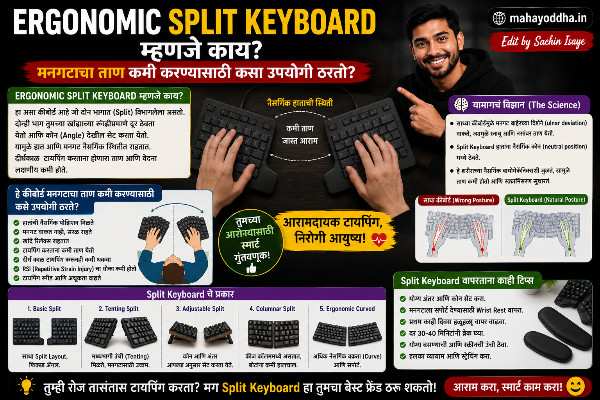
Standard keyboard flat आणि straight असतो. दोन्ही हात एकत्र, पुढे pointing.
Natural resting position मध्ये हात कसे असतात? Handshake position — थोडे rotate, slightly angled. Flat keyboard वर typing करताना हात त्या natural position मधून force केले जातात.
Ulnar Deviation — Standard keyboard वापरताना wrists बाहेर angle होतात. हे unnatural position आहे — tendons stretch होतात.
Pronation — Hands flat ठेवताना forearm bones twist होतात. Prolonged pronation मध्ये muscles आणि tendons strain होतात.
Carpal Tunnel — Wrist bent position मध्ये carpal tunnel narrow होतो — nerves compress होतात. Long term मध्ये Carpal Tunnel Syndrome होऊ शकतो.
हे सगळं daily ocho तास keyboard वापरणाऱ्यांसाठी relevant आहे. एक-दोन तास वापरणाऱ्यांना problem येत नाही बहुतेक.
Ergonomic Keyboard म्हणजे नक्की काय
एक definition नाही — design philosophy आहे
Ergonomic keyboard म्हणजे एक specific product नाही — एक design approach आहे. Hands natural position मध्ये ठेवता यावेत यासाठी keyboard shape, angle, किंवा layout बदलतो.
Different types मध्ये different problems address केल्या आहेत.
Type एक — Wave/Fixed Split Keyboard
सगळ्यात gentle introduction ergonomics ला
हा एकच keyboard आहे पण V-shape किंवा wave design मध्ये. Keys दोन groups मध्ये slight angle ला आहेत — completely flat नाही.
Logitech K860 हे popular example आहे. Curved design आहे, built-in wrist rest आहे, slight negative tilt आहे — म्हणजे keyboard पुढून उंच आणि मागून कमी. हे wrist neutral position मध्ये ठेवतं.
Mahayoddha.in च्या coding keyboard article मध्ये K860 mention आहे — wrist pain असलेल्यांसाठी recommendation म्हणून.
कुणासाठी आहे — Standard keyboard वापरत आहात, wrist discomfort सुरू झालं आहे, dramatic change नको आहे. हा familiar feel देतो — adjustment period कमी आहे.
Limitation — Ulnar deviation पूर्णपणे address होत नाही. Hands अजून थोडे inward angle आहेत.
Type दोन — Fully Split Keyboard
हा खरा split — दोन independent halves
दोन completely separate keyboard pieces. Cable किंवा wireless ने connected. दोन्ही halves independently position करता येतात — shoulder width वर, आणखी दूर, angle करून.
Microsoft Sculpt Ergonomic — ₹८,०००-₩१०,०००. Wireless, dedicated numpad, dome keys. Comfortable beginner split keyboard.
Kinesis Freestyle2 — ₹१५,०००+. Adjustable separation, accessories ने tenting add करता येतो. Heavy users साठी.
Benefit — Shoulders natural width वर. Hands straight forward — ulnar deviation नाही. Keyboard position पूर्णपणे customize होतो.
Adjustment Period — एक ते तीन आठवडे. Halves दरम्यान navigation करायला brain adjust होण्यास वेळ लागतो. Speed initially कमी होतो.
माझ्यासाठी हाच type काम केला. Left half थोडं डावीकडे, slight angle — wrist pain significantly कमी झालं.
Type तीन — Ortholinear Keyboard
हे different problem address करतो
Standard keyboard मध्ये keys staggered आहेत — rows offset आहेत. Typewriter मध्ये mechanical reasons साठी हे design होतं. आधुनिक keyboards मध्ये reason नाही, पण traditional layout continue आहे.
Ortholinear keyboards मध्ये keys straight grid मध्ये आहेत — rows aligned. प्रत्येक finger straight up-down move करतो — diagonal नाही.
Planck, Preonic — Popular ortholinear keyboards. Enthusiast community मध्ये popular. India मध्ये online मिळतात.
Benefit — Finger movement more intuitive होतो. Accuracy improve होते काही users साठी.
Limitation — QWERTY layout same असलं तरी stagger नसल्याने adjustment लागतो. Mainstream नाही — shared environments मध्ये standard keyboard लागतो.
Type चार — Concave/Keywell Keyboard
हे extreme आहे — पण maximum ergonomic benefit आहे
Keys bowl shape मध्ये arranged आहेत. Fingers natural arc मध्ये rest करतात — प्रत्येक key equal distance आहे प्रत्येक finger पासून.
Kinesis Advantage2 — ₹२५,०००-₩३०,०००. Most ergonomic keyboard available. NASA, medical transcriptionists, heavy power users वापरतात.
Dactyl, Manuform — Custom 3D printed keyboards. Enthusiasts स्वतः build करतात.
Benefit — Maximum wrist relief. Finger travel minimum. Long term heavy users साठी genuinely impressive results आहेत.
Limitation — Price high आहे. Learning curve steep आहे — एक ते दोन महिने transition. Niche product आहे — support community limited आहे.
Tenting म्हणजे काय — हे Ergonomics मध्ये Important आहे
Tenting म्हणजे keyboard center ला raise करणं — tent shape. Halves मध्ये angle येतो.
Flat keyboard वर hands completely pronated — palms down. Tenting ने hands partially supinated होतात — thumb side वर. Handshake position ला जवळ.
साधारण दहा ते पंधरा degree tenting — forearm strain significantly कमी होतो. काही keyboards मध्ये tenting built-in असतो, काहींमध्ये accessories ne add करता येतो.
माझ्या split keyboard सोबत tenting kit घेतला — हा combination wrist pain साठी सगळ्यात effective ठरला.
कोणता Type कुणासाठी
| Situation | Recommended Type | Budget |
|---|---|---|
| Mild wrist discomfort, beginner | Wave/Fixed Split (K860) | ₹८,०००-₩१२,००० |
| Serious wrist pain, daily ६+ hours | Fully Split | ₹१५,०००-₩२५,००० |
| Accuracy issues, diagonal movement problem | Ortholinear | ₹५,०००-₩१५,००० |
| Professional, maximum ergonomics | Concave/Keywell | ₹२५,०००+ |
| Budget tight, posture improve करायचं | Wrist rest + typing posture fix | ₹५०० |
Ergonomic Keyboard शिवाय पण Pain कमी होऊ शकतो
Honestly सांगतो — keyboard upgrade एकटा solution नाही.
Desk setup — Monitor eye level वर असावा. Keyboard desk edge जवळ — wrists desk वर rest करायला नको. Chair height arms approximately ninety degree असावेत.
Typing posture — Wrists floating असाव्यात — desk वर resting नाही. Floating wrists neutral position maintain करतात.
Breaks — दर तास break घ्या. Wrist stretches करा. Mahayoddha.in वर tech tips सांगताना health equally important आहे.
Mouse — Vertical mouse wrist strain कमी करतो. Keyboard ergonomic केलं आणि standard mouse ठेवलं तर half benefit जातो.
FAQ
Q. Wrist pain आहे — doctor ला आधी भेटायचं की keyboard बदलायचं?
Doctor आधी. Pain serious असेल — tingling, numbness, रात्री दुखणं — तर हे nerve involvement असू शकतो. Doctor assessment करतील. Keyboard change supplement आहे, treatment नाही. Doctor approved असेल तर keyboard ergonomics improve करा.
Q. Ergonomic keyboard वर switch केल्यावर QWERTY speed maintain राहते का?
Wave keyboards वर adjustment minimal आहे — एक दोन दिवस. Fully split keyboards वर एक ते तीन आठवडे adjustment. Speed तात्पुरती कमी होते, नंतर previous level ला येते. Ortholinear वर जास्त adjustment — stagger नसल्याने QWERTY finger placement adjust होतं.
Q. Budget ₹५,०००च्या आत ergonomic option आहे का?
Dedicated ergonomic keyboard त्या budget मध्ये limited आहेत. पण काही alternatives आहेत — Wrist rest (₹३००-₩५००) standard keyboard सोबत. Typing posture correct करणं — free. Monitor height adjust करणं — free. या combinations ने significant improvement होऊ शकतो.
Q. Gaming साठी ergonomic keyboard चालेल का?
Wave keyboards gaming साठी OK आहेत — standard feel similar आहे. Fully split keyboards gaming साठी ideal नाहीत — two halves manage करणं gaming मध्ये impractical आहे. Gaming साठी Mahayoddha.in ने recommend केलेले mechanical keyboards better आहेत — ergonomic concern असेल तर wrist rest add करा.
Q. Laptop साठी external ergonomic keyboard worth आहे का?
हो, definitely. Laptop keyboard flat आणि low आहे — neck खाली झुकते, wrists awkward angle मध्ये. External ergonomic keyboard + laptop stand — ideal setup आहे. Laptop screen eye level ला, external keyboard natural position मध्ये. Setup cost ₹५,०००-₩१५,००० असेल पण long term health benefit आहे.
Conclusion
आठ महिन्यांपूर्वी wrist pain होता. Doctor ने ergonomics suggest केलं. Fully split keyboard + tenting kit + vertical mouse — हे तीन changes केले.
तीन महिन्यांत wrist pain significantly कमी झालं. आज comfortable typing होते.
Mahayoddha.in वर tech products बद्दल honest लिहितो — Ergonomic keyboard expensive आहे, adjustment period आहे, पण daily six plus hours typing करत असाल आणि pain येत असेल तर हे investment आहे, expense नाही.
तुम्हाला typing करताना wrist किंवा shoulder pain येतो का? किती तास daily typing होते? Comment मध्ये सांगा — specific situation नुसार suggest करता येईल.

Sachin Isaye
सचिन इसाये
नमस्कार! मी सचिन इसाये, Founder of Mahayoddha.in. २०१७ पासूनच्या माझ्या Blogging आणि Digital Content क्षेत्रातील अनुभवाचा वापर करून, मी Keyboard, Typing Speed, Windows Shortcuts आणि Digital Skills यांसारख्या विषयांवर सोप्या मराठीत practical माहिती देण्याचा प्रयत्न करतो.
Keyboard Buying Guide, Mechanical Keyboard, Wireless Keyboard, Keyboard Problems, Keyboard Typing Skills आणि Keyboard Ergonomics यांसारखे विषय सामान्य मराठी वाचकांना सहज समजावून सांगणे, हेच माझे काम आहे.
विद्यार्थी, Bloggers, Content Writers, Office Users, Work From Home करणारे आणि नवीन computer users यांना keyboard वापरून आपलं काम जलद, सोपं आणि smart करता यावं, हेच माझं ध्येय आहे. नवीन Keyboard Guides, Typing Tips आणि Windows Shortcuts साठी Mahayoddha.in ला नियमित भेट द्या.