
Laser Projection Keyboard — YouTube वर बघताना Sci-Fi वाटला, हातात घेतल्यावर Reality कळली
दोन वर्षांपूर्वी एक YouTube video दिसला.
कुणीतरी café मध्ये बसलेलं, समोर कुठलाही keyboard नाही, पण table वर लाल रंगाचा QWERTY layout projected आहे — आणि तो त्यावर type करतोय. Comments मध्ये “future is here”, “this is insane” असं भरलेलं.
एक महिन्यानंतर एक tech expo मध्ये हेच device demonstrate होत होतं. Try करायला मिळालं.
पाच मिनिटे type केल्यावर clearly कळलं — हे practical typing device नाही. पण technology genuinely fascinating आहे. आज Mahayoddha.in वर हे properly explain करतो.
Laser Projection Keyboard म्हणजे नक्की काय
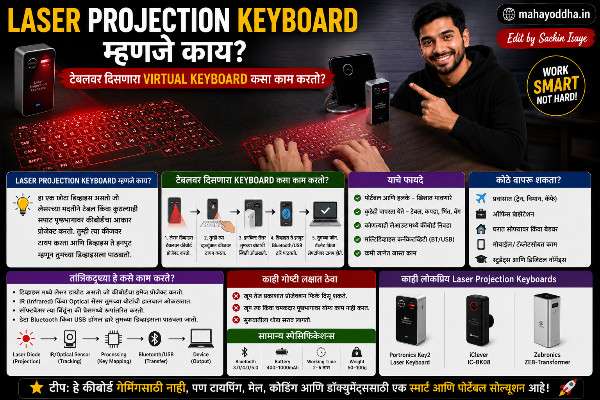
एक matchbox size चा device. त्यात तीन components आहेत — laser projector, infrared emitter, आणि sensor/camera.
Device flat surface वर ठेवला की activate होतो. Bluetooth ने phone, laptop, किंवा tablet ला connect करतो.
बघायला simple वाटतं — पण आत तीन वेगळ्या technologies एकत्र काम करतात.
Technology आतून कशी काम करते — तीन Parts
Part एक — Pattern Laser
हा लाल laser table वर QWERTY keyboard project करतो. हे फक्त visual display आहे — यात input detection नाही. तुम्हाला दिसतं keyboard कुठे आहे ते.
Laser eye-safe red light आहे — standard laser pointer सारखाच. Ambient light जास्त असेल तर projection कमी visible होतो — bright sunlight मध्ये barely दिसतो.
Part दोन — Infrared Layer
Device मधून एक invisible infrared light emitted होतो — table च्या surface च्या एक ते दोन millimeter वर horizontal plane मध्ये. डोळ्यांना दिसत नाही.
हा layer keyboard projection च्या exact height वर आहे. बोट खाली आणलं की या layer मधून pass होतो.
Part तीन — Sensor/Camera
Infrared sensor continuously monitor करतो. बोट infrared layer मधून pass झालं की light reflect होतो — sensor detect करतो. Position calculate करतो — projected keyboard च्या कुठल्या letter वर बोट होतं. Signal Bluetooth ने device ला पाठवतो.
हे सगळं milliseconds मध्ये होतं. Technology clever आहे.
Expo मध्ये Try केल्यावर काय जाणवलं
पहिल्या Minute मध्ये — Wow
Projected keyboard वर बोट ठेवलं. “H” press केलं — screen वर “H” आलं. “I” press केलं — “I” आलं. “Hello” type केलं — झालं.
Genuinely impressive वाटलं. हे काम करतं.
दुसऱ्या Minute पासून — Problems सुरू
Typing speed वाढवायला गेलो. “Hello world” type करायचं होतं.
Table वर बोटं आपटत होतो — literally. Tactile feedback नाही, depth नाही, cushion नाही. बोटांना hard table वर press करावं लागतं. दोन मिनिटांत fingertips uncomfortable झाले.
Errors खूप होत होते. Key press झाली की नाही हे feel नाही होत. Sensor कधी false positive detect करतो — बोट hovering असताना, light reflection झाल्यावर. कधी miss होतो — बोट थोडं जास्त खाली गेलं, layer missed.
पाच मिनिटांत clearly कळलं — हे fun demo device आहे, working keyboard नाही.
Technology चे Real Limitations
No Tactile Feedback — Fundamental Problem
Keyboard feel म्हणजे काय हे Mahayoddha.in च्या multiple articles मध्ये explain केलं आहे — mechanical switches, scissor switches, rubber dome — सगळ्यांमध्ये key press झाल्याचा physical feedback आहे.
Laser keyboard मध्ये physically कुठलाही feedback नाही. Brain ला “key pressed” signal येत नाही. त्यामुळे confidence नाही, errors वाढतात.
Table वर बोटं आपटणे — Physical Pain
Standard keyboard वापरताना fingers keys ला soft touch करतात — key travel absorbs force. Laser keyboard वापरताना fingers थेट hard table ला hit करतात. Short session मध्ये fingertip pain येतो. Long session मध्ये genuinely uncomfortable होतं.
Ambient Light Sensitivity
Bright light मध्ये projection barely visible होतो. Café मध्ये, outdoor मध्ये, window जवळ — laser projection washout होतो. Dark environment मध्ये best visible आहे.
Accuracy Issues
Infrared detection perfect नाही. False positives — letter type नाही केला पण register झाला. False negatives — letter type केला पण register नाही झाला. Fast typing मध्ये accuracy significantly drops.
Laser Keyboard कुठे Actually Useful आहे
Showoff Situations
Café मध्ये laptop सोबत laser keyboard ठेवलं तर लोक बघतात. Instagram reels साठी cinematic shot येतो. Tech enthusiast म्हणून conversation starter आहे.
Tech Demonstration
Infrared sensing technology, virtual input devices — हे concepts explain करायला live demo useful आहे. Tech workshops, presentations.
Novelty Use
Occasional curious use — “हे काम करतं का?” try करायला. Gift म्हणून tech-loving person ला — unique आहे.
Honest Verdict — घ्यायचं का?
₹२,००० ते ₹४,००० किंमत आहे.
Primary किंवा travel keyboard म्हणून — नाही. Roll-up silicone keyboard ₹३५० मध्ये येतो, travel साठी better practical option आहे. Bluetooth keyboard ₹१,५०० मध्ये येतो, actual typing comfortable आहे.
Novelty, showoff, tech collection साठी — हो. Technology interesting आहे, experience unique आहे, conversation starter आहे.
Mahayoddha.in वर नेहमी honest recommendation देतो — practical typing साठी हे device नाही.
Keyboard Technology Comparison — सगळे Types एकत्र
| Type | Typing Feel | Portability | Price | Best For |
|---|---|---|---|---|
| Mechanical Desktop | Excellent | कमी | ₹१,५०० ते ₹१०,०००+ | Daily use, gaming |
| Laptop Scissor | Good | Built-in | Built-in | Travel, casual |
| Roll-up Silicone | Poor | Excellent | ₹३०० ते ₅०० | Travel backup |
| Bluetooth Compact | Good | Very good | ₹१,५०० ते ₹३,००० | Multi-device, travel |
| Laser Projection | Terrible | Excellent | ₹२,००० ते ₹४,००० | Novelty, showoff |
FAQ
Q. Laser keyboard mobile वर काम करतो का?
हो, Bluetooth ने connect होतो — phone, tablet, laptop सगळ्यांना. Android, iOS, Windows — compatible आहे. Connection process standard Bluetooth pairing सारखाच आहे. पण practical typing experience phone वर पण uncomfortable आहे — tactile feedback issue same आहे.
Q. Dark room मध्ये laser keyboard better काम करतो का?
Visibility better होते — projection clearly दिसतो. पण functional issues same राहतात — tactile feedback नाही, table ला hit करावं लागतं. Dark room experience थोडा better आहे पण fundamentally same limitations आहेत.
Q. Future मध्ये laser keyboard practical होईल का?
Technology improve होतेय. Holographic displays, mid-air haptic feedback — research चालू आहे. Mid-air haptics मध्ये ultrasound waves virtual buttons चा sensation देतात — without touching. हे practical झालं तर laser keyboard concept genuinely viable होईल. अजून mainstream येण्यास वर्षे लागतील.
Q. Children साठी laser keyboard safe आहे का?
Laser eye-safe आहे — standard Class 1 laser आहे, हानिकारक नाही. पण table वर repeatedly बोटे आपटणे लहान मुलांसाठी uncomfortable असेल. Novelty म्हणून briefly use करणे ठीक आहे, extended use avoid करा.
Q. ₹४,००० मध्ये laser keyboard की mechanical keyboard — काय better आहे?
Practical use साठी mechanical keyboard clearly better आहे. ₹४,००० मध्ये excellent mechanical keyboard येतो — Redragon, Cosmic Byte चे models Mahayoddha.in च्या articles मध्ये आहेत. Laser keyboard novelty experience साठी आहे, practical typing साठी mechanical कधीही better choice आहे.
Conclusion
Expo मध्ये पाच मिनिटे type केल्यावर जे कळलं ते YouTube video मध्ये दिसत नव्हतं.
Technology impressive आहे — infrared sensing, laser projection, real-time detection. Engineers ने genuinely clever design केलं आहे. पण practical typing साठी काम करत नाही — tactile feedback नाही, table वर बोटे आपटतात, accuracy कमी आहे.
Sci-fi movies मध्ये future keyboards असे दाखवतात — invisible surfaces वर typing. Reality अशी आहे की त्या experience साठी haptic feedback technology लागेल जी अजून mainstream नाही.
आत्ता Mahayoddha.in वर recommendation simple आहे — practical typing साठी mechanical keyboard घ्या, novelty experience साठी laser keyboard एकदा try करण्यासारखा आहे.
तुम्ही laser keyboard वापरला आहे का? YouTube reels वर बघून interested झाला होतात का? Comment मध्ये सांगा.

Sachin Isaye
सचिन इसाये
नमस्कार! मी सचिन इसाये, Founder of Mahayoddha.in. २०१७ पासूनच्या माझ्या Blogging आणि Digital Content क्षेत्रातील अनुभवाचा वापर करून, मी Keyboard, Typing Speed, Windows Shortcuts आणि Digital Skills यांसारख्या विषयांवर सोप्या मराठीत practical माहिती देण्याचा प्रयत्न करतो.
Keyboard Buying Guide, Mechanical Keyboard, Wireless Keyboard, Keyboard Problems, Keyboard Typing Skills आणि Keyboard Ergonomics यांसारखे विषय सामान्य मराठी वाचकांना सहज समजावून सांगणे, हेच माझे काम आहे.
विद्यार्थी, Bloggers, Content Writers, Office Users, Work From Home करणारे आणि नवीन computer users यांना keyboard वापरून आपलं काम जलद, सोपं आणि smart करता यावं, हेच माझं ध्येय आहे. नवीन Keyboard Guides, Typing Tips आणि Windows Shortcuts साठी Mahayoddha.in ला नियमित भेट द्या.