
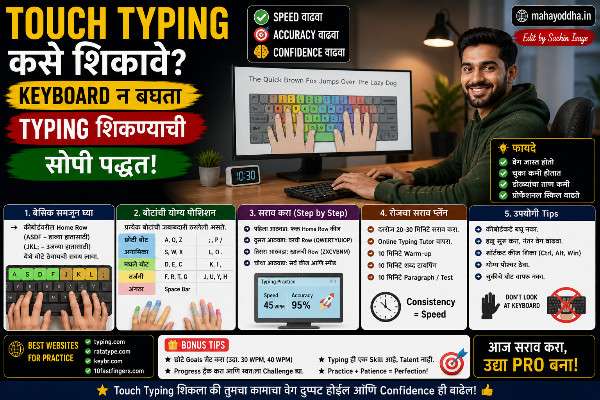
Touch Typing शिकायला बसलो — पहिले तीन दिवस frustrating होते, पण एक महिन्यानंतर keyboard बघणं बंद झालं
दोन वर्षांपूर्वी typing speed measure केला — ३२ WPM. Two-finger typing, constantly keyboard बघत.Touch Typing कसे शिकावे.
Mahayoddha.in साठी articles लिहायचे असतात — हजार ते दोन हजार words. ३२ WPM ने एक article लिहायला किती वेळ लागतो ते calculate केलं. खूप.
Touch typing शिकायचं ठरवलं. YouTube videos बघितले, articles वाचले, सुरुवात केली.
पहिले तीन दिवस genuinely painful होते. ८ WPM. चुका असंख्य. पण तीन महिन्यांनंतर — ५५ WPM, keyboard न बघता. आज ७० च्या जवळ आहे.
ती journey share करतो — काय केलं, कुठे अडलो, काय helpful होतं.
Touch Typing म्हणजे नक्की काय — आणि का शिकायचं
Keyboard बघत type करणं म्हणजे — key शोधणं (visual search), बघणं, press करणं, screen वर बघणं, result check करणं. हे cycle प्रत्येक letter साठी.
Touch typing मध्ये — finger position माहीत आहे, directly press होतं, eyes screen वर राहतात. No lookup needed.
Speed benefit — Obvious आहे. Visual search eliminate झाला.
Health benefit — Keyboard बघताना neck खाली झुकते. Mahayoddha.in च्या Neck Pain article मध्ये हे explain आहे — forward head posture cervical strain causes. Touch typing मध्ये head neutral राहतो.
Quality benefit — Eyes screen वर असल्याने writing flow improve होतो. Thoughts-to-text faster होतं. Editing करताना errors real-time दिसतात.
Accuracy benefit — Counter-intuitive वाटतं, पण touch typists कमी errors करतात — muscle memory reliable असतो visual search पेक्षा.
Home Row — Foundation जिच्याशिवाय Touch Typing शक्य नाही
Mahayoddha.in वर F आणि J bumps बद्दल एक detailed article आहे — त्यात home row explain केलं आहे. Quick recap इथे.
Home row म्हणजे keyboard चा middle row — A, S, D, F, G, H, J, K, L, semicolon.
Left hand — pinky A वर, ring S वर, middle D वर, index F वर. Right hand — index J वर, middle K वर, ring L वर, pinky semicolon वर. दोन्ही thumbs spacebar साठी.
F आणि J वर bumps आहेत — without looking hands correct position मध्ये आहेत का हे confirm होतं. हे anchors आहेत — बाकी सगळं यावरून navigate होतं.
Every key press नंतर home row वर परत — हे rule सगळ्यात important आहे. Key दाबली, finger तिथेच थांबला — wrong. Key दाबली, finger परत home row वर — correct muscle memory.
Finger Assignment — कोणतं बोट कोणती Key
हे chart एकदा नीट लक्षात ठेवा — नंतर automatic होतं.
Left Hand:
Pinky (Little finger) — A, Q, Z, Shift (left), Caps Lock, Tab.
Ring finger — S, W, X.
Middle finger — D, E, C.
Index finger — F, G, R, T, V, B.
Right Hand:
Index finger — J, H, U, Y, M, N.
Middle finger — K, I, comma.
Ring finger — L, O, period.
Pinky — semicolon, P, slash, Enter, Backspace, Shift (right).
Thumbs — Spacebar. Left thumb किंवा right thumb — whichever is natural. Personally right thumb वापरतो.
Learning Journey — Timeline आणि काय Expect करायचं
हे realistic expectations साठी important आहे.
Week एक — Frustrating, पण Critical
Speed dramatically कमी होते. माझी ३२ WPM वरून ८ WPM झाली. हे inevitable आहे — old muscle memory fight करते.
या phase मध्ये बहुतेक लोक quit करतात. “पूर्वी चांगलं typing होत होतं” असं वाटतं.
हे pass होतं. Continue करा.
Focus — home row keys फक्त. A, S, D, F, J, K, L, semicolon. Basic words — “asdf jkl;” ते “sad”, “fall”, “lads”, “flask”. Speed irrelevant, accuracy priority.
Week दोन आणि तीन — Top Row Add करा
Q, W, E, R, T आणि Y, U, I, O, P add करा. E, T, O, I, A, N, S — most common English letters — यातले बहुतेक आता available आहेत.
Speed थोडी वाढते — eighteen ते twenty five WPM.
Week चार — Bottom Row
Z, X, C, V, B आणि N, M, comma, period, slash. Common words आता type होतात.
Month दोन — Consolidation
Speed thirty five ते forty five WPM. Old two-finger speed match होऊ लागते. Confidence येतो.
Month तीन onwards — Growth
Consistent practice — speed weekly improve होतो. Sixty WPM target realistic आहे तीन-चार महिन्यांत.
माझा actual timeline — एक महिन्यात old speed match केली. तीन महिन्यांत ५५ WPM. आठ महिन्यांत ७०+ WPM.
Practice Tools — काय वापरलं
Keybr.com — AI Based, Weak Keys Target करतो
हे सगळ्यात useful tool होतं माझ्यासाठी. Algorithm track करतो कोणत्या keys मध्ये mistakes जास्त होतात — त्या keys वर जास्त practice देतो.
Random words generate करतो — real English words, nonsense नाही. Comfortable keyboard layout वर keys हळूहळू add होतात.
Free आहे, account create नाही लागत.
TypingClub.com — Structured Lessons
Beginners साठी structured curriculum. Lesson by lesson progress. Gamification elements — badges, progress tracking.
Account create केल्यावर progress save होतो. School edition पण available आहे — students साठी.
Monkeytype.com — Testing आणि Motivation
Speed test साठी best. Clean interface, multiple modes — time based, word count based. Real-time WPM आणि accuracy tracking. Progress history.
Daily test घ्या — improvement tracking motivation देतं.
10FastFingers.com — Competition
Leaderboard, typing races, competitions. Motivation साठी useful — competitive element add होतो.
TypeLit.io — Literature Typing
Famous books, speeches type करायचे. Content interesting असतं — boring random words नाही. Sherlock Holmes, Harry Potter — actual passages.
Common Mistakes — आणि How to Avoid
Keyboard बघणं
सगळ्यात common problem. Initially irresistible वाटतं.
Solution — Keyboard वर cloth ठेवा. Seriously. Cloth ठेवलं की option नाही — brain find करतं memory मधून. दोन आठवडे हे केलं — habit झाली.
Alternatively — keyboard cover (blank keycap cover) विकत मिळतो — keys वर markings नाहीत.
Speed Chasing
Beginner error — accuracy ignore करून fast type करायचा. Wrong.
Accuracy ९५% पेक्षा खाली असेल तर slow down करा. Speed नंतर येतो automatically. Wrong muscle memory form होतो speed chase केलं तर — नंतर unlearn करणं difficult.
Inconsistent Practice
रोज वीस मिनिटे — weekly एकदा दोन तास पेक्षा effective. Muscle memory consistent practice ने build होतो.
Switching Back to Old Method
Deadline आली, pressure आला — old two-finger typing सुरू होतो. हे progress destroy करतो.
Transition period मध्ये — काम slow होतं, accept करा. External keyboard वापरत असाल तर easier — laptop keyboard वर practice, external keyboard वर deadline काम — पण ideally don’t switch.
Marathi Typing — Touch Typing Apply होतं का?
Marathi phonetic typing — English keyboard वर Marathi letters — touch typing fully apply होतं. Same finger assignment, same home row. “A” दाबलं की “अ” येतो — muscle memory English letters साठी built झाली की Marathi phonetic automatically येतं.
Inscript layout — Devanagari specific layout — वेगळं शिकावं लागतं. Home row positions वेगळ्या आहेत.
Mahayoddha.in साठी Marathi लिहिण्यासाठी phonetic method वापरतो — English touch typing ने Marathi typing speed पण improve झाली.
Quick Reference
| Phase | Duration | Focus | Expected Speed |
|---|---|---|---|
| Home Row | Week 1 | A,S,D,F,J,K,L only | 8-15 WPM |
| Top Row | Week 2-3 | All letters | 18-25 WPM |
| Full Keyboard | Week 4 | Speed building | 25-35 WPM |
| Consolidation | Month 2 | Accuracy + speed | 35-45 WPM |
| Growth | Month 3+ | Consistent practice | 50+ WPM |
FAQ
Q. Age जास्त आहे — touch typing शिकणं शक्य आहे का?
हो. Adults बच्च्यांपेक्षा slow शिकतात पण शिकतात. Consistent practice महत्त्वाचं आहे. Timeline जास्त लागेल — पण skill येतो. Mahayoddha.in च्या audience मध्ये different ages आहेत — सगळ्यांना applicable आहे.
Q. Already ५० WPM two-finger typing येतो — touch typing शिकायचा का?
Worth आहे. ५० WPM two-finger typing impressive आहे — पण ceiling येतो. Touch typing ने ७०-८०+ WPM शक्य आहे. Plus health benefits — neck strain कमी. Transition painful असेल — two-three months — पण long term gain जास्त आहे.
Q. रोज किती वेळ practice करायचा?
वीस ते तीस मिनिटे रोज — optimal. जास्त केलं तर finger fatigue येतो, efficiency कमी होते. Consistent daily practice weekly marathon पेक्षा better आहे.
Q. Practice करताना actual काम पण touch typing ने करायचं का?
Ideally हो — पण realistic नाही initially. Practice sessions touch typing. Work sessions — transition होईपर्यंत — as needed. Gradually work sessions मध्ये पण touch typing enforce करा.
Q. ७० WPM touch typing येतं — आणखी वाढवता येतं का?
हो. World records १५०+ WPM आहेत. ७० ते ९० WPM — months of focused practice. ९० ते ११० — years. Diminishing returns येतात — most professionals ७०-८० WPM sufficient आहे. Beyond ११० WPM — dedicated competition typists साठी.
Conclusion
दोन वर्षांपूर्वी ३२ WPM two-finger typing. आज ७०+ WPM touch typing. Articles लवकर लिहितो, screen वर focus जास्त असतो, neck strain कमी झाला.
Transition period frustrating होती — पहिल्या दोन आठवड्यात quit करायचं वाटलं. Cloth ठेवण्याचा trick really helped — option नव्हता.
Mahayoddha.in साठी writing करताना touch typing genuinely impactful आहे. Writer, blogger, coder — कुणासाठीही worth आहे.
आजच Keybr.com किंवा TypingClub उघडा. पहिले पंधरा मिनिटे करा. Speed बघा — ते baseline आहे. एक महिन्यानंतर compare करा.
तुमची current typing speed किती आहे? Two-finger आहे की touch typing? Comment मध्ये सांगा.

Sachin Isaye
सचिन इसाये
नमस्कार! मी सचिन इसाये, Founder of Mahayoddha.in. २०१७ पासूनच्या माझ्या Blogging आणि Digital Content क्षेत्रातील अनुभवाचा वापर करून, मी Keyboard, Typing Speed, Windows Shortcuts आणि Digital Skills यांसारख्या विषयांवर सोप्या मराठीत practical माहिती देण्याचा प्रयत्न करतो.
Keyboard Buying Guide, Mechanical Keyboard, Wireless Keyboard, Keyboard Problems, Keyboard Typing Skills आणि Keyboard Ergonomics यांसारखे विषय सामान्य मराठी वाचकांना सहज समजावून सांगणे, हेच माझे काम आहे.
विद्यार्थी, Bloggers, Content Writers, Office Users, Work From Home करणारे आणि नवीन computer users यांना keyboard वापरून आपलं काम जलद, सोपं आणि smart करता यावं, हेच माझं ध्येय आहे. नवीन Keyboard Guides, Typing Tips आणि Windows Shortcuts साठी Mahayoddha.in ला नियमित भेट द्या.