
डोळे लाल होत होते, डोकेदुखी यायची — Screen Time कमी केला नाही, Setup बदलला
सहा महिन्यांपूर्वी एक pattern लक्षात आला.
दुपारी तीन वाजता laptop समोर बसलो की संध्याकाळी सात वाजेपर्यंत डोळे जळजळायचे. काम बंद केलं तरी discomfort तासभर राहायचा. रात्री झोप लवकर यायची नाही.
Doctor कडे गेलो — “Digital Eye Strain आहे. Screen time कमी करा.”Screen Eye Strain.
Screen time कमी करणं practical नव्हतं — Mahayoddha.in साठी writing, research, सगळं screen वर. त्यामुळे approach बदलला — screen time कमी नाही, setup आणि habits बदला.
तीन महिन्यांत डोळ्यांचा त्रास significantly कमी झाला. आज हे share करतो.
Digital Eye Strain म्हणजे नक्की काय होतं
Computer Vision Syndrome किंवा Digital Eye Strain — screen बघताना eyes repeatedly focus adjust करतात. Near focus — screen — आणि occasionally far focus. हे constant adjustment eye muscles थकवतो.
त्यात भर म्हणजे — screen बघताना blinking rate dramatically कमी होतो. Normal — प्रति मिनिट पंधरा ते वीस वेळा. Screen बघताना — पाच ते सात वेळा. Blinking कमी झाली की tear film evaporate होतो — dry eyes, irritation, redness.
Blue light झोपेवर impact करतो — रात्री screen बघितल्यावर melatonin production कमी होतो, झोप लवकर येत नाही.
हे समजलं की solutions logical वाटतात.
उपाय एक — 20-20-20 Rule, पण Actually Follow करणे
Rule माहीत असणं आणि follow करणं वेगळं आहे.
दर वीस मिनिटांनी वीस feet दूर बघा, वीस seconds. हे eye muscles ला rest देतो — near focus थकलेले muscles far focus मध्ये relax होतात.
Problem — काम करताना वीस मिनिटे कधी गेली कळत नाही. Flow मध्ये असताना एक-दोन तास निघून जातात.
Solution जे माझ्यासाठी काम केलं — Phone timer नाही, कारण तो ignore होतो. Windows Clock app मधला Focus Session — timer end झाला की sound येतो आणि screen वर notification. Dismiss करण्याआधी दूर बघायची सवय लावली.
Alternatively — Stretchly app — free, Windows आणि Mac दोन्हींवर. Regular micro-breaks schedule करतो, screen automatically dim होतो break दरम्यान.
वीस seconds दूर बघताना window बाहेर बघा — trees, buildings, far objects. इतकं conscious करायला लागतं, पण habit झाली की automatic होतं.
उपाय दोन — Blue Light Management
Night Light / Warm Color Temperature
Windows Settings → System → Display → Night Light. Schedule करा — सूर्यास्तापासून सूर्योदयापर्यंत automatically enable होतो.
Color temperature adjust करा — जास्त warm (yellow) म्हणजे जास्त blue light filter. Personally मला ४२०० Kelvin comfortable आहे रात्री.
दिवसभर पण Night Light थोडं enable ठेवलं तर eye strain कमी होतो — full intensity नाही, medium.
Screen Brightness — Ambient Light नुसार
Screen brightness ambient light match करायला हवी. Dark room मध्ये bright screen — contrast जास्त — eye strain. Bright room मध्ये dim screen — squinting — eye strain.
Simple test — screen वर white paper hold करा. Screen आणि paper चा brightness approximately same असेल तर brightness correct आहे.
Blue Light Glasses
Anti-glare आणि blue light filter glasses genuinely help करतात heavy screen users साठी. ₹५०० ते ₹२,000 मध्ये decent quality मिळते.
Optician कडे जा, computer glasses बनवा — power नसेल तरी plain blue filter glass बनवता येतो. Regular spectacles असतील तर blue filter coating add करता येतो.
उपाय तीन — Blinking Consciously
हे odd वाटतं — blinking conscious करणं. पण genuinely effective आहे.
Screen वर काम करताना periodic “full blinks” करा — पूर्णपणे बंद करा, briefly hold करा, उघडा. हे tear film spread करतो, dry eyes prevent होतो.
Sticky note monitor वर लावा — “BLINK” — reminder म्हणून. पहिले काही दिवस irritating वाटतं, नंतर habit होतं.
Artificial tears — lubricating eye drops — dry eyes साठी useful आहेत. Preservative-free drops prefer करा. Chemist कडे मिळतात — Refresh Tears, Systane Ultra. Doctor recommend केल्याशिवाय steroid drops वापरू नका.
उपाय चार — Screen Position आणि Distance
Distance
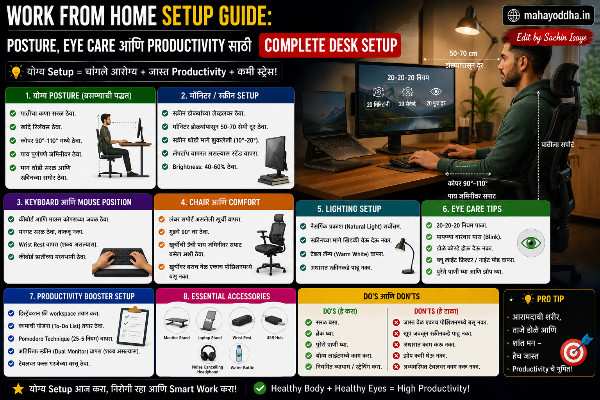
Fifty ते seventy cm — arm’s length. खूप जवळ — eye muscles जास्त work. खूप दूर — squinting, forward lean.
Phone साठी — कमीत कमी तीस ते चाळीस cm. Phone जवळ धरण्याची सवय tablet मध्ये carry होते — conscious effort लागतो.
Height
Screen चा top edge डोळ्यांच्या level ला. Slightly खाली बघणं — पाच ते दहा degrees — natural आहे, strain नाही. खाली laptop वापरणं — neck bend — मान दुखते आणि screen जवळ येते.
Laptop stand हे सगळ्यात impactful investment होतं माझ्यासाठी. ₹८०० खर्च, problem ७०% कमी. Mahayoddha.in च्या WFH Setup article मध्ये हे discuss केलं आहे.
Tilt
Screen slightly तिरकी — top थोडं मागे. Overhead light reflection avoid होतो. Glare eye strain significantly वाढवतो.
उपाय पाच — Lighting Setup
Ambient Lighting
Dark room मध्ये screen — high contrast — eye strain. Room मध्ये general lighting असावी.
Warm white bulbs — ३०००K — eye friendly आहेत. Cool white fluorescent — harsh आहेत.
Window आणि Screen Position
Screen वर direct sunlight येणार नाही असं position करा. Window side ला monitor ठेवू नका — glare येतो. Window facing असेल — blinds किंवा curtains.
Window perpendicular — side ला — best position आहे. Natural light येतो, glare नाही.
Monitor Bias Lighting
Monitor च्या मागे ambient LED light लावणं — bias lighting. Screen आणि wall मधला contrast कमी होतो. Eye strain significantly कमी होतो.
USB powered LED strip — ₹२००-₩५०० — monitor च्या मागे लावा. Warm white color temperature. YouTube वर “bias lighting setup” बघा — simple आहे.
Eye Exercises — Daily Routine
Pencil Push-ups
Pen किंवा pencil arm’s length वर धरा. Slowly जवळ आणा — focus maintain करत — nose पर्यंत. मग slowly दूर. दहा वेळा. Convergence strength improve होते.
Figure-8 Eye Movement
Imaginary figure-8 trace करा eyes ने — wall वर. Slowly. Eye muscles सगळ्या directions मध्ये stretch होतात.
Palming
Hands warm करा — एकमेकांवर घासा. Warm hands ने डोळे झाका — light येणार नाही. Dark मध्ये relax करा — एक मिनिट. Eye muscles deeply relax होतात.
Near-Far Shifting
आंगठा nose पासून एक foot वर धरा. Focus — आंगठा. मग far object — window बाहेर. Shift करत राहा — वीस वेळा. Focusing muscles exercise होतात.
Doctor कधी भेटायचं
Eye strain बऱ्याच वेळा lifestyle changes ने improve होतो. पण काही signs आहेत जे ignore करू नयेत.
Pain in or around eyes. Significant vision changes. Headache जे sleep नंतर पण जात नाहीत. Double vision. Persistent redness.
हे symptoms असतील तर ophthalmologist ला भेटा — self-treatment नाही. Computer glasses prescription असेल तर correct power चे glasses wear करणं mandatory आहे — wrong prescription जास्त strain करतो.
Quick Reference — Daily Checklist
| Habit | When | Duration |
|---|---|---|
| 20-20-20 Rule | दर 20 मिनिटांनी | 20 seconds |
| Full blink | दर 10 मिनिटांनी | Conscious blink |
| Palming | दर तासाला | 1 मिनिट |
| Pencil push-ups | सकाळी | 5 मिनिटे |
| Screen brightness check | Session सुरू करताना | 30 seconds |
| Night Light | संध्याकाळी | Sunset नंतर |
FAQ
Q. Blue light glasses खरंच काम करतात की marketing आहे?
Research mixed आहे — काही studies significant benefit दाखवतात, काही नाही. American Academy of Ophthalmology म्हणते की eye strain primarily blue light मुळे नाही, near focus आणि reduced blinking मुळे आहे. पण anecdotally बरेच users benefit report करतात. ₹५०० ते ₹१,000 मध्ये try करण्यासारखं आहे — risk कमी आहे.
Q. Phone वर eye strain जास्त होतो की laptop वर?
Phone वर screen लहान असते — closer distance ला धरतो, smaller text — जास्त strain. Laptop screen मोठी आहे, distance जास्त असतो. Total screen time जास्त महत्त्वाचं आहे — phone + laptop + TV मिळून किती तास हे बघा.
Q. Dark mode eye strain कमी करतो का?
Dark room मध्ये dark mode beneficial आहे — bright white background vs dark background. Bright ambient light मध्ये dark mode actually worse असू शकतो — contrast जास्त होतो. Situation नुसार switch करणं ideal आहे.
Q. बच्च्यांना screen time किती असावी?
WHO guidelines — दोन वर्षाखाली: शून्य screen time. दोन ते पाच वर्षे: एक तासापेक्षा कमी. सहा वर्षे आणि वर: consistent limits, quality content. Online classes necessary असतात — त्यासाठी frequent breaks, eye exercises especially important आहेत.
Q. Dry eyes साठी कोणते eye drops safe आहेत?
Lubricating eye drops — Artificial tears — generally safe आहेत. Preservative-free version prefer करा, especially frequent use साठी. “Redness relieving” drops — Visine type — avoid करा regular use साठी — rebound redness होतो. Optician किंवा doctor कडून recommend करून घ्या specific situation नुसार.
Conclusion
Doctor म्हणाले “screen time कमी करा” — ते practical नव्हतं. पण setup आणि habits बदलणं practical होतं.
Night Light, laptop stand, 20-20-20 timer, conscious blinking — या चार changes ने सहा महिन्यांत डोळ्यांचा त्रास significantly कमी झाला. Screen time same आहे, problem कमी आहे.
Mahayoddha.in वर tech articles साठी screen time कमी होणार नाही — पण screen वर healthy राहणं शक्य आहे. Right setup, right habits.
आजच एक गोष्ट करा — Night Light enable करा आणि twenty-twenty-twenty reminder set करा. एका आठवड्यात difference जाणवेल.
तुम्हाला screen वापरताना डोळ्यांचा त्रास होतो का? कोणता उपाय तुम्ही वापरतात? Comment मध्ये सांगा.

Sachin Isaye
सचिन इसाये
नमस्कार! मी सचिन इसाये, Founder of Mahayoddha.in. २०१७ पासूनच्या माझ्या Blogging आणि Digital Content क्षेत्रातील अनुभवाचा वापर करून, मी Keyboard, Typing Speed, Windows Shortcuts आणि Digital Skills यांसारख्या विषयांवर सोप्या मराठीत practical माहिती देण्याचा प्रयत्न करतो.
Keyboard Buying Guide, Mechanical Keyboard, Wireless Keyboard, Keyboard Problems, Keyboard Typing Skills आणि Keyboard Ergonomics यांसारखे विषय सामान्य मराठी वाचकांना सहज समजावून सांगणे, हेच माझे काम आहे.
विद्यार्थी, Bloggers, Content Writers, Office Users, Work From Home करणारे आणि नवीन computer users यांना keyboard वापरून आपलं काम जलद, सोपं आणि smart करता यावं, हेच माझं ध्येय आहे. नवीन Keyboard Guides, Typing Tips आणि Windows Shortcuts साठी Mahayoddha.in ला नियमित भेट द्या.